
Description

Reviews (200 cached)
This blocked everything except the video. No comments nothing. Just blank page.
Guys it is unusable with 2 of my browsers. Video doesnt play, its perma stopped. Maybe it fights with some adblock addon but yeah i dont have time to troubleshoot it further... its disabled until futher notice from my side GL
Doesn't come close to Tweaks For Youtube. And the UI is horrible.
Does not hide Shorts. Freezes the website when entering channel page.
with this enabled, most videos wont play, the page loads with paused video but when i click to resume it, it wont let me resume at all, i have to disable extension so i can watch some videos...
Youtube is detecting adblocker feature. Fix it
Playback speed does not work.
Used to work perfectly fine. Now it just breaks YouTube's player. Some of the extra buttons that I want displayed are there, but that's about it - The rest of the functionality is a hit or miss - It will either work or not work at all. In addition to this, some settings won't get enabled or disabled, even if I turn them on or off in the settings of the extension. I will not be using this extension anymore, and I don't recommend anyone else to use it either.
OMG I can't stand this thing. I have used it for years and it has been amazing. Now none of the settings actually do what they say. For some reason I am forced into theater mode... the option for theater mode being on or off has no difference. For the ability to control a few annoying things on youtube, this has way too many hoops to jump through. SIMPLIFY THIS POS! I literally installed a different addon, Enhancer. WAY Easier to use. Missing two features, so what if I install both. But do no use ANY settings besides a setting my youtube homepage... Still forced into theater mode. I have uninstalled and will not be reinstalling...
Buggy as all get out. Every YT video loaded by right-click > 'Open in new tab' has to be CTRL-F5'd on tab focus, if I want audio. I set the settings for 'Disable Up Next autoplay', and I still have to click the freakin' icon in the tray to disable it, or the next up video plays. A lot of work needs to be done, on this one, to make it usable. Do not install.
no adblock
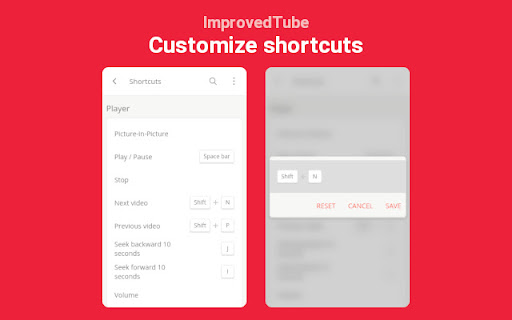
I don't want YouTube to autoplay when I'm on a playlist, but now the videos just won't play. It starts, then stops. I hit "Play," then after a couple of seconds, the playback stops. I tried fiddling around with the settings, but couldn't figure out what could've been causing this. Also, the app doesn't seem to tell if you've set overlapping shortcuts.
Enabling this is disabling the youtube player shortcuts like pressing M for Mute/Unmute, forward/backward using arrow keys. Even F5 to refresh the page doesnt work. Problem only on opera browser. Working fine on Firefox and edge browsers. Disabled all other extensions, problem still there. Recent problem, was working fine before.
Not working at all on brave browser
Shortcut key of rotation mode doesn't work at all! I set the 'R' key as a rotate button. Please fix it or give me a solution to solve it. Suddenly it is going weird. When I pressed the -> key, the video restarts! I set the -> key as jump to next 10 seconds tho... And when I pressed the space bar(pause/play) - the video restarts again lol OMG please fix it pleasssseeeeee
when i have open the extension the videos always pauses at start
I installed this feature and it did absolutely NOTHING! SCREWtube's new layout sucks!!!!
facing glitches while clicking on the extension it whiteout white screen
Ad block doesn't work
You ARE able to access all of a channel's videos in chronologicl order. However, this function only works from the most recent video backward to the beginning. This is great for time-sensitive channels, like news, where you want up-to-date videos, say, from the last week, only. It sucks if you want to start from the channel's first video and go forward in time to experience them all in order, starting from the first one, especially when episodes refer back to earlier episodes. I have a channel that is seven years old and has nearly 800 videos. Scrolling back to the beginning is pretty much IMPOSSIBLE. It took me several minutes just to go back one year. Each time I want to go back and pick up where I left off to watch more, I would have to scroll for like ten minutes. Not an option. Yet this is the ENTIRE reason I loaded this extension: So I could access a channel's videos starting from the beginning. I see no option to do this. So it appears it cannot be done. This is kind of like YouTube's approach, if they were to provide the mechanism to see videos chronologically: They would fail to anticipate the ways in which it may be used, like the order in which videos were created and posted. It seems obvious to do and yet, unless the option is tucked away somewhere completely non-intuitive, THIS EXTENSION IS A TOTAL FAIL FOR ME AND MANY OTHERS, because I have seen this complaint about YouTube expressed in multiple places. Other people have posted very simple YouTube hacks for doing this within YouTube itself, but none of them work. They are all out of date or do not work with Chrome. Apparently YouTube keeps changing and Chrome can't keep up. FAILED DEVELOPMENT BY YOUTUBE, FAILED ATTEMPT TO IMPROVE YOUTUBE BY CHROME. What a disappointment.
It has a bug, because of this addon you cannot switch video quality above 720 p.
Recently stopped working, there is just blank white popup where the options used to be. I'm on Opera GX, which can install Chrome extensions, and surprisingly extension from Opera store works very well.
Why does the rotation button keep disappearing? ? It's really annoying. Even if you activate the rotation button, it is not displayed on the screen all the time. You have to go to the extension options and press OFF and ON again to display it correctly. It really looks like garbage.
This Extension is now utter trash due to YouTube. It limits videos from specific channels to 720p due to YouTube noticing it. Add block feature is useless now. Basically unusable probably because of YouTube?
trouble playing shorts
Let me say I've used this extension for years and I do find it useful. But there's a feature to block channels and it doesn't even seem to work. They show a list of channels blocked under their blacklist button. It says empty with no way to add channels to the list. There's no button next to channel names or videos to add channels to the block list or anything. The main reason I use youtube extensions is to hide comments, previously to block ads, and now I need to block channels I'm not interested in seeing. Use BlockTube extension to block channels and videos. Prevents channels from even showing up in search results, which is what I need.
disappointed - no frame by frame option like promised! Where are these 85 features? There's like barely up to 40. What a misleading extension however I am willing to increase the rating of this extension if someone can tell me where the frame by frame option is or how to watch a video frame by frame.
Sometimes the keybinds and only the keybinds stop working. Only by clicking on the extension or reloading the page can I regain that functionality.
Was amazing until very recently. Now as soon as this extension puts the video into theatre mode for me it goes black with no interface. I still have audio and can use keyboard shortcuts to control the video, but there is no video or gui. Have had to disable until they can update.
Audio track
Reverse playlist don't work.
Broken at the time of this review. As of the new Youtube update, it leaves a bunch of buttons (such as a repeat button) strewn haphazardly around the page, and even worse actually stops videos from playing. I've tried disabling a number of options within this (and checked to see if other extensions were causing the issue), but it's definately busted with no clear sign the Devs will fix it, instead insisting everyone "Joins them on GitHub" rather than providing actual support. If it wasn't for the fact nobody else has made an extension that deals with the top right annoyances in Youtube, I wouldn't even be using this.
Was good, but is currently not working. YT videos will not play unless I disable the extension.
Currently, a lot of these features are not functioning. picture in picture being one of them. I enjoyed being able to browse while still having a video playing, but youtube just seems to hate features that fix their platform. Please tell me there is a fix in the works.
Very buggy and many features legitimately do not work. Going in order of all settings that don't work properly: "Mark watched videos" does nothing. The custom themes option in the menu glitches out constantly and randomly sets the background to light grey and text color to black, even though I'm trying to make a custom dark theme. Disabling trailer autoplay for channels also does nothing. Worst of all, after activating blacklisting, I have literally no idea how to use it. I've gone to every dropdown menu relating to channels, the about section of channels, tried right clicking in the blacklist menu, etc. Nothing seems to be able to add a channel or video to blacklist.
since unhook works perfectly fine for everything else, all i wanted this extension for was to set my own default resolution because youtube always sets every video at 2160 4k but it couldnt even do that one single thing
It has too many issues: 1. it blocks YouTube Clips from playing 2. for some videos (4k quality) it just removes all opts above 720p from Youtube, after disabling this extension I can see the 4k options for 2nd reason I'm rating this 1 star
Actually throttled my Wi-Fi card to a crawl. Download at your own risk.
Used to be a good extension but keeps getting worse just like youtube. Bring back proper 'fit to window', that and hide header (which has also been broken for months) were the only reason I used this extension and now it's useless. Had to find another extension that does windowed fullscreen but it's overall worse than this used to be, which is still better than the broken state it is now.
Pressing play no longer works. Dead extension (both beta and main).
Used to be good but some update must've broken it, keeps making the page jump to the top when loading video suggestions, clicking "Hide replies" or just scrolling down.
This exension just broke youtube Dark theme.
Can't disable shortcut keys
Wanted it to shuffle my 1200+ likes better, all it done was mess things up even more, causing the loop function to spaz out, randomly jumping pages in the middle of a song, and still didn't properly shuffle my likes Edit, it's now randomly jumping up to the top of a page when i'm scrolling down. i'm uninstalling this thing, it's absolutely bloody useless
Not Work
No updates fixes.
doesnt load youtube anymore,this is a first since i started using this extension.
I toggle off some of the player buttons (clip, thanks, download etc) and NOTHING happens. Pls help.
Blacklist and hiding/marking watched videos doesn't work for me. main reason I installed this extension
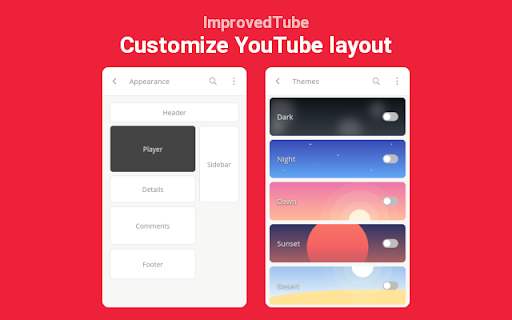
Doesn't have an option to change subscription page to list view from grid view.
Permissions (3)
Permissions
Details
| Version | 4.2026 |
| Updated | Mar 23, 2026 |
| Size | 1.03MiB |
| First Seen | Mar 24, 2026 |
More by Save time!





Popular in tools




Popular Extensions




