
Superpower YouTube - Disable YouTube Shorts & Comments
v1.1.2 Updated Mar 1, 2026 173KiB
Description
Superpower YouTube is a focused, distraction-blocking extension for YouTube. Hide the rabbit holes, keep the learning. Turn off Home, Shorts, Explore, Playables, Breaking News, thumbnails, recommendations, comments, autoplay, and more—then add smart schedules or a 25/5 Focus Session to stay on task. Built for students, professionals, and creators who want a calmer, minimal, productive YouTube.
🔹 Learn more: https://spyoutube.app
✨ What it does
• 🏠 Hide Home Feed — start on a clean YouTube
• 🎬 Hide Shorts — Hide Shorts from Home Feed, Search, Channel Pages, and Recommendations
• 📺 Redirect Home Feed to Subscriptions — see only channels you chose
• 🔎 Hide Explore & 🎮 Playables — no trending or games
• 📰 Hide Breaking News — remove news shelf from Home Feed
• 📚 Hide Sidebar & 🧭 Recommendations — fewer “watch next” traps
• 🖼️ Hide / Blur Thumbnails — reduce visual clickbait
• 🔚 Hide End Screen Feed & 💬 Comments — finish without detours
• ⛔ Disable Autoplay — stop the next video from starting
• ✅ Content Filter — Block channels, keywords, and users for a better viewing experience
– Works across Home, Search and Related
• ⏱️ Focus Session (25/5 Pomodoro) — auto-hide distractions during focus, then break
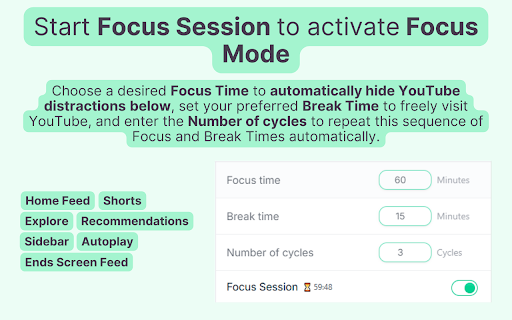
– Choose a desired Focus Time to automatically hide YouTube distractions below, set your preferred Break Time to freely visit YouTube, and enter the Number of cycles to repeat this sequence of Focus and Break Times automati
• 🕒 Hide During (time range) — Choose a daily time range to automatically hide distractions
• 📅 Hide On (days) — Choose specific days to automatically hide distractions
• 🔒 Lock Settings — protect your toggles with a password
Premium features available during a 7-day free trial.
See pricing: https://spyoutube.app/#pricing
💡 Why it’s better
• 🧠 Designed for productivity and deep work
• 🎚️ Simple toggles—use only the blocks you want
• ⚡ Lightweight and fast; built for modern YouTube layouts
• 🎯 Pairs perfectly with Study With Me, note-taking, and learning channels
• 🔁 Works on Home, Watch, Subscriptions, End screens, and more
🎯 Common use cases
• Study & learning: keep lectures and tutorials front-and-center by hiding Shorts, recommendations, and autoplay.
• Work & research: redirect to Subscriptions and blur thumbnails to avoid clickbait while searching.
• Content creation: focus on your uploads and analytics without noise from the Home feed or Explore.
• Digital wellbeing: schedule calm hours (e.g., 9–5) and block autoplay to prevent binge-loops.
⏱️ Focus Session (Pomodoro)
Turn on a 25-minute focus timer followed by a 5-minute break. During focus time, Superpower YouTube automatically enforces your distraction-blocking rules (Hide Shorts, Disable Autoplay, etc.). It’s a simple way to build momentum and maintain attention across study or work sessions.
🧭 Tips for a calmer YouTube
• Enable Redirect to Subscriptions + Hide Home Feed for a distraction-free start page.
• Combine Disable Autoplay with Hide End Screen Feed to prevent “just one more video.”
• Use Hide / Blur Thumbnails to eliminate clickbait and reduce visual noise.
• Schedule Hide During for your working hours, or select Hide On to choose specific days to automatically hide YouTube distractions whenever those periods start.
Selecting "Focus Session", "Hide During", or "Hide On" will automatically hide the YouTube distractions below:
Home Feed | Shorts | Explore | Sidebar | Recommendations | End Screen Feed | Autoplay
Use "🔒 Lock Settings" to prevent changes to your settings with a password.
👥 Who it’s for
• 🎓 Students learning with YouTube
• 🧑💻 Professionals & researchers who want signal over noise
• 🎥 Creators who need a clean workspace
• 🧩 Anyone who wants fewer distractions and more focus
Take control of YouTube — keep the value, lose the distractions — with Superpower YouTube.




Reviews
Loading reviews...
Permissions (2)
Permissions
alarmsℹ Can schedule periodic background tasks storageℹ Can store data locally in your browser
Details
| Version | 1.1.2 |
| Updated | Mar 1, 2026 |
| Size | 173KiB |
| First Seen | Mar 29, 2026 |
Popular in tools

Zotero Connector
by Zotero
8M
★ 3.96
tools
8M
★ 3.96
tools

Browsec VPN - Free VPN for Chrome
by Browsec
7M
★ 4.44
tools
7M
★ 4.44
tools

AnyDoc Translator - Translate Web and PDF
by www.wps.com
7M
★ 4.58
tools
7M
★ 4.58
tools

WPS PDF - Read, Edit, Fill, Convert, and AI Chat PDF with Ease
by www.wps.com
7M
★ 4.45
tools
7M
★ 4.45
tools

Video DownloadHelper
by Aclap
5M
★ 4.43
tools
5M
★ 4.43
tools
Popular Extensions

Adobe Acrobat: PDF edit, convert, sign tools
by Adobe Inc.
331M
★ 4.40
workflow
331M
★ 4.40
workflow

AdBlock — block ads across the web
by AdBlock
62M
★ 4.48
workflow
62M
★ 4.48
workflow

迅雷下载支持
by Shenzhen Xunlei Network Technology Co., Ltd.
59M
★ 2.77
workflow
59M
★ 2.77
workflow

Grammarly: AI Writing Assistant and Grammar Checker App
by Grammarly
42M
★ 4.50
communication
42M
★ 4.50
communication

Adblock Plus - free ad blocker
by eyeo GmbH
41M
★ 4.39
workflow
41M
★ 4.39
workflow