
⚠️Requests 1 sensitive permission
Description
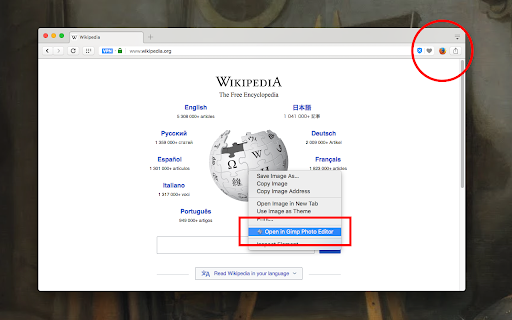
The "External Application Launcher" extension enables you to define a toolbar button or several context menu items to execute external executables right from your browser. It extracts arguments from the current web page and passes them as command-line arguments of your choice to the external application.
Use Cases:
- You can send the current page to another browser
- You can send selected text to a text editor
- You can open your external email client and send selected text to it
- You send download links to an external download manager!
- You can directly send image URLs to a photo editor of your choice
- You can browse links with specified patterns with an external application
Notes:
1. A minimal native client is required for this extension to execute native commands. The native client uses the official NodeJS executable.
2. The native client is only available for Windows, Mac, and Linux operating systems.
Usage Preview:
https://www.youtube.com/watch?v=sTOHWbX7dKU&feature=emb_title
Installtion Video tutorial:
Windows: https://www.youtube.com/watch?v=18jAqTXBiZA
Linux and Mac: https://www.youtube.com/watch?v=bB4Bj_APg4g
Reviews (5 cached)
★☆☆☆☆2018-09-17
Ethan Cutshaw
Cannot figure out how to install the native client, followed instructions on video and just takes me to options page in chrome
★★☆☆☆2020-02-07
Willem Vanhulle
The installation process of the native client is very user unfriendly. Instead of just writing a description for each OS on this page, the maintainer of this extension forces you to follow several links to vague pages. Installation of the native client could take 5 seconds, but thanks to the vague description, it takes 5 minutes.
★★☆☆☆2019-10-14
Алексей Терещенков
After the last update, the item in the context menu disappeared
★★★☆☆2023-08-28
Deja Vu
it's not bad on 04.2025, given you order items (and keys) in export file and re-import! ))
★★★☆☆2021-03-27
Nguyen Tuyen
Group menu items is bad idea.
Permissions (9)
Permissions
activeTabℹ Can access the current tab when you click the extension contextMenusℹ Can add items to the right-click menu declarativeNetRequestWithHostAccess downloadsℹ Can manage and monitor downloads nativeMessagingℹ Can communicate with programs on your computer notificationsℹ Can show desktop notifications scriptingℹ Can inject scripts into web pages storageℹ Can store data locally in your browser tabsℹ Can see your open tabs and their URLs
Details
| Version | 0.6.0 |
| Updated | Jul 1, 2025 |
| Size | 164KiB |
| First Seen | Mar 29, 2026 |
More by yokris.dev

Reader View
by yokris.dev
300K
★ 4.69
accessibility
300K
★ 4.69
accessibility

Open in VLC™ media player
by yokris.dev
300K
★ 3.86
entertainment
300K
★ 3.86
entertainment

Popup Blocker (strict)
by yokris.dev
300K
★ 4.45
tools
300K
★ 4.45
tools

Proxy Switcher and Manager
by yokris.dev
90K
★ 3.93
accessibility
90K
★ 3.93
accessibility

Open in Firefox™ Browser
by yokris.dev
50K
★ 3.48
workflow
50K
★ 3.48
workflow
Popular in workflow

Adobe Acrobat: PDF edit, convert, sign tools
by Adobe Inc.
331M
★ 4.40
workflow
331M
★ 4.40
workflow

AdBlock — block ads across the web
by AdBlock
62M
★ 4.48
workflow
62M
★ 4.48
workflow

Adblock Plus - free ad blocker
by eyeo GmbH
41M
★ 4.39
workflow
41M
★ 4.39
workflow

Chrome Remote Desktop
by Chrome Remote Desktop Release Managers
38M
★ 3.14
workflow
38M
★ 3.14
workflow

Microsoft Single Sign On
by Microsoft
36M
★ 2.27
workflow
36M
★ 2.27
workflow
Popular Extensions
Adobe Acrobat: PDF edit, convert, sign tools
by Adobe Inc.
331M
★ 4.40
workflow
331M
★ 4.40
workflow
AdBlock — block ads across the web
by AdBlock
62M
★ 4.48
workflow
62M
★ 4.48
workflow

Grammarly: AI Writing Assistant and Grammar Checker App
by Grammarly
42M
★ 4.50
communication
42M
★ 4.50
communication
Adblock Plus - free ad blocker
by eyeo GmbH
41M
★ 4.39
workflow
41M
★ 4.39
workflow
Chrome Remote Desktop
by Chrome Remote Desktop Release Managers
38M
★ 3.14
workflow
38M
★ 3.14
workflow