
✅Highly rated
User Count Trend
Loading...
Description
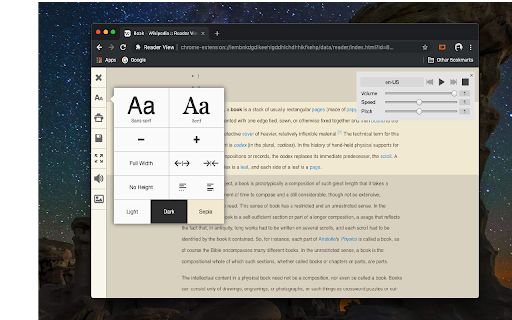
Reader View extension brings Mozilla's open-source Readability implantation to Chromium. Using this extension you can strip clutters from webpages and read them on "Reader View" mode. The extension allows you to toggle between normal view and reader view by pressing the page-action button.
Note that reader view mode works best for web pages that have a lot of content. There are some tools in the left side panel that can help you personalize your Reader View. You can change color, background-color, font-size, font-family and width of the reader view.
Features:
-> Remove distraction
-> Read in fullscreen mode
-> Remove advertisements
-> Save in HTML format
-> Print document
-> Read content using a powerful Text to Speech (TTS) engine
-> Edit HTML content (live editor)
-> Email document (with title, body, and reference to the original document)
-> Correctly display mathematical formulas (MathJax equations are Supported)
-> Highlight selected text
-> Move to the next and previous pages
-> Keyboard shortcuts for almost all actions
-> Resize images on the design-mode
-> Display DOI (Digital Object Identifier) details
-> Display publish date
-> Add persistent sticky notes
-> Bionic Reading
-> Adjust number of columns
*** 0.6.x releases ***
The extension is now running on manifest v3! Make sure you have the latest version of your browser to use this extension (The minimum acceptable Chrome version is 104). There are a few changes to make it compatible, so please report bugs if you see broken features.
For more info please visit:
https://github.com/rNeomy/reader-view/
Change Log:
0.1.3: Calling a reader view by restoring it from history will trigger history.back
0.1.4: A more visible icon. Fixes a reader bug.
0.1.5: It is now possible to toggle the reader view using keyboard shortcut (define one from Chrome's settings page)
0.2.1: Document parsing is improved. Switched to the latest Readibility.js library. Ctrl + S now saves the document same as pressing the "Save" button. Reader View now supports both rtl and ltr languages
0.2.2: It is now possible to select some content and ask the reader view to convert only the selected part. This is useful if the automatic selection tool is not detecting the content correctly.
0.2.4: Speech engine is added. You can now ask the extension to read the article for you. Estimated reading time is displayed below the article title


Reviews
Loading reviews...
Permissions (7)
Permissions
activeTabℹ Can access the current tab when you click the extension contextMenusℹ Can add items to the right-click menu declarativeNetRequestWithHostAccessfavicon notificationsℹ Can show desktop notifications scriptingℹ Can inject scripts into web pages storageℹ Can store data locally in your browser
Details
| Version | 0.8.3 |
| Updated | Oct 29, 2025 |
| Size | 302KiB |
| First Seen | Mar 21, 2026 |
Ad space
Popular in accessibility

Screenshot Tool - Screen Capture & Editor
by screenshot-tool.app
1M
★ 4.70
accessibility
1M
★ 4.70
accessibility

I still don't care about cookies
by Guus
200K
★ 4.36
accessibility
200K
★ 4.36
accessibility

Chrome Browser Lockdown
by Castle Learning
100K
★ 1.25
accessibility
100K
★ 1.25
accessibility

Chessvision.ai Chess Position Scanner
by pkacprzak
100K
★ 4.61
accessibility
100K
★ 4.61
accessibility

Mouse Gesture Events
by Simpler
100K
★ 4.02
accessibility
100K
★ 4.02
accessibility
Popular Extensions

Cisco Webex Extension
by cisco.chromestore
24M
★ 2.34
social
24M
★ 2.34
social

Kami for Google Chrome™
by Kami
17M
★ 4.56
education
17M
★ 4.56
education

uBlock Origin
by Raymond Hill (gorhill)
15M
★ 4.70
privacy
15M
★ 4.70
privacy

Custom Cursor for Chrome™
by BLife Team LLC
5M
★ 4.67
fun
5M
★ 4.67
fun

DuckDuckGo Search & Tracker Protection
by DuckDuckGo
4M
★ 4.24
privacy
4M
★ 4.24
privacy