
Screenshot Tool - Screen Capture & Editor
v1.0.10 Updated Jan 29, 2025 536KiB
⚠️Not updated in over a year ✅Highly rated ✅1M+ users
User Count Trend
Loading...
Description
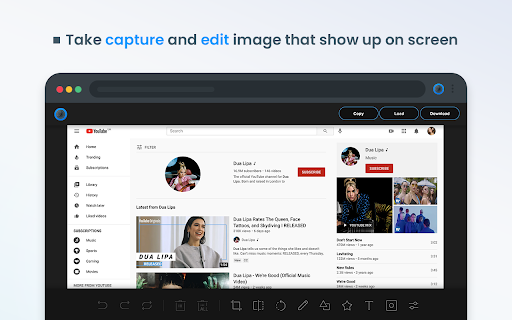
Take stunning screenshots of entire websites and capture page elements. Offline. No registration. Screenshot tool - captures entire websites and user areas. Ready-made screenshots can be quickly edited (crop, paint over, add arrows, captions or text).
Screen Capture tool for making a full page or partial capture with further editing, download, or text adding. Make a full webpage screen capture or just any part of it with an opportunity to edit, save and download screen capture to your PC.
The app is launched from a browser that totally saves your time. Simply click the extension icon to choose from options whole page capture or a selected part.
You will not see any additional windows with websites here. Why waste time if you just want a screenshot?
Want to share your screen for cases like reporting technical issues, making product demos or how-to tutorials? Here are reasons to choose Screenshot and Screen Capture:
✔️ Screenshot of the full page, not just the visible area or selected area;
✔️ Screenshot on One-Click;
✔️ Storage and processing without a server;
✔️ Save PNG files or Copy it to the clipboard with One-Click;
✔️ No login or registration required;
✔️ There are no restrictions on the size or size of the file;
✔️ Edit and discard changes your screenshot;
✔️ Add graphic and text elements such as pointer, arrow, square and other shapes;
Click on the extension icon (in the upper right corner of the browser) then choose one of the options capture and watch the Screenshot Tool capture each part of the page and then transfer the finished screenshot to a new tab, where you can edit the image and upload it as a file to your PC.
Notes
Remember to reload the page after you install extension before trying to take a screenshot of it (Chrome should initialize the extension for each page).
The extension Screenshot tool is completely free and easy to manage for users. If our extension is useful to you, please give us 5 stars!



Reviews
Loading reviews...
Permissions (3)
Permissions
scriptingℹ Can inject scripts into web pages storageℹ Can store data locally in your browser unlimitedStorage
Details
| Version | 1.0.10 |
| Updated | Jan 29, 2025 |
| Size | 536KiB |
| First Seen | Mar 21, 2026 |
Ad space
Popular in accessibility

Copyfish 🐟 Free OCR Software
by Ui.Vision / a9t9 software GmbH
800K
★ 4.03
accessibility
800K
★ 4.03
accessibility

Reader View
by yokris.dev
300K
★ 4.69
accessibility
300K
★ 4.69
accessibility

I still don't care about cookies
by Guus
200K
★ 4.36
accessibility
200K
★ 4.36
accessibility

Chrome Browser Lockdown
by Castle Learning
100K
★ 1.25
accessibility
100K
★ 1.25
accessibility

Chessvision.ai Chess Position Scanner
by pkacprzak
100K
★ 4.61
accessibility
100K
★ 4.61
accessibility
Popular Extensions

Adobe Acrobat: PDF edit, convert, sign tools
by Adobe Inc.
330M
★ 4.40
workflow
330M
★ 4.40
workflow

Cisco Webex Extension
by cisco.chromestore
24M
★ 2.34
social
24M
★ 2.34
social

Kami for Google Chrome™
by Kami
17M
★ 4.56
education
17M
★ 4.56
education

uBlock Origin
by Raymond Hill (gorhill)
15M
★ 4.70
privacy
15M
★ 4.70
privacy

Custom Cursor for Chrome™
by BLife Team LLC
5M
★ 4.67
fun
5M
★ 4.67
fun