
⚠️Not updated in over 2 years
Description
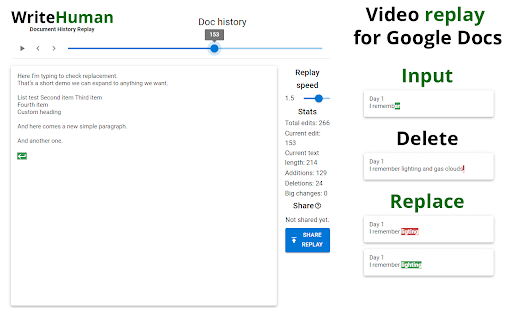
It loads the video substantially faster than Draftback & other playback Google Doc revision history tools.
Simply install the plugin and then click “Load replay” and within 2 seconds you can watch a video from start to finish of the writing process.
This extension is not anti-AI, it’s just about transparency. Whether you allow zero AI used by your students or employees or partial AI usage, WriteHuman can give you a look into that process and ensure your rules are adhered to.
“But what if they generate the text on another device and then slowly type it out in the Google Doc?”
That’s a good point, but watch back the history of one of your own pieces of writing and you’ll see that genuine authorship looks very different than slowly typing out a piece of writing from another screen. Genuine authorship shows movement to different sections of the document, lots of backspacing, lots of deletions and rewrites, etc. And the good news is all of that is viewable within WriteHuman.
Most importantly, we DO NOT track the time spent on a document (as of now) as I currently do not believe it is necessary to discern human effort vs AI cheating. However, we will revisit this in the future if it is requested. I have concerns about bias if less time is spent, or a project is started close to the deadline, and I have discussed these concerns with educators and they've confirmed they could be true.
Feature requests? Brett@writehuman.org.
HOW TO USE
1. Install.
2. Open any Google document you have edit access to.
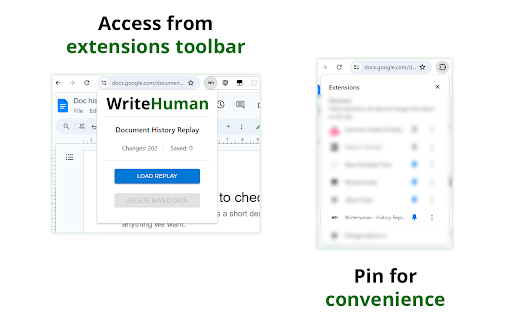
3. Click the extension icon in the extension area of Chrome to the right of the address bar.
You might need to open the list of all extensions if you have many installed. It's the puzzle icon in the extensions area. Pin WriteHuman for convenience.
4. Click load replay then view replay.
DATA PRIVACY & COLLECTION
The extension DOESN'T collect any of your personal data. It only fetches document changes on the level of text - nothing about who and when did those changes. By default, all fetched data is stored locally on your computer.
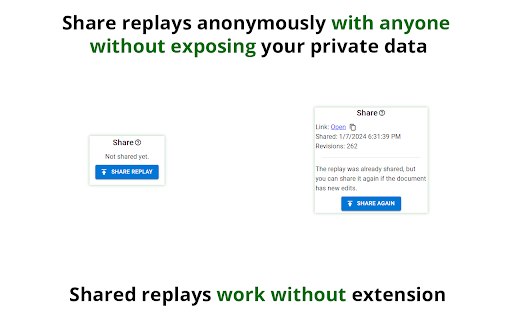
You can upload the replay using the share feature, but even then it doesn't use any of your personal data: the online sharing uploads only raw changes data and assigns it a random link so you can share it with others. Unless you give this link to someone - it's impossible to find your replay online. All shared replays are also automatically deleted in 30 days.
Reviews (1 cached)
★☆☆☆☆2025-05-18
Robert Zieger
According to their webpage, they aren't hear to help teachers detect AI. They are hear to help students "nstantly convert AI-generated text into natural, human-like content with WriteHuman. Paste from ChatGPT, Claude, or any AI platform—our tool enhances it with authentic phrasing and emotional depth. Works with Turnitin, GPTZero, and AI detectors effortlessly. No technical skills required. Preserve your message while eliminating AI fingerprints. Get undetectable, reader-friendly content every time." Yeah, students can use this to avoid doing their own thinking and writing (until a workaround if found to detect this "tool"--developed by tools). But teachers should look for an extension with an ethical basis.
Permissions (1)
Permissions
activeTabℹ Can access the current tab when you click the extension
Details
| Version | 1.0.1 |
| Updated | Jan 17, 2024 |
| Size | 397KiB |
| First Seen | Mar 29, 2026 |
Popular in tools

Zotero Connector
by Zotero
8M
★ 3.96
tools
8M
★ 3.96
tools

Browsec VPN - Free VPN for Chrome
by Browsec
7M
★ 4.44
tools
7M
★ 4.44
tools

AnyDoc Translator - Translate Web and PDF
by www.wps.com
7M
★ 4.59
tools
7M
★ 4.59
tools

Video DownloadHelper
by Aclap
5M
★ 4.43
tools
5M
★ 4.43
tools

Microsoft Bing Homepage & Search for Chrome
by Microsoft Corporation
4M
★ 3.72
tools
4M
★ 3.72
tools
Popular Extensions

Adobe Acrobat: PDF edit, convert, sign tools
by Adobe Inc.
331M
★ 4.40
workflow
331M
★ 4.40
workflow

AdBlock — block ads across the web
by AdBlock
62M
★ 4.48
workflow
62M
★ 4.48
workflow

Grammarly: AI Writing Assistant and Grammar Checker App
by Grammarly
42M
★ 4.50
communication
42M
★ 4.50
communication

Adblock Plus - free ad blocker
by eyeo GmbH
41M
★ 4.39
workflow
41M
★ 4.39
workflow

Chrome Remote Desktop
by Chrome Remote Desktop Release Managers
38M
★ 3.14
workflow
38M
★ 3.14
workflow