
⚠️Not updated in over 2 years
Description
ReplaiGPT allows you to automatically compose email replies with AI and predefined context about you or your business.
The difference to all the other ChatGPT Email Chrome extensions is that the AI creates email replies for you, but has no Context whatsoever about you or your Business.
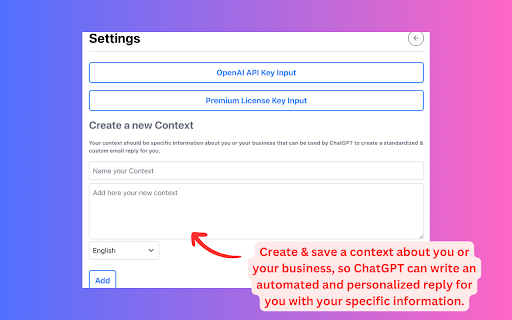
The Idea is to create and save information that can be used by ChatGPT as context to create a personalized response to standard and time-consuming email requests.
Ideal for recurring email requests of all kinds. You basically create a context and save information about you or your products for later use.
✔️ Seamlessly integrate ReplaiGPT into Gmail.
✔️ All languages are supported.
✔️ Privacy friendly - Emails and Contexts are not saved on our servers, only on your browser
✔️ Use your own OpenAI API key.
✔️ The basic version is free to use
____________
HOW TO USE
1) Click on the extension icon
2) A popup window will appear
3) Go to settings, then create and save a context
4) Get your API Key from OpenAI and paste it in the API Key input field
____________
HOW TO USE IN GMAIL
How to generate an email reply in Gmail:
1) Go to Gmail, open an email, and click on the extension icon
2) Select the context you created earlier.
3) Click the Generate Button and wait ca. 10–15 seconds.
____
FAQ
Which languages does it support?
All popular languages. Just select the language in the context dropdown.
Which data is shared with the AI model?
When writing a new email, the data sent is the user context and email content of the opened email.
What is your privacy policy?
Your emails or any other messages are not saved on our servers. The context of an email or message is solely used for the purpose of generating the response and nothing else. Furthermore, we value your privacy and refrain from using any third-party cookies, trackers, etc. To ensure the protection of your data, we use industry-standard encryption and security measures.


Reviews
Loading reviews...
Permissions (4)
Permissions
activeTabℹ Can access the current tab when you click the extension scriptingℹ Can inject scripts into web pages storageℹ Can store data locally in your browser tabsℹ Can see your open tabs and their URLs
Details
| Version | 1.1.0 |
| Updated | Nov 25, 2023 |
| Size | 815KiB |
| First Seen | Apr 1, 2026 |
More by replaigpt

Popular in tools

Browsec VPN - Free VPN for Chrome
by Browsec
8M
★ 4.44
tools
8M
★ 4.44
tools

Zotero Connector
by Zotero
8M
★ 3.96
tools
8M
★ 3.96
tools

AnyDoc Translator - Translate Web and PDF
by www.wps.com
7M
★ 4.58
tools
7M
★ 4.58
tools

WPS PDF - Read, Edit, Fill, Convert, and AI Chat PDF with Ease
by www.wps.com
7M
★ 4.45
tools
7M
★ 4.45
tools

Video DownloadHelper
by Aclap
5M
★ 4.43
tools
5M
★ 4.43
tools
Popular Extensions

Adobe Acrobat: PDF edit, convert, sign tools
by Adobe Inc.
322M
★ 4.40
workflow
322M
★ 4.40
workflow

AdBlock — block ads across the web
by AdBlock
62M
★ 4.48
workflow
62M
★ 4.48
workflow

迅雷下载支持
by Shenzhen Xunlei Network Technology Co., Ltd.
59M
★ 2.77
workflow
59M
★ 2.77
workflow

Grammarly: AI Writing Assistant and Grammar Checker App
by Grammarly
42M
★ 4.50
communication
42M
★ 4.50
communication

Adblock Plus - free ad blocker
by eyeo GmbH
40M
★ 4.39
workflow
40M
★ 4.39
workflow