
Simple Macro Recorder and Auto Clicker
Description
Reviews (21 cached)
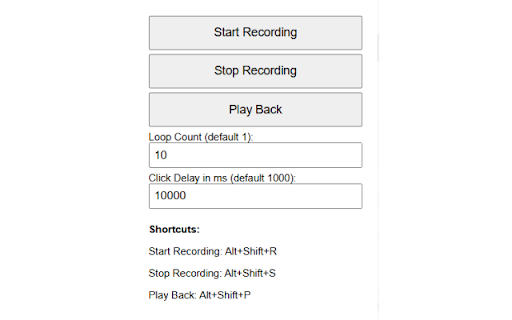
I tried to record my clicks but nothing has been recorded and played back. I was useless.
It does not record with either shortcuts or by clicking record on the interface. What a waste of time.
installed and when I click on start record it does nothing
Installed, clicked "Start Recording" and nothing happened...Clicked "Stop Recording" and nothing continued to happen....removed from Chrome.
Doesn't do anything. If you click "Start Recording" nothing happens. Extension is not functional at all
I cant even open it idk how and it wont let me pls help me and other ppl
I think something has broken on this and needs to be looked into. No actions happen when any of the buttons are clicked or the shortcuts are used. It is currently completely non functional.
Doesn't record or do anything. Waste of time.
No worky work. I hit start recording and made a click, hit stop recording and it didn't play anything back. I looked in settings for anything to change. Kind of a waste of time.
This doesn't work, I tried using this to record and unfollow all the people I'm following so I don't have to do it manually and this would not work, I pressed record and then did what I needed and then pressed stop recording and pressed playback and it would not do what I recorded.
Having problems. The tool box opens and the position of it cannot be changed. First click anywhere on the browser and the pop-up window dissapears?????????????? Keyboard commands have no effect. Is there a user page with instructions?
Doesnt work
fake
Fake not works at all. NOTHING!
I've used these programs before, this is the only one I've found that supposedly works on Chrome and I found it simply does not work. No directives other than refresh the "page after installing" and although it does appear to be recording, on play back none of the mouse clicks actually did anything. Sorry, not an average user but not a programming genius either. Perfect the program for somewhere in between and I may be able to get it working.
Doesn't work. Refreshed the tab as indicated in another review, but it still doesn't work. Clicking the button to start recording does nothing, neither does the shortcut Alt + Shift + S.
Doesn't work
i also tried to wor it but when i click record, it shows that i'm recording but when i click play back nothing happens
I'm not sure what I'm doing wrong. I can see it record my steps. I can see the playback work correctly but it doesn't actually click the buttons.
Kinda work but doesnt have AutoRefresh option like for autounfollow people on some social network.
tooo sloooowwwwww. i love it. but tooooo sloooooooowwwww. i don't want to see the progress.. just make it done in 1 second.
Permissions (3)
Permissions
Details
| Version | 1.4 |
| Updated | Oct 2, 2025 |
| Size | 9.82KiB |
| First Seen | Mar 26, 2026 |
Popular in tools



Popular Extensions




