

MyMemo Web Clipper icon

MyMemo Web Clipper

v1.2.10 Updated Dec 24, 2025 664KiB
CWS
8K
Users
β˜… 4.34
35 reviews
#8716
of 207.5K
tools
#1704 of 64.6K

Description

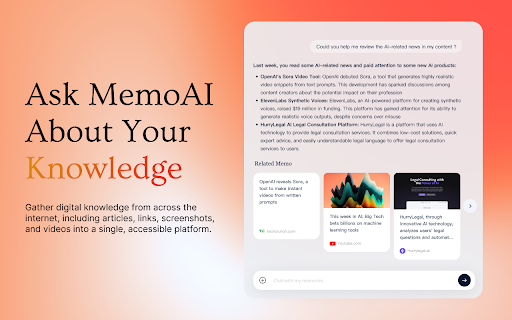
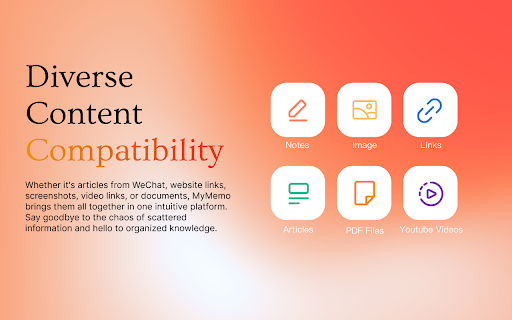
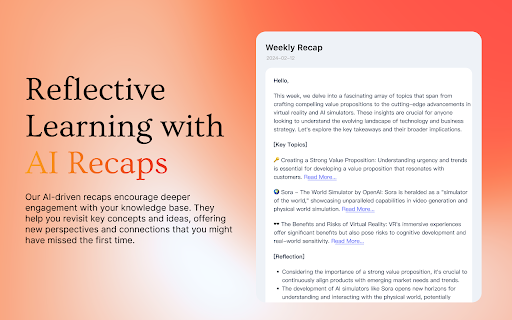
πŸš€ Introducing the MyMemo Chrome Plugin β€” Your Smart Digital Knowledge Hub Save, organize, and reflect on valuable web content effortlessly β€” all in one place. !New updates: Now supports saving directly from X (Twitter) and Gmails, seamlessly integrated into your browsing experience. ✨ Key Features: 🌐 One-Click Save – Instantly capture webpages, YouTube videos, tweets, and even emails to your MyMemo library with just one click. 🧠 Reflective Learning – Save with AI-powered summaries. Review key points and truly retain what matters. πŸ” Quick Access & Smart Search – Say goodbye to digging through bookmarks. Easily find saved content with powerful tags and filters. πŸ“ Workspace Selection – Choose where your content goes. Keep work, study, and personal life neatly separated with multiple workspaces. 🎧 MemoCast – Turn your saved content into audio playlists. Learn on the go by listening to summaries and highlights. Add MyMemo to Chrome today and take control of your digital knowledge. Smarter browsing starts now.
MyMemo Web Clipper screenshot 1MyMemo Web Clipper screenshot 2MyMemo Web Clipper screenshot 3MyMemo Web Clipper screenshot 4MyMemo Web Clipper screenshot 5

Reviews (6 cached)

β˜…β˜†β˜†β˜†β˜†2026-03-26
Corvaad Daggerhilt

Requires login. Doesn't allow you to log in.

β˜…β˜†β˜†β˜†β˜†2025-04-23
Camilo CBG

Although you can install it on MS Edge, it does not work on that browser, at all.

β˜…β˜†β˜†β˜†β˜†2025-01-31
Michael N

On Arc Browser at least, this extension does work. Repeatedly asking for login even after you have logged in. Fix this.

β˜…β˜†β˜†β˜†β˜†2024-12-03
Axel Schneider

Bad new update! I could not copy a link to my documents! The last version did it without problems! I could see by"green tick" that the copy of the link was successfully copied.

β˜…β˜…β˜†β˜†β˜†2025-07-25
Fernando Girante

Overall, this is a very good product. However, the Chrome extension has a major issue that prevents me from giving a higher rating. When I save an article through the web app ("Add > Links"), it captures the content perfectly, keeping the original text formatting and images. Unfortunately, the extension only captures plain text. This makes the saved articles very difficult to read and unusable for my needs. Additionally, the capture process could be much faster. Having a popup appear every time I save an article slows down the workflow, even when I don't need to change the default "Space" and "Collection". The ideal solution would be to allow users to set a default location in the settings, and then add an option to disable the popup for true one-click saving.

β˜…β˜…β˜…β˜†β˜†2025-11-07
Hao Zhou

Cannot log in chrome extension with error as: ``` Unchecked runtime.lastError: Could not establish connection. Receiving end does not exist. Uncaught (in promise) TypeError: Cannot destructure property 'sub' of 'e' as it is undefined. ``` Not sure what is happening, and I am using Brave Browser. Thank you

Permissions (9)

Permissions

activeTabβ„Ή Can access the current tab when you click the extension contextMenusβ„Ή Can add items to the right-click menu declarativeContentβ„Ή Can show the extension icon based on page content identityβ„Ή Can use your Google account identity notificationsβ„Ή Can show desktop notifications scriptingβ„Ή Can inject scripts into web pages sidePanel storageβ„Ή Can store data locally in your browser tabsβ„Ή Can see your open tabs and their URLs

Details

Version 1.2.10
Updated Dec 24, 2025
Size 664KiB
First Seen Mar 30, 2026

