
✅Highly rated
Description
Step 1: Install extension to your device
Step 2: Click reload page to use,
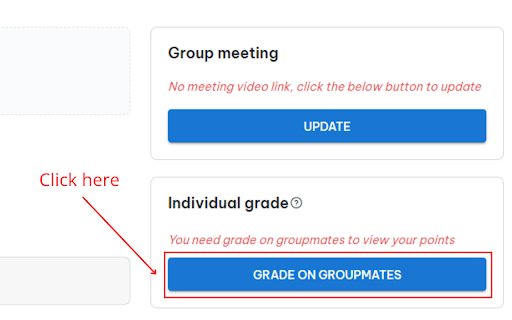
Step 3: Click on the "Grade on groupmates" button and then automatically rate 5 stars (member rating)
Or click on the "Grade" button and then automatically rate the presentation 5 stars (score the presentation).
Step 4: Click the "Grade" button to record the score
- If you are not satisfied with the 5-star score, please turn off the extension, then reload the page and rate it as you like.
- Allow CTRL + C and CTRL + V


Reviews (1 cached)
★☆☆☆☆2025-02-27
Nguyen Thanh Thang (K18 HCM)
gg
Details
| Version | 1.2.6 |
| Updated | May 18, 2025 |
| Size | 26.76KiB |
| First Seen | Mar 29, 2026 |
More by minhdung25

Popular in tools

Zotero Connector
by Zotero
8M
★ 3.96
tools
8M
★ 3.96
tools

Browsec VPN - Free VPN for Chrome
by Browsec
7M
★ 4.44
tools
7M
★ 4.44
tools

AnyDoc Translator - Translate Web and PDF
by www.wps.com
7M
★ 4.59
tools
7M
★ 4.59
tools

Microsoft Bing Homepage & Search for Chrome
by Microsoft Corporation
4M
★ 3.72
tools
4M
★ 3.72
tools

IE Tab
by Blackfish Software
4M
★ 4.31
tools
4M
★ 4.31
tools
Popular Extensions

Adobe Acrobat: PDF edit, convert, sign tools
by Adobe Inc.
331M
★ 4.40
workflow
331M
★ 4.40
workflow

AdBlock — block ads across the web
by AdBlock
62M
★ 4.48
workflow
62M
★ 4.48
workflow

Grammarly: AI Writing Assistant and Grammar Checker App
by Grammarly
42M
★ 4.50
communication
42M
★ 4.50
communication

Chrome Remote Desktop
by Chrome Remote Desktop Release Managers
38M
★ 3.14
workflow
38M
★ 3.14
workflow

Microsoft Single Sign On
by Microsoft
36M
★ 2.27
workflow
36M
★ 2.27
workflow