
⚠️Not updated in over 2 years
Description
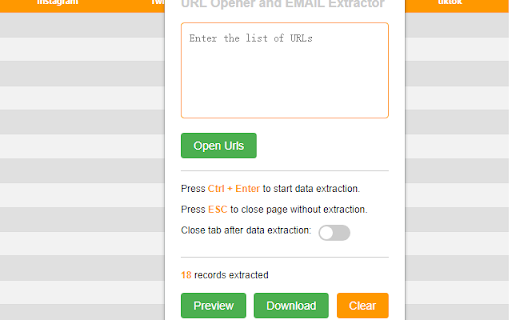
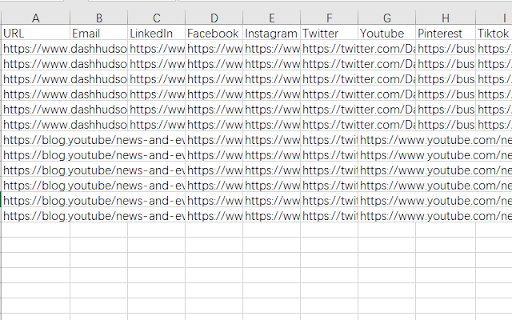
"URL Opener and EMAIL Extractor" can effectively improve the efficiency of searching for email, LinkedIn and other social media information within web pages and can export the results as CSV files. Here's how to use it:
1 Click on the extension and enter the URLs.
2 Click "Confirm" to automatically open the specified URLs.
3 Press the Ctrl + Enter keyboard shortcut will automatically collect information such as Email, Social media links.(Use the slider to confirm if the page will automatically close after gathering information).
4 If there's no information you want to save in the opened page, press the ESC key to automatically close the current page.
5 Click “preview” to view the collected information.
6 Click "Download" to automatically download the saved information.
Version 1.1.2
Fix macOS keyboard shortcuts bug

Reviews
Loading reviews...
Permissions (1)
Permissions
storageℹ Can store data locally in your browser
Details
| Version | 1.1.2 |
| Updated | Aug 28, 2023 |
| Size | 9.45KiB |
| First Seen | Mar 26, 2026 |
Popular in tools

Zotero Connector
by Zotero
8M
★ 3.96
tools
8M
★ 3.96
tools

Browsec VPN - Free VPN for Chrome
by Browsec
7M
★ 4.44
tools
7M
★ 4.44
tools

AnyDoc Translator - Translate Web and PDF
by www.wps.com
7M
★ 4.59
tools
7M
★ 4.59
tools

Microsoft Bing Homepage & Search for Chrome
by Microsoft Corporation
4M
★ 3.72
tools
4M
★ 3.72
tools

IE Tab
by Blackfish Software
4M
★ 4.31
tools
4M
★ 4.31
tools
Popular Extensions

Adobe Acrobat: PDF edit, convert, sign tools
by Adobe Inc.
331M
★ 4.40
workflow
331M
★ 4.40
workflow

Grammarly: AI Writing Assistant and Grammar Checker App
by Grammarly
42M
★ 4.50
communication
42M
★ 4.50
communication

Chrome Remote Desktop
by Chrome Remote Desktop Release Managers
38M
★ 3.14
workflow
38M
★ 3.14
workflow

Microsoft Single Sign On
by Microsoft
36M
★ 2.27
workflow
36M
★ 2.27
workflow

Cisco Webex Extension
by cisco.chromestore
23M
★ 2.34
social
23M
★ 2.34
social