
Description
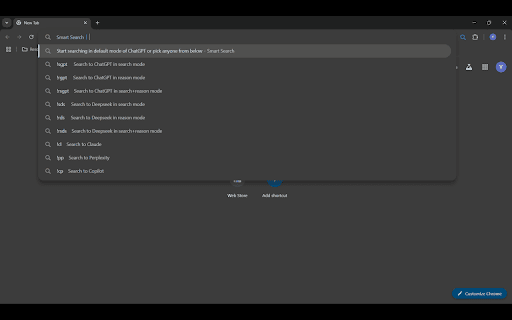
Smart Search is a Chrome extension that lets you search five popular AI platforms—ChatGPT, DeepSeek, Claude, Perplexity, and Copilot—directly from your address bar.
How It Works:
Activation: Type “s+ space” in your browser’s address bar to activate the extension. Otherwise your search engine's normal search will happen.
Commands: Use the syntax
!ModeNameAI query
For example:
• !rgpt, !sgpt, !rsgpt (for ChatGPT in different modes)
• !rds, !sds, !rsds (for DeepSeek in different modes)
• !cl (for Claude)
• !pp (for Perplexity)
• !cp (for Copilot)
Default Search: If you type your query without a command, it uses your default AI and mode.
Modes: ChatGPT and DeepSeek support “reasoning” and “search” modes. Other AIs work in standard mode.
This extension makes AI searching quick, simple, and customizable—all from your browser’s address bar.


Reviews
Loading reviews...
Permissions (1)
Permissions
storageℹ Can store data locally in your browser
Details
| Version | 1.0 |
| Updated | Apr 19, 2025 |
| Size | 17.06KiB |
| First Seen | Mar 26, 2026 |
More by AiNoYash


Popular in tools

Zotero Connector
by Zotero
8M
★ 3.96
tools
8M
★ 3.96
tools

Browsec VPN - Free VPN for Chrome
by Browsec
7M
★ 4.44
tools
7M
★ 4.44
tools

AnyDoc Translator - Translate Web and PDF
by www.wps.com
7M
★ 4.59
tools
7M
★ 4.59
tools

Microsoft Bing Homepage & Search for Chrome
by Microsoft Corporation
4M
★ 3.72
tools
4M
★ 3.72
tools

IE Tab
by Blackfish Software
4M
★ 4.31
tools
4M
★ 4.31
tools
Popular Extensions

Adobe Acrobat: PDF edit, convert, sign tools
by Adobe Inc.
331M
★ 4.40
workflow
331M
★ 4.40
workflow

Grammarly: AI Writing Assistant and Grammar Checker App
by Grammarly
42M
★ 4.50
communication
42M
★ 4.50
communication

Chrome Remote Desktop
by Chrome Remote Desktop Release Managers
38M
★ 3.14
workflow
38M
★ 3.14
workflow

Microsoft Single Sign On
by Microsoft
36M
★ 2.27
workflow
36M
★ 2.27
workflow

Cisco Webex Extension
by cisco.chromestore
23M
★ 2.34
social
23M
★ 2.34
social