
✅Recently updated
Description
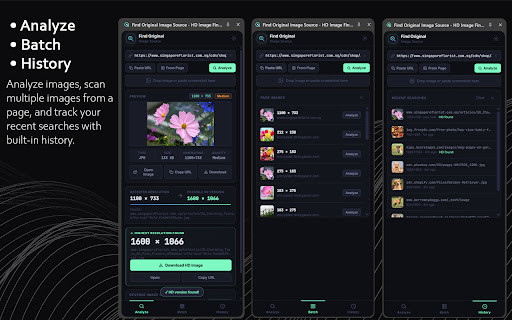
Find Original Image Source helps you quickly discover the original source of images and download the highest resolution versions available online.
Whether you are a designer, researcher, student, or content creator, this extension makes it easy to trace images back to their origin and locate high-quality versions.
Simply right-click any image and choose "Find Image Source" to instantly analyze the image.
KEY FEATURES
Reverse Image Search
• Search images using multiple engines including Google Images, TinEye, and Yandex to find the original creator or source.
Detect Higher Resolution Images
• Automatically scan for larger and higher-resolution versions of images hosted on websites.
Download Highest Resolution
• Quickly download the best quality version of an image when available.
Right-Click Image Detection
• Right-click any image on a webpage to instantly analyze it.
Image Preview and Resolution Detection
• View image dimensions, file size, and quality before downloading.
Multiple Reverse Search Engines
• Search the same image across multiple platforms to increase the chances of finding the original.
SUPPORTED SITES
Works on most websites including:
• Pinterest
• Blogs and article websites
• Image galleries
• Design inspiration sites
WHO IS THIS FOR
• Designers looking for original artwork
• Students researching image sources
• Content creators searching for high-quality images
• Anyone who wants to find the origin of an image
HOW IT WORKS
1. Right-click an image on any webpage
2. Select "Find Image Source" and Analyze
3. View the detected resolution and possible HD versions
4. Download the highest quality image or search reverse image engines
The extension runs directly in your browser and does not upload or store your images externally.
Start discovering original image sources and higher resolution images instantly.


Reviews
Loading reviews...
Permissions (7)
Permissions
activeTabℹ Can access the current tab when you click the extension clipboardWriteℹ Can write to your clipboard contextMenusℹ Can add items to the right-click menu downloadsℹ Can manage and monitor downloads sidePanel storageℹ Can store data locally in your browser tabsℹ Can see your open tabs and their URLs
Details
| Version | 5.0.0 |
| Updated | Mar 20, 2026 |
| Size | 29.58KiB |
| First Seen | Mar 28, 2026 |
Popular in tools

Zotero Connector
by Zotero
8M
★ 3.96
tools
8M
★ 3.96
tools

Browsec VPN - Free VPN for Chrome
by Browsec
7M
★ 4.44
tools
7M
★ 4.44
tools

AnyDoc Translator - Translate Web and PDF
by www.wps.com
7M
★ 4.59
tools
7M
★ 4.59
tools

Microsoft Bing Homepage & Search for Chrome
by Microsoft Corporation
4M
★ 3.72
tools
4M
★ 3.72
tools

IE Tab
by Blackfish Software
4M
★ 4.31
tools
4M
★ 4.31
tools
Popular Extensions

Adobe Acrobat: PDF edit, convert, sign tools
by Adobe Inc.
331M
★ 4.40
workflow
331M
★ 4.40
workflow

Grammarly: AI Writing Assistant and Grammar Checker App
by Grammarly
42M
★ 4.50
communication
42M
★ 4.50
communication

Chrome Remote Desktop
by Chrome Remote Desktop Release Managers
38M
★ 3.14
workflow
38M
★ 3.14
workflow

Microsoft Single Sign On
by Microsoft
36M
★ 2.27
workflow
36M
★ 2.27
workflow

Cisco Webex Extension
by cisco.chromestore
23M
★ 2.34
social
23M
★ 2.34
social