
Free Translator Panel: Powered by chat GPT
v0.0.1 Updated Oct 27, 2023 1.28MiB
⚠️Not updated in over 2 years
Description
Free Translator Panel: Powered by chat GPT
Introducing the next-generation Chrome extension designed to enhance your browsing experience with the power of OpenAI! This user-friendly tool allows you to easily translate selected text fragments right within the browser. Not just that, it also features an integrated chat panel, letting you converse in real-time with the advanced capabilities of GPT-3.5-Turbo and GPT-4 models.
🌟 Advantages of the Application 🌟
1. Translate Easily:
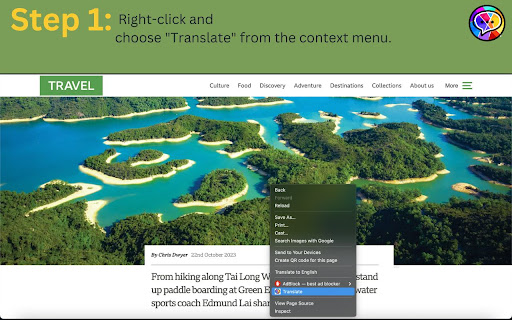
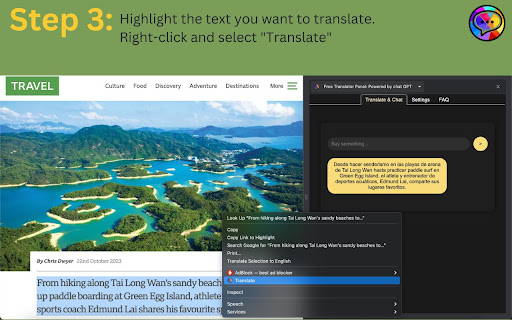
Highlight text and see the translated version right next to it.
2. Powered by Leading AI:
Get high-quality results and features backed by OpenAI's capabilities.
3. Understands Context:
Our translator recognize the nuances of language, including complex sentence structure and tone of voice.
4. Helpful Extras from Chat GPT:
Apart from translation, it can provide summaries and answer simple questions about the text.
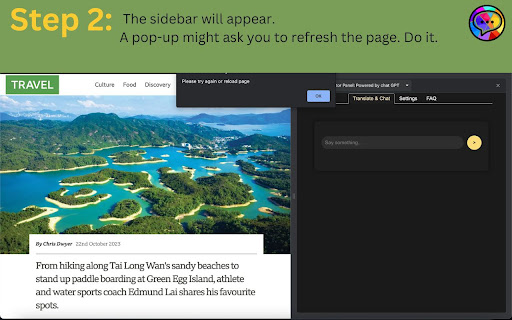
5. Dual Display in Sidebar:
View both the original content and its translation simultaneously w
7. No subscription fees:
Get all the advantages without the worry of ongoing costs.
8. Pay as You Go with OpenAI:
Only be charged for your actual usage, ensuring transparency and cost-efficiency.
Key Features:
👍 Instant Translation:
Simply highlight a piece of text on a webpage, and you'll instantly see its translation, thanks to OpenAI's advanced tech.
💬 Integrated Chat Panel:
Chat naturally with top-notch GPT-3.5-Turbo and GPT-4 models. Whether you're curious or just want a chat, we're here for you.
🎯 High-Quality Translations:
With OpenAI's latest technology, our translations are accurate and understand the context, making your web experience smooth.
👱♀️User-Friendly Interface: Our tool is designed for ease. Navigate and use the features without a hassle.
How to Get Started:
To use the OpenAI Translator & Chat Extension, an API key from OpenAI is required. If you're unsure how to obtain one, simply head over to the 'settings' tab within the extension panel, and you'll find a step-by-step guide to help you through the process.
Enhance your browsing, understand content better, and engage in enlightening conversations with the OpenAI Translator & Chat Extension for Chrome. Get started today!
Reviews
Loading reviews...
Permissions (3)
Permissions
contextMenusℹ Can add items to the right-click menu sidePanel storageℹ Can store data locally in your browser
Details
| Version | 0.0.1 |
| Updated | Oct 27, 2023 |
| Size | 1.28MiB |
| First Seen | Mar 28, 2026 |
Popular in communication

Grammarly: AI Writing Assistant and Grammar Checker App
by Grammarly
42M
★ 4.50
communication
42M
★ 4.50
communication

Loom – Screen Recorder & Screen Capture
by Loom
8M
★ 4.58
communication
8M
★ 4.58
communication

QuillBot: AI Writing and Grammar Checker Tool
by quillbot
5M
★ 4.69
communication
5M
★ 4.69
communication

DeepL: translate and write with AI
by team-browser-extensions
4M
★ 4.73
communication
4M
★ 4.73
communication

Fathom AI Note Taker for Google Meet
by Fathom
400K
★ 4.95
communication
400K
★ 4.95
communication
Popular Extensions

Adobe Acrobat: PDF edit, convert, sign tools
by Adobe Inc.
331M
★ 4.40
workflow
331M
★ 4.40
workflow
Grammarly: AI Writing Assistant and Grammar Checker App
by Grammarly
42M
★ 4.50
communication
42M
★ 4.50
communication

Chrome Remote Desktop
by Chrome Remote Desktop Release Managers
38M
★ 3.14
workflow
38M
★ 3.14
workflow

Microsoft Single Sign On
by Microsoft
36M
★ 2.27
workflow
36M
★ 2.27
workflow

Cisco Webex Extension
by cisco.chromestore
23M
★ 2.34
social
23M
★ 2.34
social