
⚠️Not updated in over 2 years ⚠️Requests 1 sensitive permission
Description
Wouldn't it be nice if you could simply add a term to the catalog while doing your everyday work with reports, spreadsheets, and documents without the hassle of navigating to the catalog interface?
This extension provides catalog admins the ability to capture important terms in the normal flow of daily business. It includes options for picking a term template and glossary.
It provides the ultimate, low-friction way to capture knowledge.
- Works with Google Chrome Browser
- For both Alation on-prem and managed cloud configurations
- Meets all Google Chrome Store security requirements
- Free seven (7) day trial (after beta period)
It requires a catalog API refresh token and a catalog admin user ID. Both are part of the profile of the catalog admin.
Configuration Instructions
1. Download and load the unpacked extension using the Chrome browser Manage Extension feature.
2. Pin the extension using the Chrome browser Extension feature.
3. Use the extension options to sign up for the beta and verify your free account.
4. Add the catalog url, refresh token, and catalog admin ID on the option window.
hints:
- The catalog admin profile page URL contains the ID. For example: https://YOUR.alationcatalog.com/user/64/
- Editing the profile allows the admin to add their own refresh token on the authentication tab.
Usage Instructions
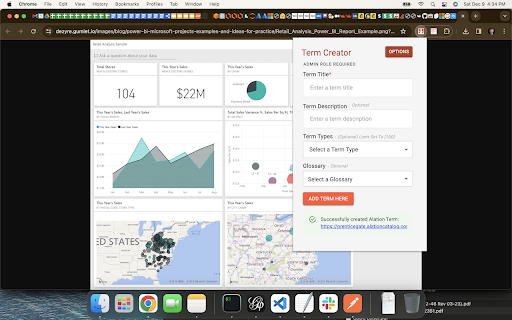
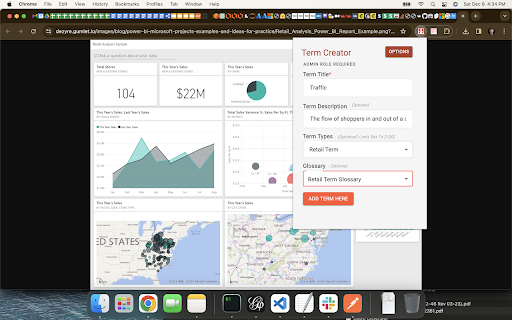
1. Click the extension icon, enter the new term name, enter a description (optional), pick the term template, and glossary where it will be created.
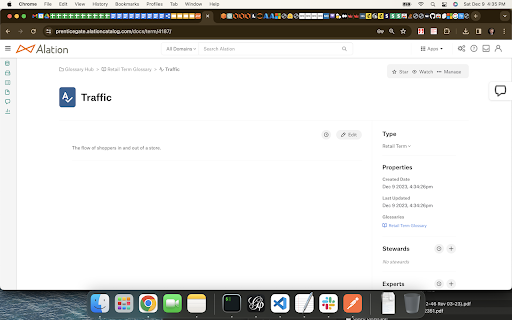
2. Navigate to the glossary to see your new term.
3. Optional: A new term workflow can be used to trigger a review and approval process. This is functionality provided by the Alation Governance app.
Support
If you need help email us at: support@prenticegate.com.
Enjoy!

Reviews
Loading reviews...
Permissions (4)
Permissions
contextMenusℹ Can add items to the right-click menu cookiesℹ Can read and modify browser cookies storageℹ Can store data locally in your browser tabsℹ Can see your open tabs and their URLs
Details
| Version | 1.1.0 |
| Updated | Dec 19, 2023 |
| Size | 383KiB |
| First Seen | Mar 26, 2026 |
More by john.wills

Popular in tools

Zotero Connector
by Zotero
8M
★ 3.96
tools
8M
★ 3.96
tools

Browsec VPN - Free VPN for Chrome
by Browsec
7M
★ 4.44
tools
7M
★ 4.44
tools

AnyDoc Translator - Translate Web and PDF
by www.wps.com
7M
★ 4.59
tools
7M
★ 4.59
tools

Microsoft Bing Homepage & Search for Chrome
by Microsoft Corporation
4M
★ 3.72
tools
4M
★ 3.72
tools

IE Tab
by Blackfish Software
4M
★ 4.31
tools
4M
★ 4.31
tools
Popular Extensions

Adobe Acrobat: PDF edit, convert, sign tools
by Adobe Inc.
331M
★ 4.40
workflow
331M
★ 4.40
workflow

AdBlock — block ads across the web
by AdBlock
62M
★ 4.48
workflow
62M
★ 4.48
workflow

Grammarly: AI Writing Assistant and Grammar Checker App
by Grammarly
42M
★ 4.50
communication
42M
★ 4.50
communication

Chrome Remote Desktop
by Chrome Remote Desktop Release Managers
38M
★ 3.14
workflow
38M
★ 3.14
workflow

Microsoft Single Sign On
by Microsoft
36M
★ 2.27
workflow
36M
★ 2.27
workflow