
Description
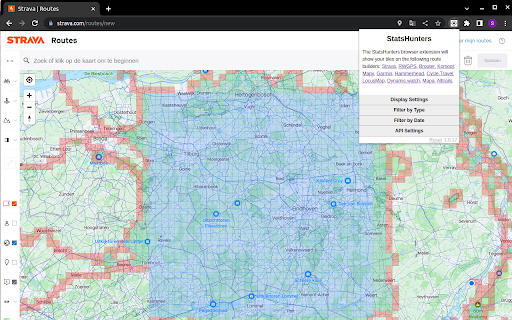
To make it easier to create new routes to achieve new tiles you can use the StatsHunters Chrome extension to show tiles on different route builders.
1. Install the extension
2. Login to StatsHunters and copy the API-code from the settings page
3. Click the StatsHunters Chrome extension icon and past the API-code
4. Go to one of the route builders
5. Start building new routes
You can use the plugin on different websites, the following sites are supported: Strava, Komoot and others. Check the full list on https://www.statshunters.com/faq

Reviews
Loading reviews...
Permissions (1)
Permissions
storageℹ Can store data locally in your browser
Details
| Version | 3.2.4 |
| Updated | Jan 30, 2026 |
| Size | 35.17KiB |
| First Seen | Mar 26, 2026 |
Popular in entertainment

Netflix Party is now Teleparty
by Netflix Party
10M
★ 4.11
entertainment
10M
★ 4.11
entertainment

AHA Music - Song Finder for Browser
by AHA Music
1M
★ 4.23
entertainment
1M
★ 4.23
entertainment

Watch2Gether
by Watch2Gether
900K
★ 3.53
entertainment
900K
★ 3.53
entertainment

FetchV - Video Downloader for m3u8 & hls
by idxF
600K
★ 4.90
entertainment
600K
★ 4.90
entertainment

Equalizer for Chrome browser
by Equalizer - AudioStudio
500K
★ 4.62
entertainment
500K
★ 4.62
entertainment
Popular Extensions

Adobe Acrobat: PDF edit, convert, sign tools
by Adobe Inc.
331M
★ 4.40
workflow
331M
★ 4.40
workflow

AdBlock — block ads across the web
by AdBlock
63M
★ 4.48
workflow
63M
★ 4.48
workflow

迅雷下载支持
by Shenzhen Xunlei Network Technology Co., Ltd.
59M
★ 2.77
workflow
59M
★ 2.77
workflow

Grammarly: AI Writing Assistant and Grammar Checker App
by Grammarly
42M
★ 4.50
communication
42M
★ 4.50
communication

Adblock Plus - free ad blocker
by eyeo GmbH
41M
★ 4.39
workflow
41M
★ 4.39
workflow