
⚠️Not updated in over a year
Description
Ever needed to transfer a weapon in the middle of an encounter, but you didn't have time to Alt-Tab to DIM and find it yourself? Here comes Voice DIM to the rescue. Using a global shortcut (defaulted to Ctrl+Shift+0) or the new Always listening mode (using an activation phrase defaulted to "okay ghost"), Voice DIM will now listen for your command and execute it within seconds, even while in the middle of a heated Crucible match or raid encounter.
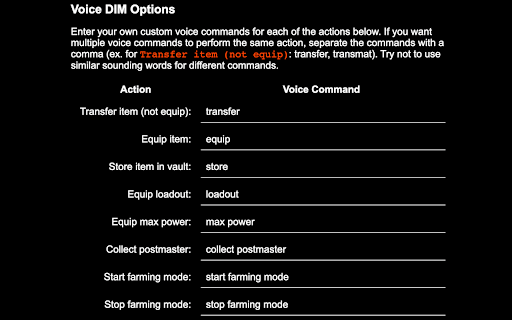
Here are the voice commands available:
• Transfer/Equip <weapon name>: Transfer any weapon by name
• Transfer/Equip <weapon type> + <energy type>: Transfer a weapon by its type and energy
• Transfer/Equip <weapon name> with <perks>: Transfer a weapon with a particular perk (works with multiple perks)
• Store <weapon name>: Store a weapon in the vault
• Loadout <loadout name>: Equip a loadout by name
• Start Farming Mode: Prevent items from going to the postmaster
• Stop Farming Mode: End farming mode
• Max Power: Equip the current character's max power items
• Collect postmaster: Collect all items from the current character's postmaster
These commands are now fully configurable! Head to the options page of Voice DIM to setup your own custom voice commands.
Current issues:
• Loadouts with numerics don't match well when requesting them (ex. Loadout 1)
• The auto rifle Krait doesn't match well because speech recognition gets "crate" and matches Fractethyst quite often. Mitigate by using "transfer K R A I T"
Visit voicedim.com for more information.

Reviews
Loading reviews...
Permissions (2)
Permissions
storageℹ Can store data locally in your browser tabsℹ Can see your open tabs and their URLs
Details
| Version | 1.3.0 |
| Updated | Jul 28, 2024 |
| Size | 91.65KiB |
| First Seen | Mar 26, 2026 |
Popular in tools

Browsec VPN - Free VPN for Chrome
by Browsec
7M
★ 4.44
tools
7M
★ 4.44
tools

Microsoft Bing Homepage & Search for Chrome
by Microsoft Corporation
4M
★ 3.72
tools
4M
★ 3.72
tools

IE Tab
by Blackfish Software
4M
★ 4.31
tools
4M
★ 4.31
tools

Monica: All-In-One AI Assist & Smartest AI Agent
by Monica Team
3M
★ 4.89
tools
3M
★ 4.89
tools

Ad Blocker: Stands AdBlocker
by Stands
3M
★ 4.79
tools
3M
★ 4.79
tools
Popular Extensions

Adobe Acrobat: PDF edit, convert, sign tools
by Adobe Inc.
330M
★ 4.40
workflow
330M
★ 4.40
workflow

Chrome Remote Desktop
by Chrome Remote Desktop Release Managers
38M
★ 3.14
workflow
38M
★ 3.14
workflow

Cisco Webex Extension
by cisco.chromestore
24M
★ 2.34
social
24M
★ 2.34
social

Kami for Google Chrome™
by Kami
17M
★ 4.56
education
17M
★ 4.56
education

Read&Write for Google Chrome™
by Texthelp
17M
★ 3.44
accessibility
17M
★ 3.44
accessibility