
⚠️Not updated in over 2 years
Description
🌟 Seamless Integration into Your Workflow. Image Resizer seamlessly integrates into your Chrome browser, offering a hassle-free experience. No need to switch between tabs or download additional software. With just a click, access Image Resizer and optimize your images on the go.
💡 Why Choose Image Resizer?
🔺 High quality. Ensures top-notch photo quality even after resizing.
🔺 Super fast. Instant photo resizing for time efficiency.
🔺 Simple image resizer with user-friendly interface.
🔺 Offline access. No need for an internet connection, use it anytime, anywhere.
🔺 Resize image for free. Completely free service with no hidden costs.
🔝 Elevated user experience
➤ Intuitive interface for seamless navigation.
➤ Ensured security and confidentiality in communications.
➤ Swift and efficient access to all features.
👥 Community-Driven Growth
① Ongoing feature enhancements inspired by user feedback.
② Actively engaging with the community for continuous improvement.
③ Dedicated to innovation and user-centric development.
🌍 Cultural and Linguistic Assistance
🌐 Numerals tailored to local languages and dialects.
🌐 Cultural considerations for a personalized experience.
🌐 Multilingual user support to assist a global audience.
📑 Transparent Usage Policies
♦️ Concise guidelines for the proper use of temporary numbers.
♦️ Dedicated to transparency in all our operations.
♦️ Expanded FAQ section addressing a broader range of user queries.
🖼️ How to resize an image?
1. Install the extension.
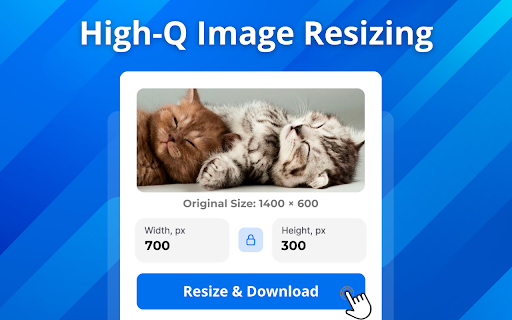
2. Upload photo in formats: png, jpg, jpeg, webp.
3. Specify the needed photo dimensions.
4. Download the resized photo in just one click.
🧐 FAQs about the extension
💸 Is this service really free?
🔹 Absolutely! It's completely free with no hidden fees.
🔹 Enjoy our photo resizer at no cost to you.
🔄 What photo formats can I use?
🔹 Our extension allows uploading photo in the following formats:
❗️ PNG. You can easily resize png image.
❗️ JPG, JPEG. Resize jpeg image in just one click.
❗️ WEBP
⏳ Do you have bulk photo resizing?
🔹 Currently - no, but the feature is in the near future plans.
📪 Contact us: Any questions or suggestions? Please contact us at 💌 tapnetic307@gmail.com
Reviews (1 cached)
★★★☆☆2026-02-28
Mani
It resizes but not to the size you asked for.
Permissions (1)
Permissions
contextMenusℹ Can add items to the right-click menu
Details
| Version | 1.0.6 |
| Updated | Feb 4, 2024 |
| Size | 525KiB |
| First Seen | Mar 28, 2026 |
More by tapnetic307

MP4 to MP3 converter
by tapnetic307
9K
★ 4.46
tools
9K
★ 4.46
tools

Convert JPG to PDF
by tapnetic307
5K
★ 4.88
tools
5K
★ 4.88
tools

MP4 to GIF converter
by tapnetic307
2K
★ 3.40
tools
2K
★ 3.40
tools

Convert PNG to PDF - Images to PDF converter
by tapnetic307
1K
★ 5.00
tools
1K
★ 5.00
tools

AI Chat
by tapnetic307
399
★ 4.00
tools
399
★ 4.00
tools
Popular in tools

Zotero Connector
by Zotero
8M
★ 3.96
tools
8M
★ 3.96
tools

Browsec VPN - Free VPN for Chrome
by Browsec
7M
★ 4.44
tools
7M
★ 4.44
tools

AnyDoc Translator - Translate Web and PDF
by www.wps.com
7M
★ 4.59
tools
7M
★ 4.59
tools

Microsoft Bing Homepage & Search for Chrome
by Microsoft Corporation
4M
★ 3.72
tools
4M
★ 3.72
tools

IE Tab
by Blackfish Software
4M
★ 4.31
tools
4M
★ 4.31
tools
Popular Extensions

Adobe Acrobat: PDF edit, convert, sign tools
by Adobe Inc.
331M
★ 4.40
workflow
331M
★ 4.40
workflow

Grammarly: AI Writing Assistant and Grammar Checker App
by Grammarly
42M
★ 4.50
communication
42M
★ 4.50
communication

Chrome Remote Desktop
by Chrome Remote Desktop Release Managers
38M
★ 3.14
workflow
38M
★ 3.14
workflow

Microsoft Single Sign On
by Microsoft
36M
★ 2.27
workflow
36M
★ 2.27
workflow

Cisco Webex Extension
by cisco.chromestore
23M
★ 2.34
social
23M
★ 2.34
social