
QR Code Scanner - Free Barcode Reader
v2.0 Updated Mar 10, 2026 294KiB
✅Recently updated
Description
QR Code Scanner - Free Barcode Reader is a simple Chrome extension that helps you scan QR codes and barcodes from image files directly in your browser. If you need a practical qr code reader or a quick qr code scanner, this extension makes the process easy without requiring a camera.
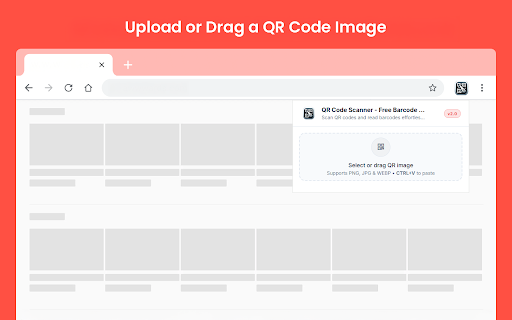
You can upload or drag an image into the extension and see the decoded result in seconds. It is useful when you need to open a QR code from a saved image or screenshot while browsing on desktop.
Key Features
✓ Scan QR Codes from Images: Open an image file and extract the encoded result directly inside the extension.
✓ Barcode Support: In addition to QR codes, the extension also works as a simple barcode scanner for supported image files.
✓ Drag and Drop Upload: Add your QR image quickly by dragging it into the upload area.
✓ Clipboard Paste Support: You can also paste a copied image directly into the extension with CTRL+V.
✓ PNG, JPG, and WEBP Support: The extension supports common image formats, making it easier to scan saved screenshots and exported images.
✓ Decoded Result Box: Once the scan is complete, the content appears in a clear result area for quick review.
✓ One-Click Copy: Use the Copy button to copy the decoded result instantly.
Why use it?
This extension lets you read QR codes from image files directly in your browser. You can upload or paste a QR image and see the decoded result immediately. It is useful when you receive QR codes as screenshots, saved images, or shared files.
How to use this?
1. Install the extension from the Chrome Web Store.
2. Open the extension by clicking its icon.
3. Drag and drop a QR image into the upload area, select an image file, or paste an image with CTRL+V.
4. Wait for the extension to scan the image.
5. View the decoded result in the result box and use Copy if needed.
6. Click Scan Another Image to load a new file.
QR Code Scanner - Free Barcode Reader helps you read QR codes from images in a simple way directly in Chrome.


Reviews
Loading reviews...
Details
| Version | 2.0 |
| Updated | Mar 10, 2026 |
| Size | 294KiB |
| First Seen | Mar 27, 2026 |
More by moryconvert.com

Case Converter - Upper Case to Lower Case
by moryconvert.com
916
★ 5.00
tools
916
★ 5.00
tools

Free Barcode, QR Code Generator
by moryconvert.com
737
★ 0.00
tools
737
★ 0.00
tools

Fast PNG to JPG Converter
by moryconvert.com
665
★ 0.00
tools
665
★ 0.00
tools

ICO Converter - Convert to PNG, JPG
by moryconvert.com
436
★ 0.00
tools
436
★ 0.00
tools

Remove Line Breaks in Text
by moryconvert.com
347
★ 5.00
tools
347
★ 5.00
tools
Popular in tools

Zotero Connector
by Zotero
8M
★ 3.96
tools
8M
★ 3.96
tools

Browsec VPN - Free VPN for Chrome
by Browsec
7M
★ 4.44
tools
7M
★ 4.44
tools

AnyDoc Translator - Translate Web and PDF
by www.wps.com
7M
★ 4.59
tools
7M
★ 4.59
tools

Microsoft Bing Homepage & Search for Chrome
by Microsoft Corporation
4M
★ 3.72
tools
4M
★ 3.72
tools

IE Tab
by Blackfish Software
4M
★ 4.31
tools
4M
★ 4.31
tools
Popular Extensions

Adobe Acrobat: PDF edit, convert, sign tools
by Adobe Inc.
331M
★ 4.40
workflow
331M
★ 4.40
workflow

Grammarly: AI Writing Assistant and Grammar Checker App
by Grammarly
42M
★ 4.50
communication
42M
★ 4.50
communication

Chrome Remote Desktop
by Chrome Remote Desktop Release Managers
38M
★ 3.14
workflow
38M
★ 3.14
workflow

Microsoft Single Sign On
by Microsoft
36M
★ 2.27
workflow
36M
★ 2.27
workflow

Cisco Webex Extension
by cisco.chromestore
23M
★ 2.34
social
23M
★ 2.34
social