
Description


Reviews (26 cached)
Used this for months with no issue. Then suddenly my notes were locked behind a paywall — no email, no warning. The extension was originally called “Free Notes for Gmail,” but now access requires Premium. Changing the terms without notifying users and holding their own data hostage isn’t “free.” It’s misleading. Deleted.
Suddenly the extension is not free anymore. When contacting them, they insist that they did not change their policy regarding free usage. But right after that, they send you to their "pricing" page. Disappointing.
Once you stop paying ALL your notes disappear. None tells you this upfront. Should be 0 Stars for that reason alone. 1000s of notes gone!!! Beware!!!!!
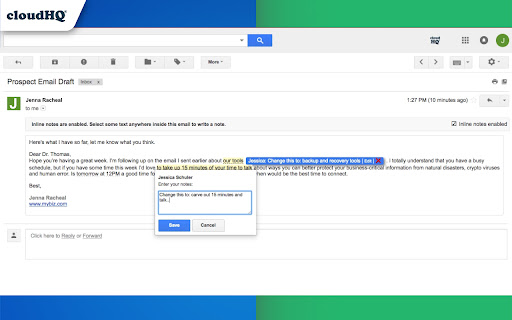
Good thought but unfortunately disappointing experience: 1) It doesn't add notes as sticky notes like shown on the picture 2) Stretches the whole email body when using inline notes, i.e. highlighting anything in the email to add a note. The note is squeezed into the text making any text with a lengthy not not really readable anymore. 3) Cannot change colours. Blue background, black notes, cannot read my own notes I take. 4) When inline note taking is activated it always refreshes the email which costs not only time but also moves the entire email body up and down a few times when refreshing it.
I'm very disappointed. I've been using this app for years and suddenly I get this warning: Trial expired. Please upgrade to Notes for Gmail Premium Plan. But the company keeps advertising it as free. If they want to charge new subscribers, I understand, but I don't think it's right to change my plan after so long. I hope they reconsider.
Uh oh. I've been using Gmail Notes for a while, albeit for very few emails. Today, I added a note to an email, and the email was emptied! Its contents and attachments just disappeared. I've sent an email to Support (and heard nothing back over a month later), but needless to say, I'm not going to trust this one again 🙁
PERMANENTLY DELETING/CORRUPTING EMAILS, AVOID FOR NOW, SENT MESSAGE TO SUPPORT.
CloudHQ normally has great extensions, but this one is completely broken. I tried adding an inline note and it went into this crazy infinite loop opening up other emails including my drafts (which was kind of scary because it looked like it was going to send an email to a completely different person). I had to close the tab and open a new one. The note was saved, but I can't add another note or remove the first note without this crazy refresh infinite loop happening. I tried clearing the cache but this still happened. I have cloudhq Gmail Copilot extension enabled as well - I don't really want to keep testing / debugging this any further, because I don't want part of one email to accidentally get sent to a different person (which is what it looks like is about to happen during the infinite loop).
Doesn't work. It won't save the note inside the email, just creates the window and sits there.
Doesn't work for me - nothing shows up on gmail even after installing the extension. Console shows some errors.
doesn't work
I have tried 3 different ways to contact the HQ people and they never respond. Trying ONE more time!! When adding notes to your email, how do you search the notes at a later time?
This developer seems psychotic to me. They blocked my account for no reason I can imagine, and then when I asked why, they said they cannot tell me "for security reasons". Whose security is that, mine, or yours CloudHQ? How is telling me why my account was blocked a security issue? What did I do? I used the addon about 5 times... so what is wrong? Very, very bizarre developer. BEWARE that you don't rely on this addon, the may do the same to you for no reason.
Nice idea, but the performance is unusable
inline notes need a bit more work, quite clumsy to use, compared to its full potential.
Initially caused browser to crash, over and over again, until I managed to close the Gmail tab. Then I could get in and disable it. When I finally got it working, I found that the "Inline Notes" part doesn't seem to work. The "box" doesn't pop up when I highlight. Also, this adds adds a label to notes that's completely uninformative. Overall, I find "Simple Gmail Notes" to be superior in several ways, including colorization and being able to see the beginning of the note in the Message List. So using colors and emoji symbols, my "Messages List" can give me at-a-glance information about the status of the email/project, as well as some additional information WITHOUT having to actually click on the email to see the whole note. It also includes a "Notes Viewer" and Search, which is incredibly handy for finding notes I've made previously. I like some CloudHQ products overall though, so I'll probably try this again down the road a bit, when it's had some more development. Meanwhile, it's "Simple Gmail Notes" for me!
Love the idea, but needs the function that the notes will not be shared with other accounts by default. For example, if you add a note to an email in chrome, but then respond to that email using Apple Mail or mail from your phone, etc. Then the note goes with the email and the recipient can see the note. So, say for example, you get an email offering $5,000 for a piece of property and you add a note "Respond at $3,000, client wants $4,000." Later, you send a reply using your Apple Mail or your phone, etc., then that note now goes to the recipient of the email and you really may be in some hot water.
Can't be used in french because of accented characters not supported.
App didn't work for me. Needed to refresh browser to get it save or edit a note. I like other HQ Apps but this one wasn't reliable.
Very slow - constantly having to hard refresh gmail. Each inline note takes a 10 seconds to save, which stops my ability to continue annotating for that duration. Even some times the page crashes entirely. No other gmail extensions are installed, I've tried emptying my chrome images and files cache and didn't help.
Something has happened to this extension. The new version has inline notes disabled by default and you have to click on a box to turn them on. But then, it only works with the first note. After that, if you higlight the text, no pop-up window appears for your notes anymore. Bummer...
When you leave a note in most HTML emails it destroys the email formatting. Even worse, Gmail sees the altered email as spam and you must fetch the email from the spam folder. Also, it would be nice to have some indicator in the email header when a note has been left.
This extension worked for me for one week, after that its not working. When i type a note and save it then the note disappears automatically on refresh.
A good idea but I don't like that the notes are at the top of an email and lose any WORD formatting applied. I am not getting the option to include or not in forwarded emails and saved notes do not show up when I try to forward an email to a third party.
Gmail Notes does not work with the new design of Gmail. When a note is saved, a string appears in the search box and Gmail freezes. The same thing happens when you delete a note. Everything works as it should in the old Gmail design.
I did a quick test. It is easy enough to add a note just by highlighting some text. A pop-up window then appears so you can enter your note. I found two problems, though. One is that it reformats the text of the email to make room for your comment. The other problem is that I could not completely delete the comment. While I could delete the text just by editing the comment and deleting the words I added, the reformatted email remained reformatted, and the highlighted text remained highlighted. I could not figure out how to get the formatting back to the original, or how to completely remove the highlighting. It's a good concept, but it did not work well enough for me to keep.
Permissions (3)
Permissions
Details
| Version | 1.0.1.6 |
| Updated | Nov 29, 2025 |
| Size | 584KiB |
| First Seen | Mar 27, 2026 |
More by cloudHQ





Popular in workflow




Popular Extensions
