
Bookmark, AI Tagging, Cache & Screenshot | PageOrg icon

Bookmark, AI Tagging, Cache & Screenshot | PageOrg

by Page Org

v1.6.5 Updated Sep 10, 2025 1.99MiB
CWS
1K
Users
★ 4.47
30 reviews
#13258
of 145.9K
tools
#2719 of 45.2K
⚠️Requests 1 sensitive permission

Description

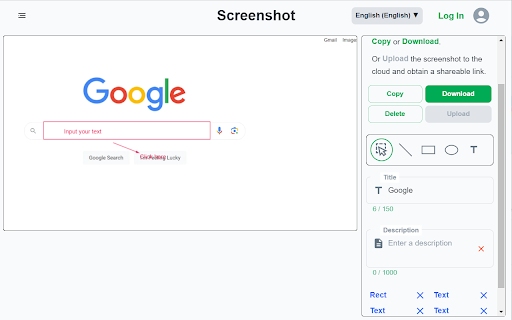
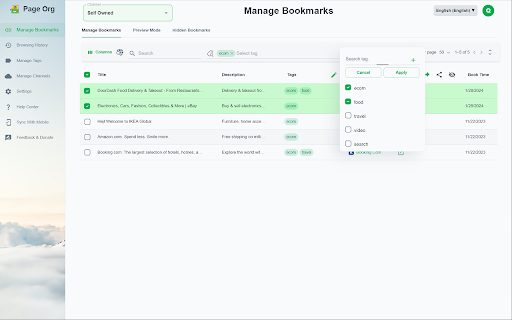
Functionality: 1. Bookmark Management: Import bookmarks and search by text, tags, domain, or URL. 2. Browsing History Search: Import browsing history and search by text, date range, domain, or URL. 3. Easy Bookmark Organization: Edit titles inline, bulk-apply and drag & drop tags, and leverage AI-driven auto-tagging for efficient organization. 4. Offline Page Caching: Cache pages locally for offline access with an option to auto-cache bookmarked pages. All data is stored locally to ensure privacy. 5. Screenshot Capture & Editing: Capture, annotate, and download screenshots easily, or upload to share via a unique link. 6. Cross-Device Sync & Collaboration: Sync data across devices and collaborate on bookmarks with friends and colleagues for seamless teamwork. Introduction: Page Org – the ultimate Chrome extension for seamlessly managing bookmarks, browsing history, and more across devices, with powerful collaboration tools for teams. Cache pages for offline access, capture and annotate screenshots. Organize, search, cache and share content—all with productivity-focused features designed to streamline your workflow. With Page Org, elevate your browsing experience through tools that let you: ✔️ Efficiently Manage Bookmarks & Browsing History : Import bookmarks and history, then find what you need quickly by searching through keywords, tags, domains, URLs, or date ranges. Advanced Tagging & Editing: Edit titles inline, bulk-apply and drag & drop tags, and let AI-powered auto-tagging organize your collection faster than ever. ✔️ Offline Page Caching: Cache any page for offline access, with options to auto-cache bookmarked pages—all stored locally for your privacy. ✔️ Enhanced Screenshot Capture & Editing: Capture, annotate, and edit screenshots on any page. Save locally or upload to share through a unique link. ✔️ Cross-Device Sync & Collaboration: Download our app for mobile, sync data across devices, and create channels to collaboratively manage bookmarks and tags with friends or colleagues for efficient teamwork. Our Help Center offers step-by-step guidance and tips for maximizing productivity. Say goodbye to cluttered bookmarks and disorganized browsing history. Experience streamlined browsing with Page Org, your partner in efficient online organization. Support Languages: العربية, Deutsch, Español, English, Français, 日本語, 한국어, 简体/繁体中文
Bookmark, AI Tagging, Cache & Screenshot | PageOrg screenshot 1Bookmark, AI Tagging, Cache & Screenshot | PageOrg screenshot 2Bookmark, AI Tagging, Cache & Screenshot | PageOrg screenshot 3Bookmark, AI Tagging, Cache & Screenshot | PageOrg screenshot 4Bookmark, AI Tagging, Cache & Screenshot | PageOrg screenshot 5

Reviews (3 cached)

★☆☆☆☆2025-04-13
Don't Expect Less Productions

ARE YOU SERIUOS ¿¿¿ https://www.pageorg.com/eula Privacy & Data Use Analysis – PageOrg App (English Version) 1. Access to Personal Data and App Content "Licensor will be able to access and adjust Your downloaded Licensed Application content and Your personal information..." This means the company can access and even modify your stored content and personal data at their discretion. While they claim to follow their privacy policy, the permissions granted here are very broad and vague. 🔴 2. Technical and Usage Data Collection "Licensor may periodically collect and use technical data and related information about your device..." You're allowing them to collect device and app usage data, which is common, but there's no clear limit or opt-out option. They say it's not personally identifiable, but there’s no transparency about how that’s guaranteed. 🔴 3. User Content License – You Give Up a Lot "...you automatically grant... an unrestricted, unlimited, irrevocable, perpetual, non-exclusive, transferable, royalty-free, fully-paid, worldwide right... including, without limitation, your image and voice..." Anything you upload (text, links, images, voice, etc.) gives them the right to use it however they want, forever, including for commercial use, with no payment to you. They also state that you waive all moral rights to your contributions (meaning they can modify or use your content without attributing it to you). 🔴 4. Public Visibility of Your Content "Contributions may be viewable by other users... and through third-party websites or applications." Even though it’s a link organizer, anything you upload could be made public, which increases the risk of unintentional exposure of personal or sensitive info. 🟡 5. Unilateral Changes to Terms "Licensor reserves the right to modify the terms and conditions..." You agree to let them change the terms of the agreement at any time, including how your data is handled. No requirement for explicit user consent.

★☆☆☆☆2024-09-29
krishna

Not able to store more than 1000 bookmarks, please allow to store bookmark as unlimited

★☆☆☆☆2024-08-19
林赫哲

It launch slowly,spending memory more than 2GB. 2024-8-26,I re-opened this,but still over 30 sec to open. However,Chrome said:It crashed. Traditional Chinese is worse supported than Simpled Chinese.

Permissions (12)

Permissions

activeTab Can access the current tab when you click the extension bookmarks Can read and modify your bookmarks contextMenus Can add items to the right-click menu declarativeNetRequest Can block or redirect network requests history Can read and modify your browsing history identity Can use your Google account identity identity.email pageCapture Can save web pages as MHTML storage Can store data locally in your browser tabs Can see your open tabs and their URLs unlimitedStoragewindows

Details

Version 1.6.5
Updated Sep 10, 2025
Size 1.99MiB
First Seen Mar 27, 2026