Highlight Emails in Gmail by cloudHQ icon

Highlight Emails in Gmail by cloudHQ

by cloudHQ

v1.0.1.23 Updated Dec 15, 2025 1.23MiB
CWS
8K
Users
★ 3.90
10 reviews
#8714
of 207.5K
accessibility
#462 of 6.4K

Description

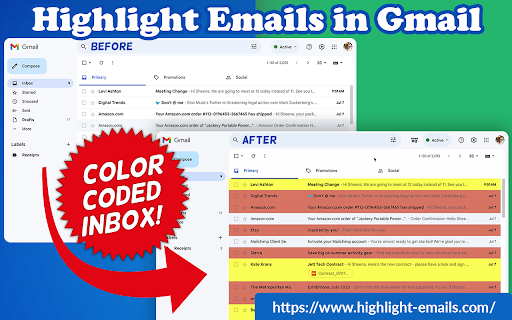
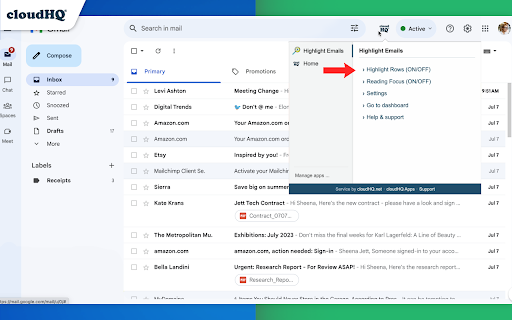
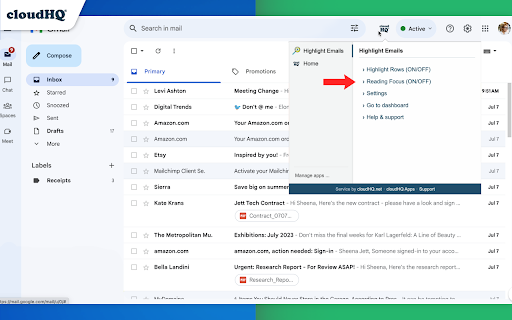
Color code email rows in Gmail to visually organize them. ✅ Select from a choice of calming or bright colors. ✅ Adjust background color based on email status, such as read/unread or selected. ✅ Customize the background color highlight depending on the sender’s email domain. ✅ Focus mode minimizes distractions, specifically designed to assist individuals with neurodevelopmental disorders to more easily navigate, read, and concentrate. In short, with this extension you can inbox customization through color-coding, allowing users to visually categorize emails. For example, assigning the color red to emails from security domains like security@google.com enhances the ability to quickly spot and prioritize critical alerts or notifications, streamlining inbox management and efficiency. Imagine having all your emails from clients, vendors, or internal company emails neatly color-highlighted. It's like having a personalized filing system right in your inbox. You'll easily spot emails that need your attention, while also decluttering your digital workspace. This is a game changer for anyone dealing with heaps of emails daily. This app isn't just about managing your inbox; it's about managing your time and focus too. There's even a unique "Focus Mode" that works when you hover over an email. That email stands out while everything else recedes into the background. All other emails gray out, removing distractions and letting you zero in on that single email. It's the visual equivalent of noise-canceling headphones for your inbox. This way, you can devote your full attention to each email in turn, without missing any important details. Perfect for anyone who needs a little help focusing amidst the constant barrage of incoming emails. Focus Mode is more than a feature, it's a way to reclaim control over your digital environment. ~~~~ Instructions for Use ~~~~ 1. Install the extension. 2. You can get started now by clicking on: - The cloudHQ log on the top of your Gmail inbox - Click on "Highlight Emails" - Click on "Highlight Rows (ON/OFF)" to toggle the feature on and off 3. To activate the "Focus Mode," just toggle "Reading Focus (ON/OFF)" to enable distraction-free reading. 4. To disable, toggle the feature off. cloudHQ website: https://www.cloudhq.net/ App website: https://www.highlight-emails.com Pricing: https://www.highlight-emails.com/pricing Support page: https://support.cloudhq.net/category/browser-extensions/highlight-emails/ FAQ page: https://support.cloudhq.net/highlight-emails-faq-frequently-asked-questions/ Blog: https://blog.cloudhq.net Gmail, Google Calendar, and Google Workspace are trademarks of Google LLC. Use of these trademarks is subject to Google Permissions. cloudHQ is trademark of cloudHQ LLC. https://www.cloudhq.net/trademark
Highlight Emails in Gmail by cloudHQ screenshot 1Highlight Emails in Gmail by cloudHQ screenshot 2Highlight Emails in Gmail by cloudHQ screenshot 3Highlight Emails in Gmail by cloudHQ screenshot 4Highlight Emails in Gmail by cloudHQ screenshot 5

Reviews (4 cached)

★☆☆☆☆2026-01-12
Carl Beehler

Been using the 'free' version of this for the better part of a year. When I installed it it clearly stated that it was FREE and PERPETUAL but unsupported. Fair enough. The vesion matrix on the site still says the same thing. So I was surprised last week when I started getting a countdown to it expiring. I checked the site again and, sure enought, it STILL said that there was a perpetual free version. Turns out it's all a masterful bait and switch. It just stopped working today and, of course, they want me to pay $36 a year for it even though it STILL SAYS ON THEIR SITE THAT IT SHOULD BE FREE. I can't help but feel like the ask is in bad faith even though it's a really, really helpful tool. Dirty bait and switch tricks like this do a great job of soiling a company's reputation and makes me less likely to trust them as a partner going forward. If they're willing to blow a customer relationship for $36 bucks do I really want to do business with them?

★★☆☆☆2023-10-20
Tom Jewell

It doesn't work well with Dark Mode. Some of the highlight colors can make an email row disappear. Another app that I use, Dark Reader, works well with colors in Dark Mode. I use the filter features that Gmail offers for marking emails. With the filters, I apply labels with color, mark email as "important" and/or with different color stars. If you don't use dark mode, then this app makes important messages grab your attention.

★★★☆☆2026-01-05
Rebecca Yu

I really liked this extension. It made important emails stand out so I never had to go searching for them. It also made daily notifications that I just end up deleting stand out, so I could quickly clean up my inbox. My only issue is that it was only free for a 30-day trial, and it's way too expensive to upgrade to the paid version. I liked it, but not enough to pay $99/year for it. It was probably more worth $12/year. It doesn't help THAT much with productivity - I can live without it for that price.

★★★☆☆2023-08-17
Karl Wild

Hi, The extension does not work if you have different persons with the same domain. At least I couldn't figure it out

Permissions (4)

Permissions

background scripting Can inject scripts into web pages storage Can store data locally in your browser tabs Can see your open tabs and their URLs

Details

Version 1.0.1.23
Updated Dec 15, 2025
Size 1.23MiB
First Seen Mar 28, 2026