
⚠️Not updated in over 2 years
Description
### Auto Refresher Chrome Extension
#### Overview
The Auto Refresher is a Chrome extension designed to automate the refreshing of web pages based on specific settings and criteria. It's useful for keeping tabs updated without manual intervention, especially for monitoring live updates or changes on websites.
#### Features
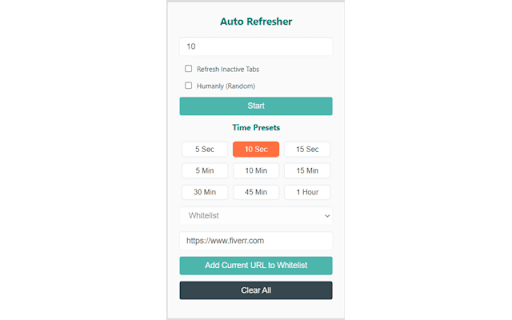
1. **Interval Setting**: Users can set a specific time interval in seconds for the auto-refresh feature. This interval determines how often the tabs will refresh.
2. **Refresh All Tabs Option**: A checkbox allows users to choose whether all tabs should be refreshed or just the active one. This is useful if users want to refresh multiple tabs simultaneously.
3. **Randomize Interval**: This feature, when enabled, randomizes the refresh interval, making the refresh behavior appear more human-like, rather than occurring at fixed intervals.
4. **URL Management**:
- **Add URL**: Users can add specific URLs to a list. These URLs will be the ones affected by the auto-refresh settings.
- **Whitelist and Blacklist**: Users can specify whether the added URLs are in a whitelist or a blacklist, controlling which sites to refresh or avoid.
- **Clear All**: This button allows users to clear all stored data, removing all URLs and settings from the extension.
5. **Time Presets**: The extension offers preset time options for quick setup, ranging from 5 seconds to 1 hour. These presets simplify the process of setting the refresh interval.
6. **List of URLs**: Displays the list of URLs that are currently set to be refreshed. Users can see and manage the websites that are affected by the extension's settings.
7. **Start/Stop Button**: A toggle button to start or stop the auto-refresh process. This allows users to easily control when the auto-refresh feature is active.
8. **Status Indicator**: The extension uses a badge to indicate the number of URLs currently in the refresh list, providing quick visibility of the extension's activity.
#### How to Use
1. **Set the Interval**: Enter the desired refresh interval in seconds in the 'Interval in seconds' input box.
2. **Select Refresh Options**: Choose whether to refresh all tabs or just the active one, and whether to randomize the interval.
3. **Manage URLs**:
- To add a URL, enter it in the 'Enter URL' field and click 'Add Current URL to Whitelist'.
- The added URLs will appear in the list below. Users can manage these URLs through this list.
4. **Start Refreshing**: Click the 'Start' button to begin auto-refreshing the tabs based on the set criteria.
5. **Use Time Presets**: For convenience, select from predefined time intervals like 5 sec, 10 min, 30 min, etc.
6. **Clear Data**: If needed, users can clear all settings and URLs with the 'Clear All' button.
#### Use Cases
This extension is ideal for users who need to keep web pages updated without manual refreshing. It's especially useful for:
- Monitoring live data or news feeds.
- Keeping tabs on auction sites or stock market updates.
- Auto-refreshing dashboards or analytics pages.
#### Note
Users should be aware of the potential impact of frequent refreshes on website servers and adhere to the terms of service of the websites they are refreshing. Regular use of auto-refreshing might not be suitable for all websites.

Reviews
Loading reviews...
Permissions (3)
Permissions
activeTabℹ Can access the current tab when you click the extension storageℹ Can store data locally in your browser tabsℹ Can see your open tabs and their URLs
Details
| Version | 1.0 |
| Updated | Dec 5, 2023 |
| Size | 21.09KiB |
| First Seen | Mar 28, 2026 |
Popular in tools

Zotero Connector
by Zotero
8M
★ 3.96
tools
8M
★ 3.96
tools

Browsec VPN - Free VPN for Chrome
by Browsec
7M
★ 4.44
tools
7M
★ 4.44
tools

AnyDoc Translator - Translate Web and PDF
by www.wps.com
7M
★ 4.59
tools
7M
★ 4.59
tools

Microsoft Bing Homepage & Search for Chrome
by Microsoft Corporation
4M
★ 3.72
tools
4M
★ 3.72
tools

IE Tab
by Blackfish Software
4M
★ 4.31
tools
4M
★ 4.31
tools
Popular Extensions

Adobe Acrobat: PDF edit, convert, sign tools
by Adobe Inc.
331M
★ 4.40
workflow
331M
★ 4.40
workflow

AdBlock — block ads across the web
by AdBlock
62M
★ 4.48
workflow
62M
★ 4.48
workflow

Grammarly: AI Writing Assistant and Grammar Checker App
by Grammarly
42M
★ 4.50
communication
42M
★ 4.50
communication

Chrome Remote Desktop
by Chrome Remote Desktop Release Managers
38M
★ 3.14
workflow
38M
★ 3.14
workflow

Microsoft Single Sign On
by Microsoft
36M
★ 2.27
workflow
36M
★ 2.27
workflow