Talking Clock icon

Talking Clock

by Jackie(Guokai) Han

v1.0.0 Updated Dec 29, 2022 259KiB
CWS
10K
Users
★ 4.39
107 reviews
#3716
of 139.3K
workflow
#1137 of 21.4K
⚠️Not updated in over 2 years

Description

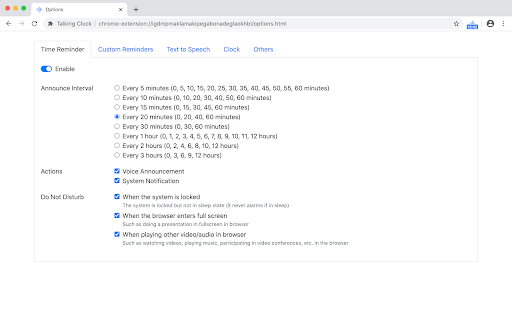
Overview Talking clock provides time reminder and custom reminder functions, suitable for time and periodic task reminders in daily work and life. It can also display date and time. Reminder methods include voice announcement and system notifications. This extension is especially suitable for people who often work for a long time with desktop computer, such as writers, programmers, and people who work remotely or indoors. • Time reminder helps to manage the time while focusing on the work. • Custom reminders are suitable for periodic daily affairs, such as "Remind me to have lunch at 11:30 every day". 1. Time Reminder It announces the time periodically by voice engine and/or system notification. The time interval can be set in the options of the extension: 5 minutes / 10 minutes / 15 minutes / 20 minutes / 30 minutes / 1 hour / 2 hours / 3 hours. In addition, there are several DnD(do not disturb) settings which enabled by default, such as don't remind me time if the browser is in full screen or playing video. 2. Custom Reminder Users can add custom reminders. Supported reminder types include: • Only once: only reminds on a specific date. • Daily reminder: reminder at one or more time every day. • Weekly reminder: choose one or more days from Monday to Sunday. • Monthly reminder: choose one or more days from the 1st day to the last day every month. • Annual reminder: choose one or more days every year, such as "Birthday reminder". All types can set one or more reminder time on the reminder day. In this way, on the one hand, it can meet the needs of multiple reminders in one day for one thing. For example, "Remind me to take medicine three times (in the morning, noon and evening) every day", just create a daily reminder, which sets three reminder time. On the other hand, multiple reminder time can be set for important things to avoid missing it. 3. Clock The popup page displays current time and date by clicking the extension icon. In addition, the extension icon itself can also display the time (not enabled by default). In the options for clock settings, you can set: • Display analog clock or digital clock. • Whether to display seconds. • Whether to display the date. • Whether to display the time on the extension icon. 4. Other In the extensions keyboard shortcuts settings(chrome://extensions/shortcuts), you can set shortcuts for displaying the time and announcing the time. About Reminder Methods You can use one or both of two reminder methods: • Voice announcement: announce the time or custom content by Text-to-Speech engine. • System notification: send a desktop notification. The voice announcement will make a sound, so it may not be suitable for everyone. In addition, if you forget to turn on the speaker or the volume is too low, you will not hear it. System notification may also be missed if it disappears automatically. So: • System notification for time reminder will automatically disappear after a few seconds, because it's not very important. • Custom reminders are more important than time reminder. So to prevent missing it, system notification for custom reminders will disappear automatically after one minute by default, not a few seconds. You can set this behavior for each custom reminder separately. In summary, voice announcements and system notifications can complement each other to avoid missing reminder. About Text-to-Speech (TTS) TTS includes the TTS provided by the operating system and the remote TTS provided by the browser. The former can be adjusted in the operating system settings, while the latter depends on the network connection. The operating system comes with a general voice effect, it is available offline; the voice provided by the browser is usually better, but it requires network connection. TTS is used by time reminder and custom reminders. In the extension options, you can set TTS voice. Each voice usually only supports text in one language, and may not read text correctly in other languages. How to open extension options? • Right-click the extension icon, then click Options. • Click the extension icon, move the mouse to the popup page, then click the setting icon in the upper right corner. This extension is not an alarm clock It is suitable for daily affairs, but it is not an alarm clock. For example, if you want to catch a plane or get up early, please do not rely on this extension. Because the extension cannot issue a reminder when you exit the browser or when the computer goes into sleep. So it is not suitable for very important things. Note: due to a browser restriction, reminders/notifications may be delayed for a little time (less than 1 minute).
Talking Clock screenshot 1Talking Clock screenshot 2Talking Clock screenshot 3Talking Clock screenshot 4Talking Clock screenshot 5

Reviews (16 cached)

★☆☆☆☆2025-04-26
David

TOTALLY UNRELIABLE. When it works, it is fine, but for several years the talking clock only works when it feels like it, so it is completely useless. (Don't trust custom reminders. It will be a disaster) I would donate to Mr Han's otherwise good work, if he could find a way to keep it working, but he can't. From time to time, I give it another try (2022 - 2025) but it is hopeless. My latest attempt (Yet again) has it sending silent notifications but not talking. It is a waste of my time. UPDATE 4 months later. August 2025. Same problem. Uninstalled, and reinstalled but not solved. Given it up.

★☆☆☆☆2025-03-22
Jurek Pazurek

I found a bug. The problem is that this add-on reads all custom reminders every time after starting Google Chrome.

★☆☆☆☆2021-09-04
Praveen kumar G T

It does not work all the time, should the chrome be an active tab for the extension to work. or it does not come when we watch other videos in chrome

★☆☆☆☆2020-10-08
Agitated _

Wont save settings... getting really annoyed at the popup., used to work fine... chromes up to date aswell... need to fix it asap

★★☆☆☆2025-10-22
Project 2013B

Works for a while, I put my computer to sleep, and when the computer wakes up again, it no longer seems to work. Tried disabling then re-anbling the extension, but nothing seems to work. Would of been nice to have.

★★☆☆☆2025-06-08
Adrelanine

I only get notifications alert but no sound... which is what I'm looking for

★★☆☆☆2024-10-20
Mary Becker

Same about voice stopped working happened right after a windows / chrome update.. talk to me!!!

★★☆☆☆2024-10-17
Mookaney Amsal Zia

Hi was working great for the past week and now suddenly the voice notifs have stopped but the desktop notifications are still occurring please fix this i am heavily reliant on your extension much love and thank you

★★☆☆☆2023-08-21
Farhan Hussain

1- custom reminder not performing actions - not showing notifications and no announcements. 2- time reminder not performing action either - no voice announcements and notifications. 3- time is stuck on the icon. not syncing with system.

★★☆☆☆2022-09-13
katie

it works perfectly fine as others said but it won't work when there's a background music.

★★☆☆☆2020-10-05
Jessica Harry

CUSTEM A real small popup With no good look to it And no clock and no time Repeat Delay like 3m if in not in the room it goes off be nice if the pop-up Display was big With a OK to close it

★★★☆☆2024-04-19
Karen Krohn

I like this extension very much, but recently it has gone completely silent. How can I troubleshoot this?

★★★☆☆2024-02-19
MadeInUSA Review0

No options for muting during certain hours

★★★☆☆2022-12-20
1953HLH

It doesn't work when browser is closed.

★★★☆☆2022-09-16
P F

Its the best option on the store but its unreliable. Ive noticed that it will randomly not work. I set it for every 30 minutes and sometimes it works and sometimes it doesnt. It just didnt which is what prompted me to write this review. A few times now Ill just be looking at the windows clock waiting for it to go from XX:29 to XX: 30 for example. And theres no pop up nor sound. Sometimes it WILL work but i need it to work 100% of the time.

★★★☆☆2021-11-29
Ruby Gem Cabagua

I love the concept but the seconds doesn't match to the current time in second. Its almost 30 seconds late. Please fix it!

Permissions (7)

Permissions

alarms Can schedule periodic background tasks background idle Can detect when you're away from the computer notifications Can show desktop notifications storage Can store data locally in your browser tts Can use text-to-speech unlimitedStorage

Details

Version 1.0.0
Updated Dec 29, 2022
Size 259KiB
First Seen Mar 26, 2026

More by Jackie(Guokai) Han

Popular in workflow

Popular Extensions