
GPT Anywhere: ChatGPT AI Assistant | Claude 4, GPT-4o, Claude 3.5, o1 &More
by flitsoft.llc
v1.0 Updated Sep 18, 2025 1.09MiB
⚠️Requests 1 sensitive permission
Description
🔥 GPT Anywhere is your all-in-one AI extension.
Right-click anywhere, use keyboard shortcuts, or click the extension icon to get started.
We offer seamless AI assistance directly on any webpage without tab switching.
💪 Key Features:
👉 Multiple View Modes
✔️ Side Panel: Always visible on any webpage, persists even when switching tabs.
✔️ Overlay Popup: Draggable popup that spawns over any webpage content.
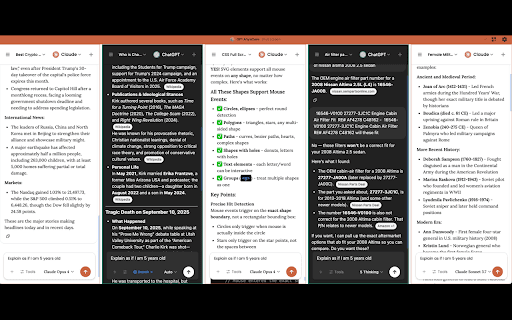
✔️ Full Screen Grid: Chat with multiple AI models simultaneously in a grid layout.
👉 Universal Access
✔️ Right-Click Context: Access all view modes via right-click context menu on any content.
✔️ Extension Popup: Quick access buttons through the extension icon in your toolbar.
✔️ Keyboard Shortcuts: Open any view mode instantly with customizable hotkeys.
✔️ Multi-Model Support: ChatGPT, Gemini, Claude, and more AI models in one place.
👉 Context Awareness
✔️ Screen Capture: Use webpage screenshots as context for your AI conversations.
✔️ Text Selection: Select any text on webpages to use as context for your prompts.
✔️ Element Picker: Select specific HTML elements as context for targeted assistance.
✔️ Image Context: Upload images directly for visual AI assistance.
👉 Multi-Chat Comparison
✔️ Parallel Chatting: Send the same prompt to multiple AI models simultaneously.
✔️ Model Comparison: Compare responses from different AI providers side-by-side.
✔️ Provider Switching: Seamlessly switch between ChatGPT, Claude, Gemini without changing tabs.
✔️ Best Response Selection: Quickly identify the most suitable AI model for your specific task.
👉 Productivity Boost
✔️ No Tab Switching: Eliminate the need to constantly switch between work tabs and AI chat tabs.
✔️ Instant Access: Get AI assistance without leaving your current webpage.
✔️ Context Preservation: Maintain webpage context while interacting with AI models.
✔️ Workflow Integration: Seamlessly integrate AI assistance into your existing browsing workflow.
💻 How to use:
🔸 Click the "Add to Chrome" button and install the extension.
🔸 Log in to your existing AI accounts (ChatGPT, Claude, Gemini, etc.).
🔸 Right-click anywhere, use keyboard shortcuts, or click the extension icon.
🔸 Start chatting with AI without leaving your current webpage!
❓ Frequently Asked Questions:
🤖 Which AI models are supported?
- We support ChatGPT and Claude, and other popular AI chatbots are being added regularly.
💳 Do I need premium subscriptions to AI services?
- You can use your existing accounts and subscriptions. If you have ChatGPT Plus, Claude Pro, or Gemini Advanced, you'll enjoy those premium benefits through our extension.
🔒 Is my data private and secure?
- Yes. We don't collect or process your prompts. All requests go directly to your existing AI accounts, ensuring complete privacy.
💰 Is it free to use?
- Yes, GPT Anywhere is completely free and unlimited. No monthly subscriptions required.
🌐 Can I use it on any website?
- Yes, the extension works on all websites and webpages in your Chrome browser.
📬 Contact us:
Any questions or suggestions? Please contact us at 💌 gptanywhere@flitsoft.com
Try it now and experience the power of having multiple AI assistants accessible anywhere in your browser!


Reviews
Loading reviews...
Permissions (9)
Permissions
activeTabℹ Can access the current tab when you click the extension contextMenusℹ Can add items to the right-click menu cookiesℹ Can read and modify browser cookies declarativeNetRequestWithHostAccess identityℹ Can use your Google account identity sidePanel storageℹ Can store data locally in your browser tabsℹ Can see your open tabs and their URLs webNavigationℹ Can monitor navigation events
Details
| Version | 1.0 |
| Updated | Sep 18, 2025 |
| Size | 1.09MiB |
| First Seen | Mar 29, 2026 |
Popular in tools

Zotero Connector
by Zotero
8M
★ 3.96
tools
8M
★ 3.96
tools

Browsec VPN - Free VPN for Chrome
by Browsec
7M
★ 4.44
tools
7M
★ 4.44
tools

AnyDoc Translator - Translate Web and PDF
by www.wps.com
7M
★ 4.59
tools
7M
★ 4.59
tools

Microsoft Bing Homepage & Search for Chrome
by Microsoft Corporation
4M
★ 3.72
tools
4M
★ 3.72
tools

IE Tab
by Blackfish Software
4M
★ 4.31
tools
4M
★ 4.31
tools
Popular Extensions

Adobe Acrobat: PDF edit, convert, sign tools
by Adobe Inc.
331M
★ 4.40
workflow
331M
★ 4.40
workflow

Grammarly: AI Writing Assistant and Grammar Checker App
by Grammarly
42M
★ 4.50
communication
42M
★ 4.50
communication

Chrome Remote Desktop
by Chrome Remote Desktop Release Managers
38M
★ 3.14
workflow
38M
★ 3.14
workflow

Microsoft Single Sign On
by Microsoft
36M
★ 2.27
workflow
36M
★ 2.27
workflow

Cisco Webex Extension
by cisco.chromestore
23M
★ 2.34
social
23M
★ 2.34
social