
✅Recently updated
Description
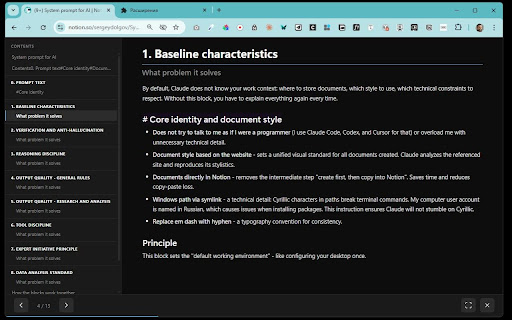
Transform any published Notion page into a clean, full-screen presentation with one click.
FEATURES:
• 4 split modes — divide slides by horizontal dividers, H1, H2, or H1+H2 headings
• 4 visual themes — Light, Dark, Notion Classic, and Gradient Dark
• H1/H2 hierarchy — sub-heading slides show their parent heading for context
• Keyboard navigation — Arrow keys, Space, Home/End, Escape, F for fullscreen
• Touch support — swipe left/right on mobile devices
• Progress bar and slide counter
• Preserves Notion formatting: tables, code blocks, images, callouts, toggle blocks
HOW TO USE:
1. Open any published Notion page (*.notion.site)
2. Click the Notion Presenter icon in your toolbar
3. Choose split mode and theme
4. Click "Start Presentation"
PRIVACY:
• No data collection — everything runs locally in your browser
• No external servers or analytics
• Open source
Perfect for teachers, presenters, and anyone who writes content in Notion and wants to present it without switching tools.


Reviews
Loading reviews...
Permissions (1)
Permissions
activeTabℹ Can access the current tab when you click the extension
Details
| Version | 1.0.0 |
| Updated | Mar 26, 2026 |
| Size | 1.29MiB |
| First Seen | Mar 29, 2026 |
Popular in tools

Zotero Connector
by Zotero
8M
★ 3.96
tools
8M
★ 3.96
tools

Browsec VPN - Free VPN for Chrome
by Browsec
7M
★ 4.44
tools
7M
★ 4.44
tools

AnyDoc Translator - Translate Web and PDF
by www.wps.com
7M
★ 4.59
tools
7M
★ 4.59
tools

Microsoft Bing Homepage & Search for Chrome
by Microsoft Corporation
4M
★ 3.72
tools
4M
★ 3.72
tools

IE Tab
by Blackfish Software
4M
★ 4.31
tools
4M
★ 4.31
tools
Popular Extensions

Adobe Acrobat: PDF edit, convert, sign tools
by Adobe Inc.
331M
★ 4.40
workflow
331M
★ 4.40
workflow

AdBlock — block ads across the web
by AdBlock
62M
★ 4.48
workflow
62M
★ 4.48
workflow

Grammarly: AI Writing Assistant and Grammar Checker App
by Grammarly
42M
★ 4.50
communication
42M
★ 4.50
communication

Chrome Remote Desktop
by Chrome Remote Desktop Release Managers
38M
★ 3.14
workflow
38M
★ 3.14
workflow

Microsoft Single Sign On
by Microsoft
36M
★ 2.27
workflow
36M
★ 2.27
workflow