
⚠️Not updated in over a year ⚠️Requests 1 sensitive permission ✅Highly rated
Description
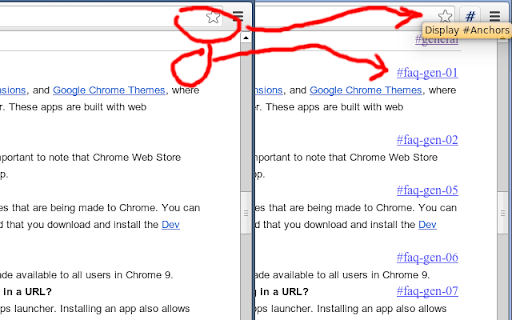
Display #Anchors offers an easy way to see
all (invisible) anchors in a page, to make it easier to link to a specific part of a webpage.
【 FEATURES 】
- Finds all anchors in a page and shows a marker next to it.
- Does not alter the layout; so no jumpy pages or expensive repaints.
- The anchored content is highlighted on Hover over the marker.
- The marker is highlighted on hover over the anchored content.
- Click on the toolbar button to remove all markers.
- The extension consumes no memory until it's actually used.
- Optional option to display anchors in cross-origin frames.
【 Customization 】
- You can set a custom shortcut to toggle the extension (Alt + Shift + A by default).
- You can customize the label of the displayed anchor.
- You can optionally grant access to all sites, to display anchors in cross-origin frames.
Detailed instructions are available at https://github.com/Rob--W/display-anchors#customization
【 HISTORY 】
Before creating this extension, I've been using the "Display Anchors" feature of Chris Pederick's
"Web Developer" extension for Chrome.
An unfortunate "feature" of this implementation is that the markers cause changes to the layout, resulting in some
loss of time to find the position of the page before activating the anchors (and a broken layout looks ugly).
Besides that, the extension had too much overhead (it activates on every page, and consumes memory even when I did
not use it). This encouraged me to develop a new extension that offers the desired feature in an optimal way.
【 SUPPORT 】
Source code: https://github.com/Rob--W/display-anchors
Report a bug: https://github.com/Rob--W/display-anchors/issues
Contact: rob@robwu.nl
Reviews
Loading reviews...
Permissions (6)
Permissions
activeTabℹ Can access the current tab when you click the extension contextMenusℹ Can add items to the right-click menu notificationsℹ Can show desktop notifications scriptingℹ Can inject scripts into web pages storageℹ Can store data locally in your browser
Host Permissions
<all_urls>ℹ Can access and modify all websites you visit
Details
| Version | 1.5 |
| Updated | Jun 3, 2024 |
| Size | 32.65KiB |
| First Seen | Apr 1, 2026 |
More by Rob W

PDF Viewer
by Rob W
1M
★ 3.31
workflow
1M
★ 3.31
workflow

Save Image As PNG
by Rob W
400K
★ 3.95
art
400K
★ 3.95
art

Chrome extension source viewer
by Rob W
100K
★ 4.58
developer
100K
★ 4.58
developer

Don't track me Google
by Rob W
40K
★ 4.64
tools
40K
★ 4.64
tools

Classic Blue Theme (back to 50)
by Rob W
9K
★ 4.66
Other
9K
★ 4.66
Other
Popular in workflow

Adobe Acrobat: PDF edit, convert, sign tools
by Adobe Inc.
331M
★ 4.40
workflow
331M
★ 4.40
workflow

AdBlock — block ads across the web
by AdBlock
63M
★ 4.48
workflow
63M
★ 4.48
workflow

迅雷下载支持
by Shenzhen Xunlei Network Technology Co., Ltd.
59M
★ 2.77
workflow
59M
★ 2.77
workflow

Adblock Plus - free ad blocker
by eyeo GmbH
41M
★ 4.39
workflow
41M
★ 4.39
workflow

Chrome Remote Desktop
by Chrome Remote Desktop Release Managers
38M
★ 3.14
workflow
38M
★ 3.14
workflow
Popular Extensions
Adobe Acrobat: PDF edit, convert, sign tools
by Adobe Inc.
331M
★ 4.40
workflow
331M
★ 4.40
workflow
AdBlock — block ads across the web
by AdBlock
63M
★ 4.48
workflow
63M
★ 4.48
workflow
迅雷下载支持
by Shenzhen Xunlei Network Technology Co., Ltd.
59M
★ 2.77
workflow
59M
★ 2.77
workflow

Grammarly: AI Writing Assistant and Grammar Checker App
by Grammarly
42M
★ 4.50
communication
42M
★ 4.50
communication
Adblock Plus - free ad blocker
by eyeo GmbH
41M
★ 4.39
workflow
41M
★ 4.39
workflow