Night Viewer - Dark mode for view page source icon

Night Viewer - Dark mode for view page source

by Promotino Ltd.

v1.4.5 Updated Feb 27, 2025 389KiB
CWS
3K
Users
★ 3.47
15 reviews
#13199
of 207.1K
developer
#1102 of 18.1K
⚠️Not updated in over a year

Description

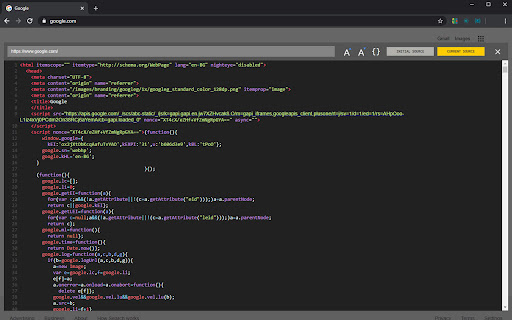
A lightweight and free Chrome Extension that enables dark mode for the View Page Source. Not only that, it also shows you how the browser has rendered a page’s original HTML into a functioning DOM, including modifications made by JavaScript. Night Viewer allows you to modify the font size of the View Page Source by increasing or decreasing it to make it more readable. CORE FEATURES ➤ Enable dark mode for the View Page Source ➤ Allow you to modify (increase and decrease) the font size at the View Page Source ➤ Beautify the source code to make it more readable ➤ Show you source code before JavaScript execution (returned from server) ➤ Show you source code after JavaScript execution (same as Developer FREE FOREVER Night Viewer is completely FREE extension that is developed by the team behind one of the best dark mode extensions - Night Eye More details can be found at http://nighteye.app WE CARE ABOUT PRIVACY Instead of simply pointing you to our privacy policy. We would like to address this topic in the most understandable language here. This extension is serverless - no requests are being made. The only data it collects and stores locally (on your computer) is what type of font have you chosen and the preferred source code view. FOLLOW US:: Facebook - https://facebook.com/night.eye.extension/ Twitter - https://twitter.com/nighteye_ext Pinterest -https://pinterest.com/nighteyeextension/
Night Viewer - Dark mode for view page source screenshot 1Night Viewer - Dark mode for view page source screenshot 2Night Viewer - Dark mode for view page source screenshot 3

Reviews (7 cached)

★☆☆☆☆2022-02-02
Julie Gagnon

Doesn't work at all.

★☆☆☆☆2021-05-08
Farzad Majidfayyaz

Super useful for me as my eyes were hurting from that white background. I don't care if it "steals" Ctrl+u to display that pop-up as others have mentioned. In fact, it's much better than I can just press ESC and go back to where I was instead of needing to close a tab. I just started using it, but first impression deserves a good review :) --- Oh no, the rating went to 1 because basically the extension doesn't let you type "u" in a text box!!!

★☆☆☆☆2020-12-31
Alauddin Afif Cassandra

Doesn't do anything when active and trying to view source page. on macos catalina

★☆☆☆☆2020-10-05
Ricky Driessel

Doesn't do anything when active and trying to view source page.

★★☆☆☆2022-03-30
Viktor Nova

Pretty, but radomly hijacks the letter U when I'm typing, so it is now popping up the view source modal nearly every time I type a message. This is just too annoying, so sadly I had to uninstall it. This for sure happened consistently in Gmail as well as Twitch chat, but really it wasn't website specific and happens all over the web. I use Linux and MacOS and the same behavior happened on both. Weirdly, when this happens, the only way to get my U key back to where I can actually type the letter U without triggering the popup is to hit the Ctrl key (Linux) or Cmd key (Mac) by itself. This then lets me type the letter U for awhile before it happens again. Hope this helps.

★★★☆☆2021-02-12
Chris Stafford

Yeah, it "works", but it doesnt actually affect the `view-source:` view, I actually doubt anything can at this point. The extension intercepts the CTRL+U keystroke and shows its own darkened+syntax colored source dump in a near full screen modal.

★★★☆☆2020-07-17
Paul Breton

Bizarrely, the source window pops up every time you type the letter U into a text field, making the web unusable, so I have to uninstall it. Other than that it works fine. It's something that really should be built into the base extension, without the overly keen keyboard shortcut.

Permissions (4)

Permissions

activeTab Can access the current tab when you click the extension scripting Can inject scripts into web pages storage Can store data locally in your browser tabs Can see your open tabs and their URLs

Details

Version 1.4.5
Updated Feb 27, 2025
Size 389KiB
First Seen Apr 1, 2026