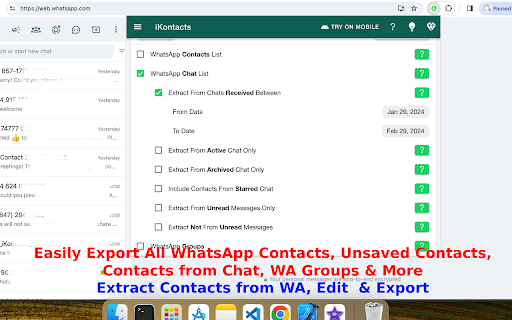
iKontacts - Contacts Manager for WhatsApp; discover the ultimate solution for efficient WhatsApp contact management with iKontacts, a powerful Google Chrome extension. Simplify the way you handle your contacts with a range of robust features designed to enhance your WhatsApp Web experience.
Key Features:
- Effortless Contact Export:
Seamlessly export all your WhatsApp contacts for easy management.
- Group Contacts Export:
Download WhatsApp group phone numbers with ease using iKontacts.
- Customized Contact Export:
Tailor your exports with options for specific chats, labeled contacts, and blocked contacts.
- Unsaved Contacts Management:
Identify and export only unsaved contacts, streamlining your contact list.
- Export to Various Formats:
iKontacts supports exporting contacts from WhatsApp to different formats, including Excel, CSV, vCard, JSON, and text formats.
- Privacy Mode for WhatsApp Web:
Protect sensitive information by blurring chat messages, contact names, phone numbers, profile pictures, chat previews, and media content while using WhatsApp Web.
- Screen Protection Tools:
Use quick hide or blur options to protect your WhatsApp screen during meetings, office work, or screen sharing.
- Auto Lock for Privacy:
Automatically lock or blur WhatsApp Web after a period of inactivity for added privacy.
- AI Writing Assistance:
Improve message quality with AI-powered tools for rewriting, grammar correction, translation, summarization, and tone adjustment, triggered only by user action.
- Chat Analyzer:
Analyze exported WhatsApp chat files to view message counts, timelines, and participant activity insights.
- Click to Chat Without Saving:
Start WhatsApp chats instantly without saving phone numbers to your contact list.
- WhatsApp Link and QR Generator:
Generate WhatsApp chat links and QR codes with prefilled messages for easy sharing.
How to Use iKontacts:
- Open WhatsApp Web and Connect Your Account:
Connect your WhatsApp account to the browser with WhatsApp Web for efficient contact management.
- Choose Your Export Preferences:
Utilize iKontacts to export contacts from WhatsApp groups, individual chats, labeled contacts, or blocked contacts.
- Effortless Unsaved Contacts Export:
Export and manage only unsaved contacts, with iKontacts automatically generating names for unknown numbers.
- Customize and Download:
Tailor your exports with customizable options and download contacts in various formats, including Excel.
- Organize and Edit:
Efficiently manage contacts within the extension, with features for editing, searching, filtering, and privacy controls.
Why Choose iKontacts:
- Time-Saving Solution:
iKontacts simplifies WhatsApp contact management and privacy handling, saving you valuable time.
- Business-Friendly:
Ideal for professionals and businesses handling frequent WhatsApp communication.
- Privacy-Focused Design:
Built-in privacy tools help protect sensitive information during daily WhatsApp Web usage.
- User-Focused Interface:
iKontacts offers an intuitive and user-friendly design suitable for all users.
More Features:
- Export contacts from WhatsApp chats, groups, labeled chats, and blocked contacts.
- Identify and manage unsaved WhatsApp numbers easily.
- Download contacts in Excel, CSV, vCard, JSON, and text formats.
- Blur chats, contact names, phone numbers, and media using Privacy Mode.
- Hide or lock WhatsApp Web instantly when needed.
- Improve message quality using AI-assisted writing tools.
- Analyze WhatsApp chat files locally for insights.
- Start WhatsApp chats without saving numbers.
- Generate WhatsApp links and QR codes for sharing.
Disclaimer:
iKontacts is an independent extension and is not directly associated with WhatsApp. It does not interfere with WhatsApp Web functionality. All trademarks belong to their respective owners.