
⚠️Not updated in over a year
Description
ログイン中の楽天RMSから商品情報CSVをダウンロードできます。
【使い方】
1.楽天RMSにログインします。
1.1.楽天RMSの「商品管理」->「商品一覧・登録」の画面を開きます。
2.このChrome拡張(「楽ダウ」)を起動します。
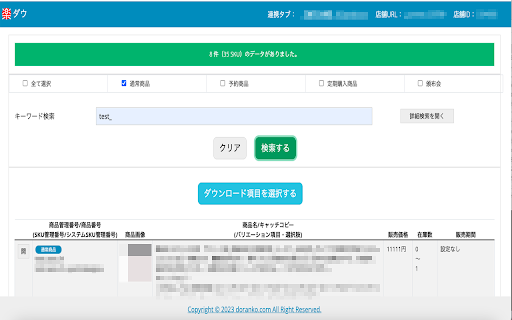
2.1.「楽ダウ」でダウンロードしたい商品の情報を入力して「検索する」ボタンを押します。
2.2.リストに表示された商品がダウンロードしたい商品であれば「ダウンロード項目を選択する」ボタンを押します。
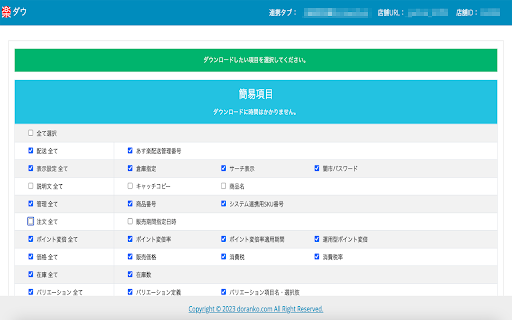
2.3.ダウンロードしたい項目を選択して「ダウンロード」ボタンを押します。
:簡易項目
すぐにダウンロードが開始される項目です。
:詳細項目
この項目を選択した場合は楽天RMSより追加の情報が必要となるので、ダウンロードに時間がかかります。
※ダウンロードを途中で中止したい場合は「楽ダウ」画面右上の「連携タブ」をクリックして開かれた楽天RMSのタブを閉じてください。
2.4.検索した商品、選択した項目のCSVファイルがダウンロードされます。
【CSVダウンロードのフォーマット】
楽天SKU対応版の商品登録用CSVファイル(ファイル名:normal-item.csv)
【ダウンロードされるファイル名】
dl-normal-item_ダウンロードした日時.csv
【注意事項】
・「楽ダウ」の使用は全て自己責任でお願いします。
・「楽ダウ」は商品点数が3,000未満を想定して作られています。商品点数がそれ以上ある場合は、正規の楽天RMSの機能をご利用してください。
・短い間隔で連続的にダウンロードするなど、楽天RMSへの負荷がかかる操作はおやめください。
Reviews
Loading reviews...
Permissions (4)
Permissions
activeTabℹ Can access the current tab when you click the extension alarmsℹ Can schedule periodic background tasks storageℹ Can store data locally in your browser tabsℹ Can see your open tabs and their URLs
Details
| Version | 2.00 |
| Updated | Apr 7, 2024 |
| Size | 212KiB |
| First Seen | Mar 22, 2026 |
Popular in tools

Microsoft Bing Homepage & Search for Chrome
by Microsoft Corporation
4M
★ 3.72
tools
4M
★ 3.72
tools

Monica: All-In-One AI Assist & Smartest AI Agent
by Monica Team
3M
★ 4.89
tools
3M
★ 4.89
tools

Ad Blocker: Stands AdBlocker
by Stands
3M
★ 4.79
tools
3M
★ 4.79
tools

Google Dictionary (by Google)
by dictionary-extension-dev
3M
★ 4.36
tools
3M
★ 4.36
tools

WPS浏览器助手:文档在线阅读编辑
by 金山PDF
2M
★ 2.90
tools
2M
★ 2.90
tools
Popular Extensions

Adobe Acrobat: PDF edit, convert, sign tools
by Adobe Inc.
330M
★ 4.40
workflow
330M
★ 4.40
workflow

Chrome Remote Desktop
by Chrome Remote Desktop Release Managers
38M
★ 3.14
workflow
38M
★ 3.14
workflow

Cisco Webex Extension
by cisco.chromestore
24M
★ 2.34
social
24M
★ 2.34
social

Kami for Google Chrome™
by Kami
17M
★ 4.56
education
17M
★ 4.56
education

Read&Write for Google Chrome™
by Texthelp
17M
★ 3.44
accessibility
17M
★ 3.44
accessibility