
Description


Reviews (16 cached)
It is failing again, without any errors and the valuable notes are getting lost instantly!! I request you to please do through testing, in all varieties of domains, sites, etc. and confirm. Just today, I tried to save some notes on this domain (https://topmate.io/), and got lost within seconds! I don't understand its rocket science here. Just store it in the local storage first, display later, and sync further. All other hacks (reset, reinstall, resync) not working.
Only looks at top level domain. Wanted to use this to take notes on eBay listings but despite making multiple notes on separate listing pages, the extension only looked at "ebay.com" so all my notes overwrote each other and despite taking at least 30+ notes, I only have 1 currently visible to me. Colossal waste of my time and effort. Feel scammed out of my time.
Couldn't get it work. Unintuitive. Useless.
its does not work anymore since 11-29
Every (!!!) you start the browser opens the page expansion of its parameters chrome-extension://omjdheidbhoghpfdnndkgoelfiogjfla/options.html. How to stop this disgrace?
EDIT: Only thing I would change would be to have an option for it save on all tabs. So i can switch between stuff and still be adding to my same note. Not sure why this is not a option let alone the default. So far just what I was looking for. My chrome toolbar is set to black color so I couln't see this extension icon. Luckily you added an option for changing it to the old icon look. :)
Used to be great. I used it all the time. This morning all my notes were gone. The support page shows this issue has happened to quite a few folks. One reply from the developer was "What's wrong with you man? Are you paying me or what? Don't use this extension please, if you see problems with it." Umm... I'm gonna dump the extension right now & spread the word. The guy doesn't seem to care if we lose data or not. Not cool.
So for example if you are booking for a hotel and then you change the date for a room that you found, you don't see the note anymore for the same room because the link changed and there's no way to make the link associated with the note less specific, even if it is the same room.
On first use, the extension seems to have janky behavior with URL parameters such as that used by https://chromewebstore.google.com/detail/page-notes/omjdheidbhoghpfdnndkgoelfiogjfla (the extension install page) where the addition of a tracking(?) parameter by the website unlinks the note. I expect this to be a huge issue with YouTube videos that adds the t= parameter automatically in some contexts and steam workshop pages with the searchtext= parameter, for example. Ideally, this extension should have the ability to differentiate between the webpage portion of the URL and state parameters as an option like the choice to note as website. Edit: just the option of a note to accept [url] and everything with extra url elements would be nice, and seems easy to implement with regex.
The current version of the app wont sync with google drive, it pops up and gives error 400. Other than that it is great.
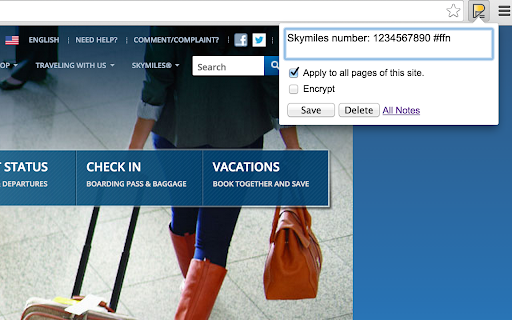
Expect something shown over the page to remind a Page Note that exists here
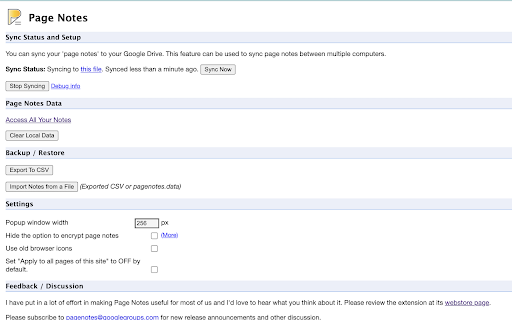
Keeps popping up asking me to setup sync every time I open Chromium on a rastberry pi... no idea why.
Good functionality but needs UI improvements. I wrote too much in the text window and now cannot get to the 'edit' button at all, it is below the bottom edge of my screen. Cannot copy the whole text either, in order to move it to a new sticky note. Finally found a page when all notes can be edited and could only edit there.
I initially rated it 5 stars but I would have kept that rating if it allowed saving multiple notes per page and not one single note for a whole page.
Interesting (especially the cloud sync via GDrive) but I need a way to highlight and put notes wherever I want on the page, (helping the highlight), to explain parts of text.
Good idea, but it fails, it doesn't sync, I got an error. When I go to All Notes, Last Modified shows Date Invalid Date and Note doesn't show the text already saved. Another problem is that you can't change tab if while writing something because you lose the text.
Permissions (7)
Permissions
Details
| Version | 3.5.4 |
| Updated | Mar 17, 2026 |
| Size | 616KiB |
| First Seen | Mar 24, 2026 |
Popular in tools





Popular Extensions




