
⚠️Not updated in over a year
User Count Trend
Loading...
Description
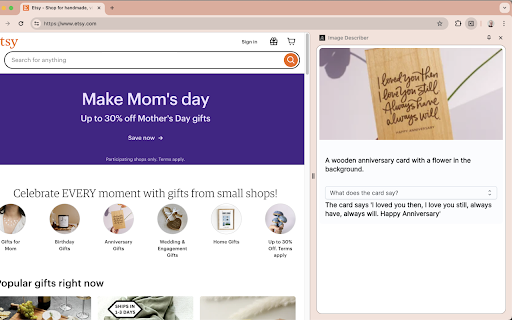
To describe content, use the context menu on a specific image, or the Extension keyboard shortcut Alt+Shift+I to describe the full tab contents. The description can be copied to your clipboard through an menu item in the context menu, or through the extension popup or Chrome side panel drawer.
You can also change the voice or toggle muting using the Extension Options page at chrome-extension://ogoddjgogmlndofcpkljmmdobjpfdolf/options.html
To access the side panel without the mouse, on Mac press Command + Option + Down arrow. On Windows, press F6.
Reviews
Loading reviews...
Permissions (9)
Permissions
activeTabℹ Can access the current tab when you click the extension clipboardWriteℹ Can write to your clipboard commands contextMenusℹ Can add items to the right-click menu identityℹ Can use your Google account identity scriptingℹ Can inject scripts into web pages sidePanel storageℹ Can store data locally in your browser ttsℹ Can use text-to-speech
Details
| Version | 1.8.0 |
| Updated | Dec 25, 2024 |
| Size | 178KiB |
| First Seen | Mar 21, 2026 |
Ad space
Popular in accessibility

Screenshot Tool - Screen Capture & Editor
by screenshot-tool.app
1M
★ 4.70
accessibility
1M
★ 4.70
accessibility

Copyfish 🐟 Free OCR Software
by Ui.Vision / a9t9 software GmbH
800K
★ 4.03
accessibility
800K
★ 4.03
accessibility

Reader View
by yokris.dev
300K
★ 4.69
accessibility
300K
★ 4.69
accessibility

I still don't care about cookies
by Guus
200K
★ 4.36
accessibility
200K
★ 4.36
accessibility

Chrome Browser Lockdown
by Castle Learning
100K
★ 1.25
accessibility
100K
★ 1.25
accessibility
Popular Extensions

Adobe Acrobat: PDF edit, convert, sign tools
by Adobe Inc.
330M
★ 4.40
workflow
330M
★ 4.40
workflow

Cisco Webex Extension
by cisco.chromestore
24M
★ 2.34
social
24M
★ 2.34
social

Kami for Google Chrome™
by Kami
17M
★ 4.56
education
17M
★ 4.56
education

uBlock Origin
by Raymond Hill (gorhill)
15M
★ 4.70
privacy
15M
★ 4.70
privacy

Custom Cursor for Chrome™
by BLife Team LLC
5M
★ 4.67
fun
5M
★ 4.67
fun