Docs Hotkey icon

Docs Hotkey

by Zack Murry

v0.24 Updated Mar 4, 2026 790KiB
CWS
10K
Users
★ 4.57
84 reviews
#1544
of 68K
tools
#278 of 17K
Highly rated Recently updated

Description

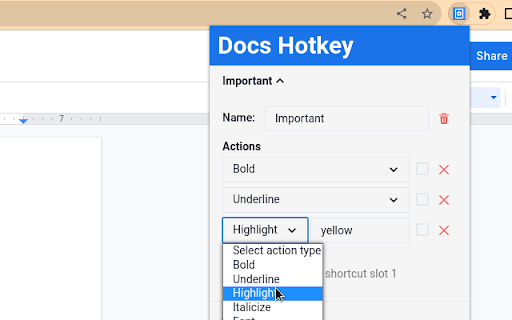
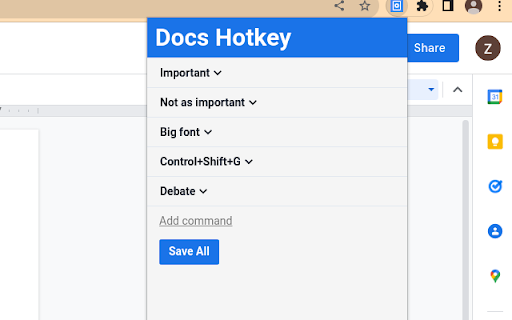
Docs Hotkey allows for complex hotkey setups with simple configuration. Hotkeys can be created to do the following: - Highlight in any color - Bold - Underline - Italicize - Change text color - Change fonts - Change font size - Set heading type (e.g., Heading 1, Normal Text, Title) - Strike through text - Change alignment and indentation - Add emoji reactions - Add bulleted lists and set their spacing - Clear all styles and remove specific styles - Execute add-ons - Insert search menu components (e.g., building blocks) A single hotkey can be configured to do several of these at once. Docs Hotkey was originally created solely for the addition of a highlight shortcut, but it has since expanded to many others. If you'd like to see a new shortcut added or if you encounter a bug, feel free to contact me. Also supports Google Slides and Google Classroom! Documentation: https://docs-hotkey.zackmurry.com
Docs Hotkey screenshot 1Docs Hotkey screenshot 2Docs Hotkey screenshot 3

Reviews (8 cached)

★☆☆☆☆2024-09-21
Soulx Stowell

I just cant get it to work, idk if its user error or if its outdated but its not working.

★☆☆☆☆2024-09-03
Jermaine Lee

Does this work on macbook? Not working on google docs on macbook

★★☆☆☆2025-11-19
Szymon Info

Strikethrough doesn't work in Edge/Windows 11. Instead of crossing a word the shortcut opens the "Format" menu in Google Docs. Can you please fix it or advise how to fix it?

★★☆☆☆2025-05-07
Jisoo

please add superscript and subscript :/ installed this specifically bc my keyboard wont recognize ctrl , and . for some reason and we should be able to customize the actions as well instead of being locked into ctrl shift h

★★☆☆☆2025-05-03
Ashekul Mustafa

I am using chrome in linux and its not working for me

★★★☆☆2026-02-05
Oliver C

Limited functionality. Unfortunately there is no way to *increment* the font size with keyboard shortcuts, only set them to discrete numbers.

★★★☆☆2025-05-05
odoriphic

I've been using this for highlighting and it's been great, but lately some hex codes don't work and they all become grey highlight instead.

★★★☆☆2023-10-24
Andrei Pascu

This was almost perfect but we need indent editing shortcut pleaseeee

Permissions (1)

Permissions

storage Can store data locally in your browser

Details

Version 0.24
Updated Mar 4, 2026
Size 790KiB
First Seen Mar 24, 2026



