Casca: New Tab with ChatGPT and Widgets icon

Casca: New Tab with ChatGPT and Widgets

by Casca

v0.2.3 Updated Sep 1, 2024 702KiB
CWS
8K
Users
★ 4.07
69 reviews
#3491
of 80.1K
functionality
#84 of 3K
⚠️Not updated in over a year

Description

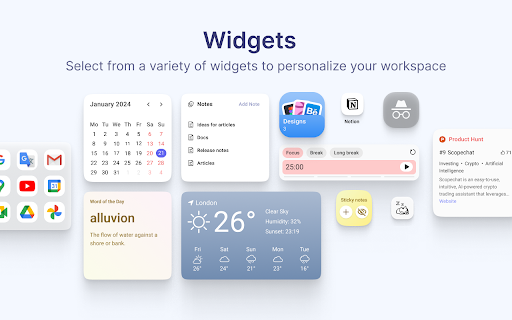
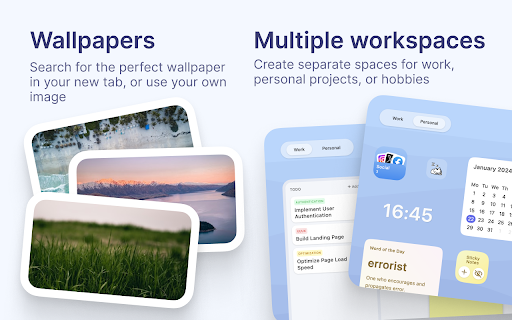
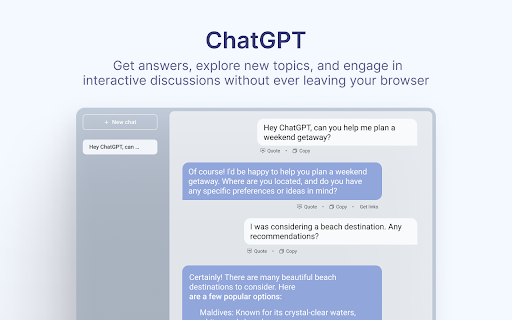
Casca Extension is a tool with ChatGPT for productivity and collaboration. Customize your new tab, create and share multiple spaces, and maintain a work-life balance with ease. Features: — Multiple workspaces: create separate spaces for work, personal projects, or hobbies. Keep each workspace organized and switch between them easily — Customizable dashboard: personalize your dashboard with widgets and customize the layout to suit your needs — Light / Dark themes with automatic switching — ChatGPT: get answers, explore new topics, and engage in interactive discussions — Change your wallpaper: search for the perfect wallpaper directly in your new tab, or use your own image — Website preview: preview multiple links without leaving your current tab. Simply long-press any link to activate a split-screen mode and compare content without switching tabs — Sticky notes: place important information anywhere on your dashboard — Collaboration: work on projects with colleagues or share spaces with friends. Collaborate in real-time and stay connected — Sync: Access your dashboard on multiple devices without having to register Here are some of our widgets: ✅ Todos: Create and manage to-do lists. 📝 Notes: Write a story, save articles or take notes 🗓️ Schedule: Efficiently plan tasks and activities 🍅 Pomodoro: Improve productivity with the Pomodoro Technique, breaking work into intervals with short breaks 🔒 Website blocker: Block distracting websites and stay focused 📑 Kanban: Visually organize tasks using interactive cards for effective workflow management ☀️ Weather: Current weather conditions and forecast for any city 🗂 Links Folder: Create a folder containing links to your favorite websites ☁️ Image hosting: Host and share images easily. Generate shareable links for smooth collaboration and image sharing 🖼️ Embedded Website: Embed any website you want to view in your dashboard ⏰ Clock: Display of current time 📅 Calendar: Track the day of the month 📧 Gmail: See all unread emails in your Gmail inbox 🔗 Link: Save frequently visited websites or important resources 🤖 Reddit Media: Browse random posts from your favorite subreddits 🛠️ GitHub PRs: Stay informed about the latest pull requests in repositories 💻 LeetCode: Sharpen coding skills with coding challenges and solutions 🚀 Product Hunt: Discover the latest products and trends in the tech industry 💡 Indie Hackers: Stay updated on innovative projects and startups 📰 Hacker News: Get the latest tech news and discussions from the community 📖 Word of the Day: Expand your vocabulary with a new word and definition every day And more 😉 Whether you're working on a project with colleagues or tracking your personal goals, Casca Extension has got you covered! Casca Extension prioritizes user privacy by not storing personal information. All data is securely stored in the browser storage by default. For more information, visit https://casca.space/privacy-policy/.
Casca: New Tab with ChatGPT and Widgets screenshot 1Casca: New Tab with ChatGPT and Widgets screenshot 2Casca: New Tab with ChatGPT and Widgets screenshot 3Casca: New Tab with ChatGPT and Widgets screenshot 4Casca: New Tab with ChatGPT and Widgets screenshot 5

Reviews (9 cached)

★☆☆☆☆2026-03-24
Bensaad Nour houda

i will never forgive you for deleting my space suddenly for no reason, my life just got destroyed

★☆☆☆☆2026-02-04
CrozoWrz

Three times now, all my space has suddenly been deleted and the casca seems to have been “reinstalled” to its default settings. I don't know what happened, even though I didn't clear my browser cache or anything. Maybe when the developer updated the cache, it automatically reset?

★☆☆☆☆2025-05-27
Bala Nagendran

I have lost my data. I am writing to report that my data has disappeared from the Notes widget within your Casca extension.🤬🤬🤬🤬🤬🤬 The data in the Notes widget I added seems to have gone missing unexpectedly. Could you please advise on how I can retrieve this data? No response to emails.

★☆☆☆☆2024-08-20
Mila Leona Dalapo

I cannot delete my site blocker widget. :( EDIT: All my tab contents were deleted :(((

★☆☆☆☆2024-01-29
jD-life-vision org

(used to rate this vvith 5 stars until Casca LOST my space!) brilliant extension and design! i'll send the feedback letter to your mail rn, i am begging you to consider these moments: - the most important one: how do i save my space so i don't lose it (if i turn off the app or anything, for example)? let us login so we can keep our customized spaces forever! what happens if i turn the app off?! scared to imagine losing everything already set up! i tried to find a 'Save Space' but there's nothing?? - when you make the tab smaller, widgets start to move in a chaotic manner and fall down where you can't even reach them. this is important because i am not the only one who doesn't always open the chrome Full Screen, esp. when i multi-tab (for my creative work). annoyed kinda? it could be nice if it just 'fits'

★★☆☆☆2025-04-07
Edie Silver Walker

Liked it very much however everything I set up has disappeared TWICE. Extremely frustrating so time to find another.

★★☆☆☆2024-06-21
Jo Querol

The main reason I wanted this is for the Site Blocker. I can add a long list of sites to block, and select to block them all, but I can still visit those websites. It doesn't appear to be doing anything.

★★★☆☆2024-06-21
Dany

The website blocker was the feature I was excited the most about and it doesn't work :( I can add websites just fine, but it doesn't block them. Could you please fix the issue? I want to use this extension so bad.

★★★☆☆2024-03-12
Neil

google sign-in doesn't work; the button appears but upon click it doesn't do anything. no redirect, no nothing. though, the other capabilities of the extension are great.

Permissions (7)

Permissions

bookmarks Can read and modify your bookmarks declarativeNetRequest Can block or redirect network requests identity Can use your Google account identity identity.email notifications Can show desktop notifications scripting Can inject scripts into web pages topSites Can access your most visited sites

Details

Version 0.2.3
Updated Sep 1, 2024
Size 702KiB
First Seen Mar 26, 2026