
✅Highly rated
User Count Trend
Loading...
Description
MaxFocus is perfect for smoothly navigating through your social media and news feeds, watching videos without interruptions, and reading articles without cluttering your browser with multiple tabs. It's an ideal tool for students and professionals who must focus on their tasks.
Key features:
1. Powerful link previews
• Preview in popup: Instantly view any link in a dedicated popup window without leaving your current page
• Move to sidebar: Easily transfer any preview from the popup to a sidebar for a convenient split-screen experience
• Customizable options:
— Choose how to open or close previews: drag, long click, hover, or with keyboard shortcuts
— Customize your popup color themes (PRO Feature)
— And many more!
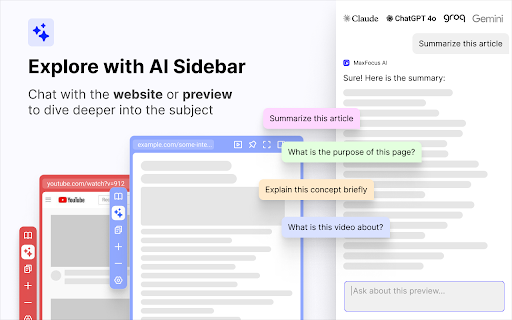
2. AI Sidebar & assistant
• Chat with AI: Get instant answers and summaries right on your viewing webpage. The AI understands the content and delivers relevant information
• Auto Prompts: Receive helpful suggestions and prompts tailored to the page you're interacting with
• YouTube AI summaries: Make summaries of your favorite videos. We'll transcribe all the videos for you
3. Stay focused and organized
• Reader view: Convert any webpage to a clean, distraction-free format for easy reading. Dark Mode is available for a comfortable reading experience at night
• Video focus mode: Watch videos without sidebars or click-away temptations. Just the video, nothing else
• Spotlight: Press Alt+Z on any page to access your favorite links. Click a link to open it in a popup for easy viewing
4. Security
• Scam detector: Browse with confidence — get alerts about potential threats like malware, phishing, or ransomware
• UTM tags remover: Preview links without the hassle of UTM tags
• Data privacy: Your privacy is our priority. We don’t collect any of your data.
Frequently asked questions:
• Is MaxFocus free to use?
— MaxFocus provides a limited free plan. For unlimited access, consider upgrading to a PRO Plan
• What features are exclusive to the PRO Plan?
— PRO users enjoy benefits like AI-powered assistance, scam detection, advanced theme customization, and unlimited link previews
• Do I need an OpenAI account for the AI features?
— No, you don’t need an OpenAI account. Upgrade to a MaxFocus PRO plan to unlock the AI capabilities
• Will it work on all websites?
— MaxFocus is compatible with most websites, providing link previews, AI support, and more across various platforms
Contact us:
If you have any questions or suggestions, feel free to email us at hello@maxfoc.us
No matter what you need — whether it's Notion link previews, link previews in Google search, an Arc alternative, student productivity tools, help to manage a ton of tabs or simply a better browsing experience — try MaxFocus today!


Reviews
Loading reviews...
Permissions (4)
Permissions
contextMenusℹ Can add items to the right-click menu declarativeNetRequestℹ Can block or redirect network requests sidePanel storageℹ Can store data locally in your browser
Details
| Version | 0.5.8 |
| Updated | Mar 28, 2025 |
| Size | 430KiB |
| First Seen | Mar 21, 2026 |
Ad space
Popular in tools

WPS浏览器助手:文档在线阅读编辑
by 金山PDF
2M
★ 2.90
tools
2M
★ 2.90
tools

ВПН для YouTube без ограничений в России. Ускорить ютуб на ПК
by Extension
900K
★ 4.70
tools
900K
★ 4.70
tools

Glasp Web Highlighter: PDF & Web Highlight
by Glasp
500K
★ 4.48
tools
500K
★ 4.48
tools

Popup Blocker Pro
by Popup Blocker Pro
300K
★ 4.29
tools
300K
★ 4.29
tools

Suiet | Sui Wallet
by Oasis Digital Holdings Limited
200K
★ 4.98
tools
200K
★ 4.98
tools
Popular Extensions

Cisco Webex Extension
by cisco.chromestore
24M
★ 2.34
social
24M
★ 2.34
social

uBlock Origin
by Raymond Hill (gorhill)
15M
★ 4.70
privacy
15M
★ 4.70
privacy

DuckDuckGo Search & Tracker Protection
by DuckDuckGo
4M
★ 4.24
privacy
4M
★ 4.24
privacy

Microsoft Defender Browser Protection
by Microsoft Corporation
2M
★ 4.15
workflow
2M
★ 4.15
workflow

Pop up blocker for Chrome™ - Poper Blocker
by dingosolutions
2M
★ 4.76
workflow
2M
★ 4.76
workflow