Material Incognito Light Theme icon

Material Incognito Light Theme

by Fiddle

v5.2.0 Updated Feb 22, 2022 7.48KiB
CWS
3K
Users
★ 4.42
145 reviews
#13236
of 207.6K
Other
Category
⚠️Not updated in over 2 years

Description

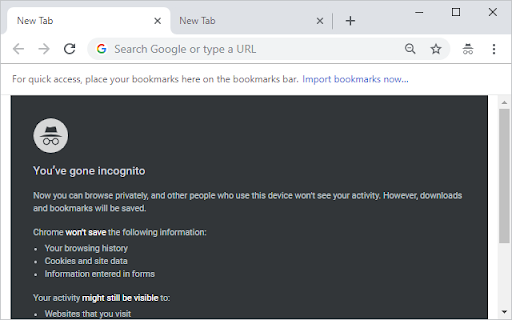
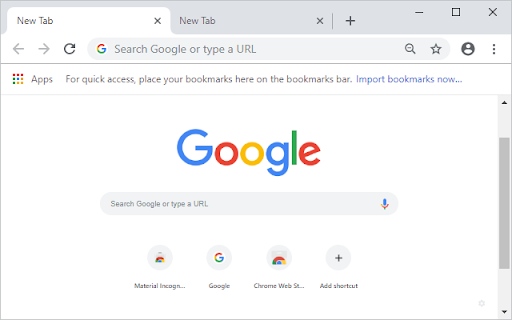
This theme is deprecated as Google has blocked all official capability to theme the Incognito window. Chrome's incognito mode (lower-case i) has been turn into Incognito (upper-case I), treated as a Google brand, not just used in Chrome but across other products like Google Maps, Gboard and others. In order to maintain a strong brand consistency, Google uses the same grey motif to indicate that you are in Incognito, and they've taken this one step further by disabling all theme customisation for Incognito. For the time being, you can temporarily reverse this by going to chrome://flags/#incognito-brand-consistency-for-desktop and setting the flag to Disabled. This will enable this theme to work once more. However, this flag will not stick around forever, and in the future when Google removes the flag, the theme will be disabled from working permanently. As a result of the above decisions from Google, this theme is officially deprecated and will no longer receive any updates. When the Chrome flag is eventually removed, this theme will be decommissioned at some point afterwards as there will be no need for it to exist. Thank you for using Material Incognito Light Theme; I hope you enjoyed it whilst it was around. --- Original Description Incognito mode uses a dark colour scheme to distinguish it from normal mode. This theme removes and replaces it with the light colour scheme from normal mode. ### Github This theme is fully open-source under the Apache License. Check out the source code on Github at https://github.com/Fiddle-N/material-incognito-light-theme . ### Uninstallation To uninstall this theme, go to Settings, scroll down to the Appearance section, and next to "Themes - Material Incognito Light Theme", click Reset to Default.
Material Incognito Light Theme screenshot 1Material Incognito Light Theme screenshot 2

Reviews (18 cached)

★☆☆☆☆2023-12-04
Victor Abraham

NOT WORKING

★☆☆☆☆2023-11-17
Anna Chugaev

OOPS!!!!

★☆☆☆☆2023-11-15
Josiah Mortimer

Doesn't work.

★☆☆☆☆2023-10-26
Anonymous A.

Was good! Unfortunately no longer working on Chrome 118.

★☆☆☆☆2023-04-26
Кумчо Вълчев

its not working !!! my theme is dark !!!

★☆☆☆☆2023-02-15
Reviewer one

NO change of theme, incognito is still in dark colour.

★☆☆☆☆2023-02-02
Erwin Zaat

It does NOT change anything for dark incognito mode

★☆☆☆☆2022-05-11
Vamcos-Robinson Antony

not working

★☆☆☆☆2022-02-28
Алексей Росляков

Does not work.

★☆☆☆☆2021-12-19
robert badner

just installed , doesnt work, still dark, removed.

★☆☆☆☆2021-12-10
Александр Макаров

Not working

★☆☆☆☆2021-11-05
Google User

Where is the uninstall option? Nevermind. Chrome removes it automatically after you close it. I pity all the losers who install before reading the comments. And then leave a review asking for help. Lol.

★☆☆☆☆2021-07-30
hippo potamus

Does not work.

★☆☆☆☆2021-04-22
Jason Rusovick

Ruins Chrome and cannot remove from extensions.

★☆☆☆☆2019-06-24
Amazing ! ! Amusing ! !

scam

★★☆☆☆2021-11-30
ray ham

It did not work for my version of chrome on win 7 - Version 96.0.4664.45 (Official Build) (64-bit) It had no effect on incognito mode but did change theme of normal mode. .So is a fail.

★★☆☆☆2021-09-23
Andi Best

This theme doesn't make any difference to Incognito mode for me. Installed 23/09/21

★★★☆☆2022-04-02
Leonid Chernyshev

Not working now

Details

Version 5.2.0
Updated Feb 22, 2022
Size 7.48KiB
First Seen Mar 27, 2026