
Description
The P2P File Transfer extension enables you to easily and securely send and receive files between peers.
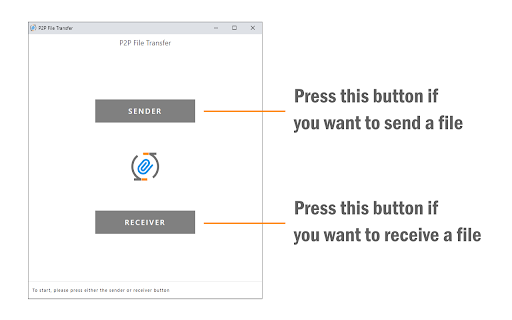
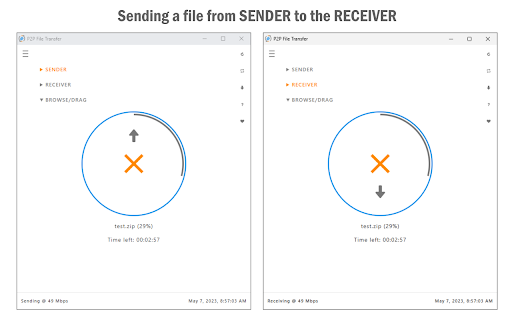
To work with this app, please open it on at least two different machines (peers). Press the SENDER button on one machine, and the RECEIVER button on the other one. Enter the 6-digit token number from the sender machine to the receiver and then press the JOIN button. Once the app is ready and the connection is made, you can send files between these two peers. Please browse or drag a file to the blue circle area and wait for the file transfer to start. To cancel the file transfer, please press the orange cross-icon at any time. You can also reload the app to cancel the ongoing progress. This extension uses WebSocket and WebRTC technologies to make the initial connection and handshakes between peers. Once the initial setup is completed, a secure direct channel is established between peers, and third-party servers are not needed and used anymore.
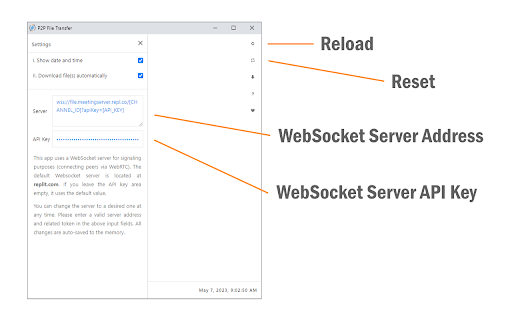
Note: this extension uses WebSocket and WebRTC servers for the initial connection and handshake operations between peers. Please read this (https://mybrowseraddon.com/privacy-policy/p2p-file-transfer.html) page to get more info.
If you have a feature request or found a bug to report, please fill out the bug report form on the addon's homepage (https://mybrowseraddon.com/p2p-file-transfer.html).


Reviews (2 cached)
★☆☆☆☆2026-02-24
Brendan Gray
if you love getting spammed with ads and popups, this extension is for you. switch to tthe fileshot extension, its truly the best zke file sharing extension out there
★☆☆☆☆2024-11-21
David Sarkisyan
This is not a Peer-to-Peer connection. Files get uploaded first from the source, then downloaded by the receiver. This means that the files get uploaded on a server and then the extension on the receiving end fetches the data from that server.
Permissions (2)
Permissions
contextMenusℹ Can add items to the right-click menu storageℹ Can store data locally in your browser
Details
| Version | 0.1.3 |
| Updated | Sep 17, 2025 |
| Size | 85.66KiB |
| First Seen | Mar 22, 2026 |
More by chYer



Popular in tools

Monica: All-In-One AI Assist & Smartest AI Agent
by Monica Team
3M
★ 4.89
tools
3M
★ 4.89
tools

Ad Blocker: Stands AdBlocker
by Stands
3M
★ 4.79
tools
3M
★ 4.79
tools

Google Dictionary (by Google)
by dictionary-extension-dev
3M
★ 4.36
tools
3M
★ 4.36
tools

WPS浏览器助手:文档在线阅读编辑
by 金山PDF
2M
★ 2.90
tools
2M
★ 2.90
tools

Pie Adblock - A Powerful Free Ad Blocker
by Pie Extensions
2M
★ 4.90
tools
2M
★ 4.90
tools
Popular Extensions

Adobe Acrobat: PDF edit, convert, sign tools
by Adobe Inc.
330M
★ 4.40
workflow
330M
★ 4.40
workflow

Chrome Remote Desktop
by Chrome Remote Desktop Release Managers
38M
★ 3.14
workflow
38M
★ 3.14
workflow

Cisco Webex Extension
by cisco.chromestore
24M
★ 2.34
social
24M
★ 2.34
social

Kami for Google Chrome™
by Kami
17M
★ 4.56
education
17M
★ 4.56
education

Read&Write for Google Chrome™
by Texthelp
17M
★ 3.44
accessibility
17M
★ 3.44
accessibility