
User Count Trend
Loading...
Description
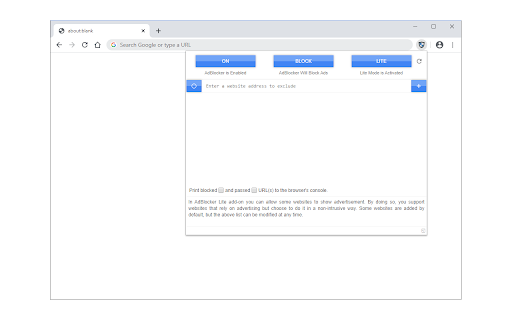
AdBlocker Lite is a browser add-on that enables you to block annoying ads seamlessly on popular websites. It has 2 modes, Lite and Full. In lite mode, the extension uses the least amount of CPU power and memory and it runs based on pure CSS. Lite mode is ideal for slow machines. In full mode, more ads are targeted and more CPU power and memory are required.
Some important features:
1. It allows you to block annoying ads, scripts, images, iframes and many more.
2. Ultra-lite extension with no significant memory and CPU usage.
3. Unlike other similar products, AdBlocker Lite uses hard coded filtering rules for fast and reliable performance.
4. Provides an easy access filtering list if you wish to allow advertisement on some websites.
5. Includes ON|OFF button to quickly disable or enable the extension.
6. Includes Highlight/Block modes; in highlight mode, you can only highlight ads without blocking (hiding) them, but in block mode, ads are blocked.
7. Easily switch between full and lite modes (default is lite mode).
8. Add custom blocking rules. Currently, only rules in the form of css-selectors are accepted.
9. Badge icon text shows the number of blocked ads (active in full mode only).
Note 1: In AdBlocker Lite you can allow some websites (including its homepage) to show non-intrusive advertisements. By doing this you support websites that rely on advertising. Some websites are added by default, but this list can be modified at any time.
Note 2: AdBlocker Lite is designed to block ads on popular websites only (i.e. facebook, youtube, gmail, yahoo mail, etc). Besides, it does not block popup-ads, if you need a full-featured adblocker please use other adblocker addons in the addon store.
Note 3: To add a custom rule, please use css-selectors. For example, the following rule hides a div element with class test: div[class='test']. Please note, you can only add valid CSS rules, otherwise, it won't be added to the list.


Reviews
Loading reviews...
Permissions (3)
Permissions
activeTabℹ Can access the current tab when you click the extension declarativeNetRequestℹ Can block or redirect network requests storageℹ Can store data locally in your browser
Details
| Version | 0.4.7 |
| Updated | Jan 30, 2026 |
| Size | 1.27MiB |
| First Seen | Mar 21, 2026 |
Ad space
More by chYer

Popular in tools

WPS浏览器助手:文档在线阅读编辑
by 金山PDF
2M
★ 2.90
tools
2M
★ 2.90
tools

Pie Adblock - A Powerful Free Ad Blocker
by Pie Extensions
2M
★ 4.90
tools
2M
★ 4.90
tools

ВПН для YouTube без ограничений в России. Ускорить ютуб на ПК
by Extension
900K
★ 4.70
tools
900K
★ 4.70
tools

Glasp Web Highlighter: PDF & Web Highlight
by Glasp
500K
★ 4.48
tools
500K
★ 4.48
tools

Popup Blocker Pro
by Popup Blocker Pro
300K
★ 4.29
tools
300K
★ 4.29
tools
Popular Extensions

Cisco Webex Extension
by cisco.chromestore
24M
★ 2.34
social
24M
★ 2.34
social

uBlock Origin
by Raymond Hill (gorhill)
15M
★ 4.70
privacy
15M
★ 4.70
privacy

DuckDuckGo Search & Tracker Protection
by DuckDuckGo
4M
★ 4.24
privacy
4M
★ 4.24
privacy

Microsoft Defender Browser Protection
by Microsoft Corporation
2M
★ 4.15
workflow
2M
★ 4.15
workflow

Pop up blocker for Chrome™ - Poper Blocker
by dingosolutions
2M
★ 4.76
workflow
2M
★ 4.76
workflow