
MediaPlayer - Video and Audio Player icon

MediaPlayer - Video and Audio Player

by InBasic

v0.4.9 Updated Dec 10, 2025 1.14MiB
CWS
100K
Users
★ 3.89
142 reviews
#229
of 43.5K
workflow
#84 of 5.4K

Description

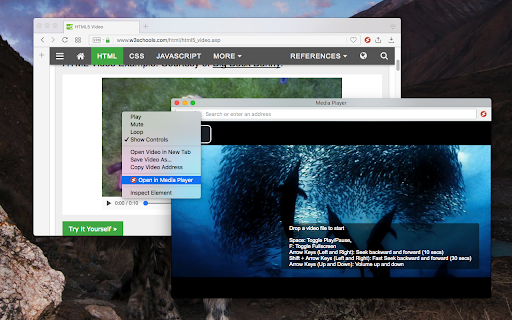
The "Media Player" is a browser extension to play music and video files either locally or from online sources. This project aims to bring a VLC-liked media playing experience using native HTML5 technology. The add-on is built on top of the well-known "video.js" project by applying a few custom plug-ins to enhance the user experience. This player supports media boosting, speed control, playlist media selection, fullwidth-progress bar, HTTP-streaming (M3U8), cast to a remote device, and wave surfer visual for audio files. How to Use (local resources): Open the interface and drop the media link to it How to Use (remote resources): Open a video page like https://www.w3schools.com/html/html5_video.asp Right-click on the player and select "Open in Media Player" You can start watching an offline video file by dragging and dropping the video file into the player or pressing the big play button. To have the player load subtitle make sure to drop both video and subtitle files together (The dropped subtitle should have the same name as the file and needs to be in SRT or VTT format). Also, you can add a subtitle file later using the "+CC" button. This button appears when there is no subtitle found for the current track. Extra Features: 1. Video casting: right-click on the player. If your browser supports this feature, you can transfer the media to a remote device. 2. Take a screenshot: Press the "screenshot" button on the player 3. 2x volume-boosting: Like VLC, you can boost the audio by 200%. Use the boosting feature when the volume is not loud enough. 4. Media Capturing: The player can optionally detect media files in the current tab and transfer them to the media player 5. Play in a separate window or inside a browser tab 6. Supports media keys even if the player is not focused 7. Supports native context menu on Chrome OS. You can right-click on the finder window (explorer) and use this player to open media files. You can use your keyboard to control the following playback options: 1. "F" key: This will toggle the fullscreen mode on and off 2. "Space" key: This will toggle the playing state of the player 3. "Key Up" and "key Down": Increase or decrease volume. 4. "Key Left" and "Key Right": Seek backward and forward for 10 seconds. 5. "U" key: Shuffle playlist 6. "R" key: Toggle repeat, repeat one, and no-repeat 7. "S" key: Take s screenshot 8. "B" key: Boost volume (2x or 200%) 9. "O" key: Open network URLs Change Log: 0.1.2: 1. Media Player now supports history (it will save the current track position and retrieves it after a restart) 2. Media player now supports global keyboard shortcuts for toggle pause and play state, moving to the previous track and moving to the next track 0.1.3: 1. Better playlist! 0.1.4: 1. For audio tracks, a seek-able wave-surfer is replaced with the old poster image 2. playback rate is now adjustable. 0.1.7: 1. Supports live stream (m3u8) 2. Supports folder drop and recursive media file search 0.2.3 1. Partial support for MKV video container 0.2.5 1. Better support for video/mkv format
MediaPlayer - Video and Audio Player screenshot 1

Reviews (30 cached)

★☆☆☆☆2025-10-03
Samrat Tripathi

there is no open in media player option coming on right click

★☆☆☆☆2024-11-08
Tree Fiddy

videos play for a second then cuts out lol

★☆☆☆☆2024-08-08
user

It does not read AVI files

★☆☆☆☆2024-04-20
I

TRASH

★☆☆☆☆2024-04-04
Stephen Lipira

Downloaded it twice, cant find it on my computer.

★☆☆☆☆2024-02-28
Cena Bale

Detected: Trojan:HTML/PikaBot.PRQ!MTB Details: This program is dangerous and executes commands from an attacker. Affected items: file: C:\Users\Your name\AppData\Local\Google\Chrome\User Data\Default\Extensions\mgmhnaapafpejpkhdhijgkljhpcpecpj\0.4.6_0\file_handlers\index.html by Windows security on win10

★☆☆☆☆2024-02-23
Thereisnopandemic Wakeup!

Audio is not working like the last person was saying. dolbydigital + format. also subs are not automatically found of the mkv... need to add them manually which kinda makes this useless. i wish to use this to use the new high dynamic range option in nvidia control panel to watch video files in sdr to hdr.

★☆☆☆☆2024-01-15
Khushi Tiwari

audio not playing

★☆☆☆☆2023-08-16
Estela

No reproduce TS

★☆☆☆☆2022-08-15
Leo Zandvliet

As a mediaplayer does not have the ability to do the simplest thing as 'go to next' or 'go to previous' and it cannot handle/start/stop from a simple folder with media files such as FLAC or MP3 files it is worthless. This extention is worthless.

★☆☆☆☆2022-06-11
Cass Heide

Can't seem to play the video track of an mp4 file, also can't get it to cast

★☆☆☆☆2022-05-20
Ahmed Aljuboori

Very BAD extension decrease the video quality

★☆☆☆☆2022-03-29
Eddy Jenkinson

Useless stuttery garbage. Worthless.

★☆☆☆☆2021-12-03
Andrew Leembruggen

doesn't work, it's a bad ap and full of advertisting. can't find a way to open media. lame

★☆☆☆☆2021-11-10
R John

fairly useless - can't play audiobooks without crashing within a minute or two because "out of memory", extremely difficult to use with music playlists, very clunky interface - pity, I was hoping this would work

★☆☆☆☆2021-07-01
cir yxam

can not play [ is not recognising ] MKV video files, can not play [ is not recognising ] MPV video files, MKV format [ container ] is most used video extension together with MP4 & MOV chromebook itself can play MKV & MOV files well. can play MP4 container, as result, it can play 1 of 3 file formats, very BAD extension [ RUBBISH ] !!!

★☆☆☆☆2020-10-01
Chris Eldridge

Description says there is a speed control. This is not correct. Files that are dragged and dropped into the extension page won't work, and there is no "big play button" to press.

★☆☆☆☆2020-07-16
Ken Gachoki Njuguna

Useless.

★☆☆☆☆2018-11-19
Milan Stojanovic

doesent work

★☆☆☆☆2018-08-25
Alex Godbout

useless

★☆☆☆☆2018-01-21
Meghal Pandya

Tried to use it as a media player to stream mp3 files from my hard disk to Chromecast audio. I cannot add a folder, cannot create a playlist, cannot shuffle music and cannot cast it to Chromecast. What a gyp!

★★☆☆☆2025-09-11
boof

plays mkv videos but there was no audio :(

★★☆☆☆2025-01-06
Jill Philpott

my mp3 plays and then it crashes with error code SIGILL

★★☆☆☆2023-07-06
Anindya Sundar Bhar

Unable to play offline videos of HEVC quality, after seeing so many positive reviews I decided to try it but unfortunately it failed to play HEVC videos

★★★☆☆2025-02-06
Greg M

Looks good but no apparent way to select which subtitles to load when they are included with the mkv file.

★★★☆☆2023-12-11
Cheap PVA SEO & SMM

Work like they state, but... It could be a lot more better if integration with others extentions can be added !

★★★☆☆2023-02-03
jorge forrest

it does what i wanted it to do, but my problem is when using Bluetooth earbuds or headphones, when you skip to the next song and go back to said song, it starts right where you were at when you skipped to the next song. this extension isn't for everyone but if you're okay with this everyday, then use this extension if you'd like.

★★★☆☆2021-09-04
Thiago Nunes

Tried to play a video but audio doesn't work. If I play on local apps the audio works

★★★☆☆2021-08-22
Kate Eruien

Worked perfectly until yesterday when it just keeps giving me the message: "No compatible source was found for this media." I thought I found the perfect media player that can cast even the subtitles on TV. But sadly, all good things come to an end.

★★★☆☆2018-02-17
Nelson Silva

Yes...

Permissions (6)

Permissions

activeTab Can access the current tab when you click the extension contextMenus Can add items to the right-click menu declarativeNetRequestWithHostAccess notifications Can show desktop notifications scripting Can inject scripts into web pages storage Can store data locally in your browser

Details

Version 0.4.9
Updated Dec 10, 2025
Size 1.14MiB
First Seen Mar 22, 2026