
Turbo Download Manager (3rd edition) icon

Turbo Download Manager (3rd edition)

by InBasic

v0.7.0 Updated Sep 21, 2023 133KiB
CWS
100K
Users
★ 3.78
116 reviews
#163
of 29.7K
workflow
#57 of 3.7K
⚠️Not updated in over 2 years ⚠️Requests 1 sensitive permission

Description

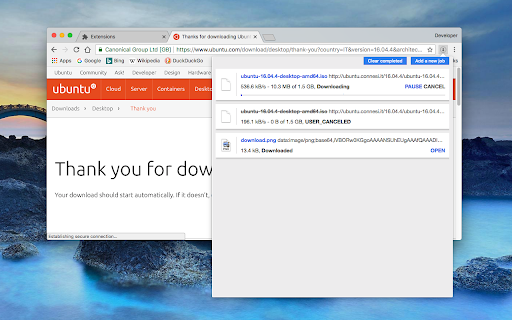
"Turbo Download Manager" (edition 3) is a download management extension that employs multi-threading techniques and incorporates an embedded HTML spider for extracting video, audio, and image content from web pages. Much like IDM (Internet Download Manager) and JDownloader, this extension includes a feature to enhance download speeds by fetching multiple file segments simultaneously. This downloader is written entirely in JavaScript and does not rely on external dependencies. Features: 1. Resume and Error Recovery: You can resume downloads and recover from interruptions, such as lost connections, computer shutdowns, or unexpected power outages, without restarting from scratch. 2. Pause Active Tasks: Pause ongoing downloads when necessary to reduce network traffic. 3. Dynamic Segmentation and Speed Boost: Turbo Download Manager divides files into multiple sections and downloads them concurrently within an internal IndexedDB database, ensuring optimal download speeds regardless of your connection type. 4. Enhanced Media File Support: It includes an internal HTML spider module for detecting media content like videos, audio, and images. 5. Integrated M3U8 Parser and Live Stream Downloader: This tool supports HLS (HTTP Live Streaming) and features AES-128 decryption capabilities. 6. Custom "Referrer" Header Support: You can specify custom "Referrer" headers for download jobs. Whether you want to accelerate your download speeds or enhance download stability on unreliable networks, this download manager integrates with your browser's download manager to provide a smooth experience.
Turbo Download Manager (3rd edition) screenshot 1

Reviews (13 cached)

★☆☆☆☆2026-01-29
Bacon Hair

i downloaded a yandere simulator mod which is very large and it was 6.3 GB now the extension lied to me and downgraded to 3.8 GB and it didn't even fasted

★☆☆☆☆2025-12-04
Christopher Larsson

Serves no actual purpose.. Had less control over failed downloads than the defaul download manager in Brave! xD

★☆☆☆☆2025-05-14
Floyd Young

False advertised junk. Just an extension of Chromes regular downloader with no other capabilities whatsoever.

★☆☆☆☆2025-03-13
Accuface2000

It does not resume or save interrupted downloads. Waste of time. There are lots of false claims about this extension. You are better off with Chrome inbuilt features

★☆☆☆☆2024-01-04
Petr Shilkin

false advertised, does not resume downloads!!!

★☆☆☆☆2023-12-25
A G

Google Drive download FAILED. Retry does not work. Useless addon is useless.

★☆☆☆☆2021-09-28
Gilberto Torres

does not work

★☆☆☆☆2021-03-14
emilio sebastian

I wait 3hrs to finish downloading file and askme about change the name of file (unnecesary), and then started to copy the file and stops in a middle and I lost 3hr and get no file .. unnecesary

★☆☆☆☆2020-09-17
MurderChickenXL

No such thing as a working download accelerator that's free when it comes to Chrome. Right click a download link on, say, Dailyuploads and choose download. Nothing happens. Same for clicknload and EVERY other file hosting site I've tried. DTA used to be the goto extension but the dev can't figure out how to choose a download location? All of these extensions are no match for Chrome's extremely restrictive options. None of them will work with Chrome anymore because Google doesn't want them to.

★☆☆☆☆2020-01-10
Mygod Studio (Mygod)

no use

★★☆☆☆2021-05-22
CDA Xfiles

It actually made my download speed a little slower while testing it out. Hope you have better luck with it.

★★☆☆☆2018-09-23
Stedy As.

1. Displays wrong size of downloaded file (i paused download several times and have bad connection, file size was 2.9GB, but app displays that it downloaded 3.5GB of 2.9GB) 2. 2.9GB file was splitted for two slices, first slice was 1/3 of actual size, second 2/3, so after 2/3 of the file was downloaded the remaining data was downloaded without multithread.

★★★☆☆2022-09-08
Péter Pallos

The only multi-thread download manager for Chrome that I've found so far. I mostly use it combined with the "Allow Right-Click" extension to download videos. While it works, it has several major issues: - I can only specify the file name once the video was fully downloaded. - It only downloads the videos in 3 threads ignoring my custom settings. - When the download finishes, the save dialog pops up in full screen if my current tab is in full screen. It's not obvious how to switch to another tab without entering a file name and finishing the download.

Permissions (12)

Permissions

clipboardRead Can read from your clipboard contextMenus Can add items to the right-click menu declarativeNetRequestWithHostAccess downloads Can manage and monitor downloads downloads.open notifications Can show desktop notifications offscreenpower scripting Can inject scripts into web pages storage Can store data locally in your browser unlimitedStorage webRequest Can observe and analyze network traffic

Details

Version 0.7.0
Updated Sep 21, 2023
Size 133KiB
First Seen Mar 22, 2026