
Description
Image to Text (Using AI) extension lets you create a related caption for any image by using artificial intelligence.
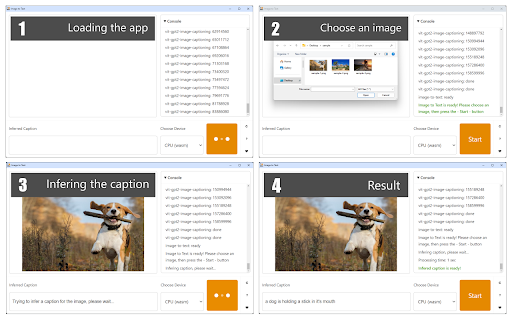
To work with this addon, please press the toolbar button to open the interface. Then, wait for the app to load completely. Once the addon is ready, please choose a desired image via the file selector (at the top). When the image is loaded, press the - Start - button. Depending on your machine, it takes up to a few seconds for the AI engine to generate a caption (at the bottom section).
Please note that this is still a work in progress and might not be able to generate a correct caption (text) for all images. Moreover, during the text generation process, you might see some lags or freezes in your browser. So please be patient until the AI engine completes the job. This addon uses a machine-learning library for the web called Transformers.js (https://huggingface.co/docs/transformers.js/). It also uses an image captioning library called VIT GPT-2 (https://huggingface.co/nlpconnect/vit-gpt2-image-captioning).
Note: When you first open the extension, it needs to download training data. The complete trained database for this addon is rather large (~1GB), so please be patient while it is being downloaded to your browser. Once the addon is ready, it does not need an internet connection to operate.
If you have a feature request or found a bug to report, please fill out the bug report form on the addon's homepage (https://mybrowseraddon.com/image-to-text.html).


Reviews
Loading reviews...
Permissions (2)
Permissions
contextMenusℹ Can add items to the right-click menu storageℹ Can store data locally in your browser
Details
| Version | 0.1.3 |
| Updated | Nov 17, 2025 |
| Size | 5.27MiB |
| First Seen | Mar 22, 2026 |
More by Jorvi


Popular in tools

Microsoft Bing Homepage & Search for Chrome
by Microsoft Corporation
4M
★ 3.72
tools
4M
★ 3.72
tools

Monica: All-In-One AI Assist & Smartest AI Agent
by Monica Team
3M
★ 4.89
tools
3M
★ 4.89
tools

Ad Blocker: Stands AdBlocker
by Stands
3M
★ 4.79
tools
3M
★ 4.79
tools

Google Dictionary (by Google)
by dictionary-extension-dev
3M
★ 4.36
tools
3M
★ 4.36
tools

WPS浏览器助手:文档在线阅读编辑
by 金山PDF
2M
★ 2.90
tools
2M
★ 2.90
tools
Popular Extensions

Adobe Acrobat: PDF edit, convert, sign tools
by Adobe Inc.
330M
★ 4.40
workflow
330M
★ 4.40
workflow

Chrome Remote Desktop
by Chrome Remote Desktop Release Managers
38M
★ 3.14
workflow
38M
★ 3.14
workflow

Cisco Webex Extension
by cisco.chromestore
24M
★ 2.34
social
24M
★ 2.34
social

Kami for Google Chrome™
by Kami
17M
★ 4.56
education
17M
★ 4.56
education

Read&Write for Google Chrome™
by Texthelp
17M
★ 3.44
accessibility
17M
★ 3.44
accessibility