
⚠️Not updated in over 2 years ⚠️Requests 1 sensitive permission
Description
With Sales.Rocks Chrome Extension you can easily find all contact information when visiting a company website with a single click. Find all Contacts by hierarchy and find their direct email addresses and social media links. Expand your search with Company information, from address, local registry number, revenue and size to detailed information like email address, phone number and social media profiles, and check the web-technologies used by the company. Create custom Lead Lists and start your direct prospecting via the Sales.Rocks Platform.
🏢 Company Search
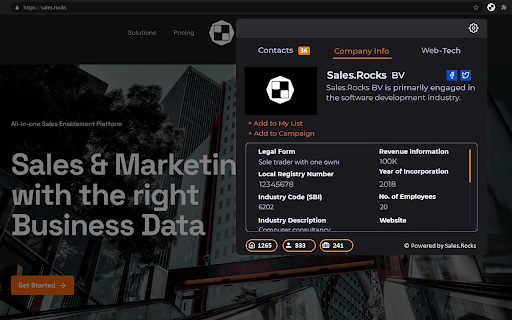
The Company Search will retrieve data from our regularly updated and enriched B2B Database searched by the company domain. It will list 15 different data points about the company among which local address, local registry number, company size, industry and industry code (NACE), revenue and company size, year of incorporation together with contact details about the company like the email address, phone number and social media profiles.
👔 Contact Search
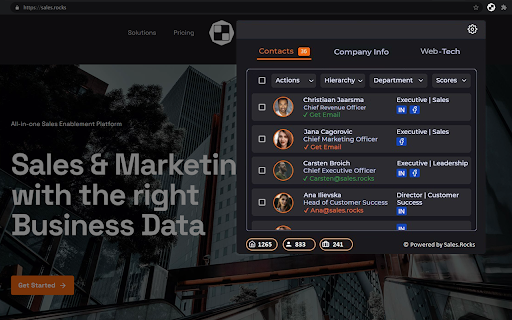
The Contact Search works also based on a search by company domain. It will retrieve all the Contacts working within the company sorted by hierarchy and department, revealing their job title, direct email address and social media links.
⚙️Web-Technologies
The Web-Tech tab unlocks the company technology stack. You can check the current web-technologies used by the company and the version of the used software.
✉️ Lead Lists
Once found, the Contacts can be added to a Lead List in your Sales.Rocks account. The same can be done with the whole company data. You can choose to either create a new Lead List or add the information to an existing Lead List. With a single click on the + Add to My List button you can prepare your next outreach list.
🚀 Getting Started
To join our 3000+ Users you would need to register for a Sales.Rocks account. This can be easily done on the Register button upon the installation of the Sales.Rocks Chrome Extension in your Browser. If you already have your Sales.Rocks account, you can connect it to the Chrome Extension with a simple Login.
With the installation of the Sales.Rocks Chrome Plugin you agree with our terms and conditions (https://sales.rocks/privacy-terms-conditions/)
Have some questions? Drop us an email at help@sales.rocks
Made with 🧡 from the Sales.Rocks Team


Reviews
Loading reviews...
Permissions (3)
Permissions
cookiesℹ Can read and modify browser cookies storageℹ Can store data locally in your browser tabsℹ Can see your open tabs and their URLs
Details
| Version | 1.0.9 |
| Updated | Jan 18, 2024 |
| Size | 5.81MiB |
| First Seen | Mar 22, 2026 |
Popular in tools

Microsoft Bing Homepage & Search for Chrome
by Microsoft Corporation
4M
★ 3.72
tools
4M
★ 3.72
tools

Monica: All-In-One AI Assist & Smartest AI Agent
by Monica Team
3M
★ 4.89
tools
3M
★ 4.89
tools

Ad Blocker: Stands AdBlocker
by Stands
3M
★ 4.79
tools
3M
★ 4.79
tools

Google Dictionary (by Google)
by dictionary-extension-dev
3M
★ 4.36
tools
3M
★ 4.36
tools

WPS浏览器助手:文档在线阅读编辑
by 金山PDF
2M
★ 2.90
tools
2M
★ 2.90
tools
Popular Extensions

Adobe Acrobat: PDF edit, convert, sign tools
by Adobe Inc.
330M
★ 4.40
workflow
330M
★ 4.40
workflow

Chrome Remote Desktop
by Chrome Remote Desktop Release Managers
38M
★ 3.14
workflow
38M
★ 3.14
workflow

Cisco Webex Extension
by cisco.chromestore
24M
★ 2.34
social
24M
★ 2.34
social

Kami for Google Chrome™
by Kami
17M
★ 4.56
education
17M
★ 4.56
education

Read&Write for Google Chrome™
by Texthelp
17M
★ 3.44
accessibility
17M
★ 3.44
accessibility