
Description
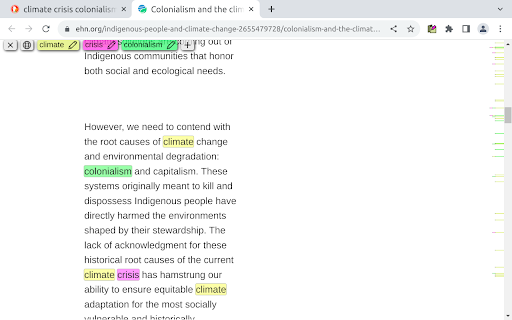
Mark My Search is a complete word finder for anything you search online. Powerful highlighting and advanced features combine with a friendly, intuitive interface to provide effortless text finding without the compromise. Vibrant highlight colors look great on any page, complemented by scroll markers for locating matches and a keyword edit bar which stays until you're done. Shortcuts are available for every action while varied options let you personalise to your taste.
Search for anything, on any search engine - DuckDuckGo, Google, Bing, even Reddit - and Mark My Search will pick out the words you're looking for, in that page and through any links you follow. Highlighting happens without having to press a button! Activate on any page using Alt+M or the context menu.
Mark My Search is Free and Open Source on GitHub(1). See the Roadmap(2) for planned improvements!
1. https://github.com/searchmarkers/mark-my-search
2. https://github.com/searchmarkers/mark-my-search/discussions/108
⎻⎻⎻⎻ Features & Productivity ⎻⎻⎻⎻
Main Features:
• Enter keywords to find in the page
• Create and automate keyword lists in the popup
• Search query highlighting on any search engine
• Compact toolbar to view and edit the query
• Popup and settings menu for configuration
• Rapid scrolling to matches
• Keyword scrollbar markers
• Completely operable by mouse or keyboard
• Specific websites can be filtered
Matching Options:
• Case sensitivity
• Whole words only
• Word stemming (match all word forms)
• Diacritics sensitivity (match accents)
• Regular expression
Current Limitations:
• Sites may reorder text containing highlights; a workaround is available in settings
• Word stemming can result in unexpected matches
⎻⎻⎻⎻ Accessibility ⎻⎻⎻⎻
To turn off visibility for automatic highlighting, simply open the options page at chrome://extensions > Mark My Search [Details] > [Extension options] and disable both visibility settings. The highlights will be hidden, while the toolbar and scroll markers remain visible, ready to be shown at a moment's notice. This does not apply to manually activated highlighting.
To turn off automatic highlighting completely, click the extension's icon to open the popup, and disable "Detect search engines".
You may wish to press the top-right puzzle piece (Extensions) and 'pin' the Mark My Search icon, so that you can easily click it to open the popup.
To assign more shortcuts, visit chrome://extensions/shortcuts


Reviews (1 cached)
★★★☆☆2024-02-01
Robert Pellegrino
When you want to change an option, you are presented with a long scrolling list of checkboxes. You click a box and exit. Nothing changes. Why? Because there is a hidden "Save Changes" button that does not show up unless you scroll all the way down to the bottom of the list. Please don't hide critical functionality like this.
Permissions (5)
Permissions
contextMenusℹ Can add items to the right-click menu scriptingℹ Can inject scripts into web pages search storageℹ Can store data locally in your browser tabsℹ Can see your open tabs and their URLs
Details
| Version | 1.15.0 |
| Updated | Apr 7, 2025 |
| Size | 129KiB |
| First Seen | Mar 22, 2026 |
Popular in tools

Microsoft Bing Homepage & Search for Chrome
by Microsoft Corporation
4M
★ 3.72
tools
4M
★ 3.72
tools

Monica: All-In-One AI Assist & Smartest AI Agent
by Monica Team
3M
★ 4.89
tools
3M
★ 4.89
tools

Ad Blocker: Stands AdBlocker
by Stands
3M
★ 4.79
tools
3M
★ 4.79
tools

Google Dictionary (by Google)
by dictionary-extension-dev
3M
★ 4.36
tools
3M
★ 4.36
tools

WPS浏览器助手:文档在线阅读编辑
by 金山PDF
2M
★ 2.90
tools
2M
★ 2.90
tools
Popular Extensions

Adobe Acrobat: PDF edit, convert, sign tools
by Adobe Inc.
330M
★ 4.40
workflow
330M
★ 4.40
workflow

Chrome Remote Desktop
by Chrome Remote Desktop Release Managers
38M
★ 3.14
workflow
38M
★ 3.14
workflow

Cisco Webex Extension
by cisco.chromestore
24M
★ 2.34
social
24M
★ 2.34
social

Kami for Google Chrome™
by Kami
17M
★ 4.56
education
17M
★ 4.56
education

Read&Write for Google Chrome™
by Texthelp
17M
★ 3.44
accessibility
17M
★ 3.44
accessibility