
⚠️Not updated in over 2 years
Description
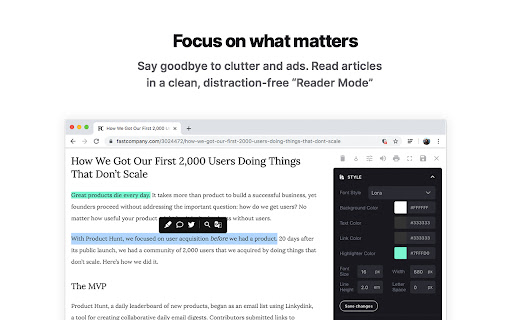
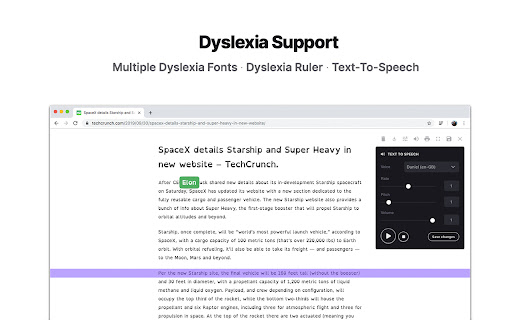
Reader Mode is a feature-packed Chrome reading extension and web app that removes clutter, ads and distractions, while also includes dyslexia support, bookmarking, annotating, highlighting, text-to-speech and many other features all in one tool.
This is the PRO and paid version of the Reader Mode extension and requires a license to use it. You can buy yours at https://readermode.io
Features:
✔ Distraction-free and ad-free "Reader Mode"
✔ Deletion of unwanted elements
✔ Theme customization
✔ Custom theme
✔ Custom CSS
✔ Print pages
✔ Fullscreen mode
✔ Auto-run ability
✔ Save edited pages
✔ Share To Twitter
✔ Dyslexia Fonts
✔ Dyslexia Ruler
✔ Text To Speech
✔ Article Outline
✔ Text annotating and highlighting
✔ Notes List
✔ Auto-scroll functionality
✔ Dark Panel Mode
✔ Google Search
✔ Google Translate
✔ Remove footer option
✔ Cloud storage
✔ Share pages in Reader Mode format
✔ Read-it-later mode
✔ Full-text search
✔ Favourites
✔ Organization folders
✔ Tags for pages
✔ Sync styles
To see all the features and learn more, check out https://readermode.io
##### Changelog #####
Version 1.2.7 (11/11/2021)
- Upgraded to manifest v3
Version 1.2.6 (13/9/2020)
-Added Lexend fonts
Version 1.2.5 (22/4/2020)
-Fixed syntax error when there’s no author found
Version 1.2.4 (22/4/2020)
-Fixed links not working after deletion mode
-Set max-width for all elements to 100%
Version 1.2.3 (15/4/2020)
-Author is default to “Unknown author” if not found
-Show “Saved” notice if article is already saved
-Auto-saved page when highlighting
-Added pre tags styles for codes
Version 1.2.2 (19/3/2020)
-Fixed Toolbar css affected issue
Version 1.2.1
-Fixed empty Auto-run issue
Version 1.2.0
-Fixed outline li default style
-Removed default line-height css from default and app
-Removed inline css styles
-Removed Headings from settings
-Removed cr-saved-info and cd-footer default colors
-Removed updateTheme function
-Fixed highlighter color for Dark Theme issue
-Fixed Auto Scroll setting not saving issue
-Fixed TTS Pitch not saving issue
-Removed “DId you know…” popup
Version 1.1.9
-Fixed font style options
Version 1.1.8
-Fixed color queries
Version 1.1.7
-Fixed Saved Panel button colors
-Renamed "Auto-run Domain Rules" to "Auto-run Rules"
Version 1.1.6
-Fixed background color & text color conflict issue
-Added Headings style setting
-Added Themes
-Fixed sans-serif font not saving issue
-Increased maximum Dyslexia Ruler height to 250px
Version 1.1.5
-Added indicator when the main menu is active
-Moved Custom CSS settings panel to the bottom
-Fixed auto height for options panel
-Fixed some font styles not saving issue
-Rearranged font options position
Version 1.1.4
-Rearranged main menu for better readability
-Used global address for Google Search
-Included li tag in text color changes
Version 1.1.3
-Added Saved/Removed Info Panel
-Allow Note panel to be resizable
Version 1.1.2
-Fixed Meta not saving issue
Version 1.1.1
- Removed Analytics
Version 1.1.0
- Updated description
Version 1.0.9
- Fixed reader’s width not-saving issue
- Fixed overflow text for meta info
- Added style for quotes content
- Fixed auto-run rules grammar mistakes
- Removed Helvetica Neue font
- Set default font as Arial
- Notes List is set to “Show” by default


Reviews (3 cached)
★☆☆☆☆2024-11-04
Belay Mulat
this require License Activation key
★☆☆☆☆2020-06-28
Peter
Text gets corrupted when saved. After highlighting and saving file, when revisited there are many issues with missing apostrophes and hyphens, text replicated, etc. The errors weren't there first time through. No way to clear it up, even after deleting the saved file and starting over. I contacted developer in early May and no response. Not useable for the main reasons I paid for Pro.
★★☆☆☆2022-05-01
Pat MySecret
Immediately asked for a License Activation key. Couldn't use it.
Permissions (5)
Permissions
activeTabℹ Can access the current tab when you click the extension contextMenusℹ Can add items to the right-click menu scriptingℹ Can inject scripts into web pages storageℹ Can store data locally in your browser tabsℹ Can see your open tabs and their URLs
Details
| Version | 1.2.7 |
| Updated | Nov 14, 2022 |
| Size | 2.79MiB |
| First Seen | Mar 30, 2026 |
More by Ryzal Yusoff

Reader Mode
by Ryzal Yusoff
200K
★ 3.11
accessibility
200K
★ 3.11
accessibility

Reader Mode Premium
by Ryzal Yusoff
1K
★ 4.09
workflow
1K
★ 4.09
workflow

Motivational Quotes Tab
by Ryzal Yusoff
91
★ 3.00
workflow
91
★ 3.00
workflow

Shortcut Practice
by Ryzal Yusoff
20
★ 0.00
workflow
20
★ 0.00
workflow
Popular in workflow

Adobe Acrobat: PDF edit, convert, sign tools
by Adobe Inc.
331M
★ 4.40
workflow
331M
★ 4.40
workflow

AdBlock — block ads across the web
by AdBlock
63M
★ 4.48
workflow
63M
★ 4.48
workflow

迅雷下载支持
by Shenzhen Xunlei Network Technology Co., Ltd.
59M
★ 2.77
workflow
59M
★ 2.77
workflow

Adblock Plus - free ad blocker
by eyeo GmbH
41M
★ 4.39
workflow
41M
★ 4.39
workflow

Chrome Remote Desktop
by Chrome Remote Desktop Release Managers
39M
★ 3.14
workflow
39M
★ 3.14
workflow
Popular Extensions
Adobe Acrobat: PDF edit, convert, sign tools
by Adobe Inc.
331M
★ 4.40
workflow
331M
★ 4.40
workflow
AdBlock — block ads across the web
by AdBlock
63M
★ 4.48
workflow
63M
★ 4.48
workflow
迅雷下载支持
by Shenzhen Xunlei Network Technology Co., Ltd.
59M
★ 2.77
workflow
59M
★ 2.77
workflow

Grammarly: AI Writing Assistant and Grammar Checker App
by Grammarly
42M
★ 4.50
communication
42M
★ 4.50
communication
Adblock Plus - free ad blocker
by eyeo GmbH
41M
★ 4.39
workflow
41M
★ 4.39
workflow