
Saladict: Online Dictionary & Text Selection & Immersive Translation
v10.0.2 Updated Mar 10, 2026 15.67MiB
⚠️Requests 2 sensitive permissions ✅Highly rated ✅Recently updated
Description
🌟 Saladict
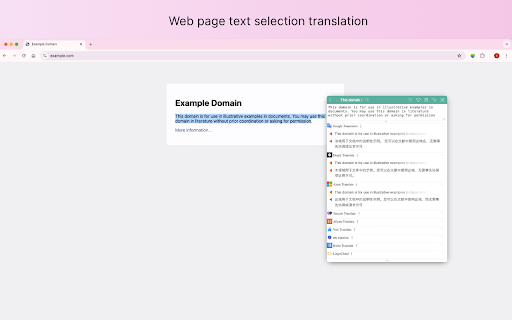
A professional word translation、page translation ( Bilingual Immersive Translate ) and dictionary extension that helps you easily overcome language barriers. Supported AI Translation Services: OpenAI、Claude、 Gemini etc
🚀 Main Features:
• Translate Website
- Offers bilingual website translate by smartly identifying the main content area of web pages, reducing the "intrusiveness" on the original webpage. This brings a better foreign language webpage translation and reading experience, usually call it [Immersive Translate].
- In-depth customization optimizes mainstream website translations, optimizing translations for Twitter, Reddit, Medium and other mainstream websites, making search, social, and information more smooth and efficient
- Web page input box translation, where typing in your native language followed by a AltLeft + space in any web page's input box (immediately translates your input into the target language you've set). This unlocks a bilingual real-time conversation experience across languages with tools like Google Search, ChatGPT, and others.
• Vast Dictionary, Knowledge at Your Fingertips!
A selection of authoritative dictionaries covering Chinese, English, Japanese, Korean, French, German, and Spanish, supporting voice reading and automatic pronunciation, allowing you to navigate language learning with ease. 📚 Supported Dictionaries: Bing Dictionary、Oxford Advanced Learner's Dictionary、Google Dictionary etc
• 🏞️ Image/Screenshot Translation
🚀 Say goodbye to the traditional mode of saving web images to the local area before uploading the translation, and directly right-click on the web page to achieve web image translation without interrupting web browsing. Or use shortcuts to take screenshots for translation
• Flexible Word Selection, At Your Convenience!
Four methods of word selection for you to choose from, with mouse hover for easier word retrieval. The word lookup panel can be pinned, dragged, or input freely, fully accommodating your usage habits.
• Context Mode, Quick Switching!
Each context has independent dictionary settings, allowing for quick switching, helping you learn efficiently and easily handle different scenarios, enhancing learning efficiency.
• Full Keyboard Operation, Boost Efficiency!
Customizable shortcuts, quickly look up words by pressing the Ctrl key three times, and clicking the address bar icon is incredibly convenient, making word lookup easy and enjoyable.
• Intelligent Word Management, Learning Made Easy!
Save context and translations, support for vocabulary lists and word lookup history, with black and white list features to help you precisely control and easily track every new word.
• Built-in PDF Reader, Reading Without Barriers!
Supports PDF word selection and black and white lists, easily handling document content, making your reading experience smoother.
• Independent Translation Window, Anytime, Anywhere!
Translate text outside the browser, helping you communicate seamlessly, break down language barriers, and access global information anytime, anywhere.
🌐 Supported Translation Services: Google、 DeepL、Azure etc
Download Saladict now and start your journey of language exploration!
Let’s break down language barriers together, swim in the ocean of knowledge, and become a better version of ourselves! 🌊
You can use it with Saladict Desktop App (https://app.saladict.net) to experience smoother translation services!



Reviews (2 cached)
★☆☆☆☆2025-05-24
Zander Zhang
This is not the original saladict! The original saladict is open-source. I appreciate focusapps that they enabled saladict on chrome again, but they SHOULD NOT ADOPT THE OLD ICON and NAME!
★☆☆☆☆2025-03-05
bbo o
face! https://github.com/crimx/ext-saladict/issues/2260#issuecomment-2574384282
Permissions (13)
Permissions
alarmsℹ Can schedule periodic background tasks clipboardReadℹ Can read from your clipboard clipboardWriteℹ Can write to your clipboard contextMenusℹ Can add items to the right-click menu cookiesℹ Can read and modify browser cookies declarativeNetRequestWithHostAccess notificationsℹ Can show desktop notifications offscreen scriptingℹ Can inject scripts into web pages storageℹ Can store data locally in your browser tabsℹ Can see your open tabs and their URLs unlimitedStorage webRequestℹ Can observe and analyze network traffic
Details
| Version | 10.0.2 |
| Updated | Mar 10, 2026 |
| Size | 15.67MiB |
| First Seen | Mar 27, 2026 |
More by allentown0406

Marinara New: Pomodoro® Assistant
by allentown0406
20K
★ 4.14
workflow
20K
★ 4.14
workflow

DF Tube New (Distraction Free for YouTube™)
by allentown0406
20K
★ 3.12
tools
20K
★ 3.12
tools

Rofocus new: Increase your Focus and Productivity
by allentown0406
1K
★ 5.00
workflow
1K
★ 5.00
workflow

AIChatOne : AI ChatGPT Copilot (ChatHub tools)
by allentown0406
880
★ 4.41
tools
880
★ 4.41
tools

Screenshot YouTube New
by allentown0406
322
★ 5.00
workflow
322
★ 5.00
workflow
Popular in workflow

Adobe Acrobat: PDF edit, convert, sign tools
by Adobe Inc.
331M
★ 4.40
workflow
331M
★ 4.40
workflow

AdBlock — block ads across the web
by AdBlock
62M
★ 4.48
workflow
62M
★ 4.48
workflow

Chrome Remote Desktop
by Chrome Remote Desktop Release Managers
38M
★ 3.14
workflow
38M
★ 3.14
workflow

Microsoft Single Sign On
by Microsoft
36M
★ 2.27
workflow
36M
★ 2.27
workflow

MetaMask
by metamask
13M
★ 2.68
workflow
13M
★ 2.68
workflow
Popular Extensions
Adobe Acrobat: PDF edit, convert, sign tools
by Adobe Inc.
331M
★ 4.40
workflow
331M
★ 4.40
workflow
AdBlock — block ads across the web
by AdBlock
62M
★ 4.48
workflow
62M
★ 4.48
workflow

Grammarly: AI Writing Assistant and Grammar Checker App
by Grammarly
42M
★ 4.50
communication
42M
★ 4.50
communication
Chrome Remote Desktop
by Chrome Remote Desktop Release Managers
38M
★ 3.14
workflow
38M
★ 3.14
workflow
Microsoft Single Sign On
by Microsoft
36M
★ 2.27
workflow
36M
★ 2.27
workflow