
⚠️Not updated in over a year
Description
Individuals can use it to increase engagement and develop more meaningful connections.
Brands can utilize this tool to offer prompt and efficient responses to customer complaints, adhering to their internal guidelines. Ensuring timely, consistent, and high-quality interactions will strengthen and maintain a positive brand image.
🔑 Key Features:
1️⃣ One click comment generator with optimized default settings
2️⃣ Unlimited comments
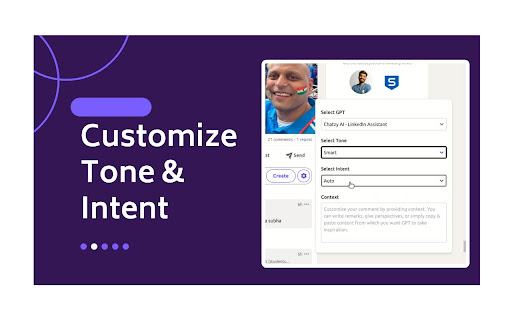
3️⃣ Customize Tone and Intent
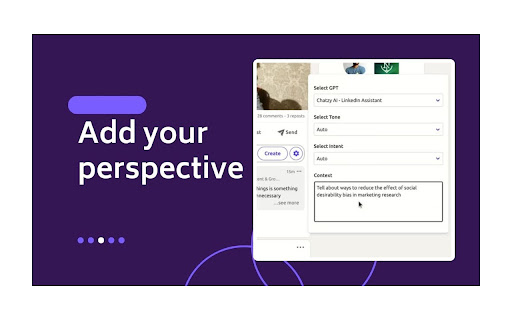
4️⃣ Customize your comment by providing context. You can write remarks, give perspectives, or simply copy & paste content from which you want GPT to take inspiration.
5️⃣ Generate comment replies, enabling you to further continue the conversation in comments
6️⃣ Create custom GPTs trained on your writing style, mimicking famous influencers, and adhering to your brand guidelines.
🛠️ Setup Process:
1️⃣ Click on 'Add to Chrome', accept permissions and you will be redirected to Chatzy AI login.
2️⃣ After logging in to Chatzy AI, you can head back to LinkedIn and start using the extension.
📘 How to use:
1️⃣ You can use optimized default settings, by just clicking on the Comment button to generate the comment.
2️⃣ To customize settings, click on the Chatzy AI setting icon in your comment box. You can customize the comment by selecting/providing
a. GPT
b. Tone
c. Intent
d. Context.
3️⃣ Select GPT: In the free plan “Select GPT” is disabled and set to GPT 3.5 by default. Whereas in the paid plan you also have option to select a custom GPT.
4️⃣ Select Tone from drop down
5️⃣ Select Intent from drop down
6️⃣ Provide Context
Starter Plan (GPT 3.5) is always free!!
💰 Pricing and Plans:
Chatzy AI offers various pricing options and subscription plans, allowing you to choose the best fit for your needs and budget.
1️⃣ Starter Plan: Always free, works on GPT 3.5.
2️⃣ Basic Plan: Use Chatzy AI no-code platform to create custom bots trained on your data. Uses GPT 4.0.
🚀 Benefits:
Using Chatzy AI - LinkedIn Assistant can significantly enhance your LinkedIn experience and professional networking strategy.
1️⃣ Efficient Engagement: Quickly generate responses and increase engagement.
2️⃣ Enhanced Quality of Interactions: Produce relevant and thoughtful comments.
3️⃣ Personalization: Customize responses to maintain authenticity.
4️⃣ Consistency in Engagement: Maintain a regular presence with quality interactions.
5️⃣ Ease of Use: User-friendly interface and quick learning curve.
6️⃣ Innovative Edge: Leverage the latest AI technology.
7️⃣ Growth Opportunities: Engage meaningfully for collaboration and business opportunities.
📪 Contact us:
Any questions or suggestions? Please contact us at 💌 hello@chatzy.ai or rohit@chatzy.ai.


Reviews
Loading reviews...
Permissions (4)
Permissions
activeTabℹ Can access the current tab when you click the extension scriptingℹ Can inject scripts into web pages storageℹ Can store data locally in your browser tabsℹ Can see your open tabs and their URLs
Details
| Version | 7.1.0 |
| Updated | Nov 28, 2024 |
| Size | 529KiB |
| First Seen | Mar 24, 2026 |
Popular in tools

Microsoft Bing Homepage & Search for Chrome
by Microsoft Corporation
4M
★ 3.72
tools
4M
★ 3.72
tools

Monica: All-In-One AI Assist & Smartest AI Agent
by Monica Team
3M
★ 4.89
tools
3M
★ 4.89
tools

Ad Blocker: Stands AdBlocker
by Stands
3M
★ 4.79
tools
3M
★ 4.79
tools

Google Dictionary (by Google)
by dictionary-extension-dev
3M
★ 4.36
tools
3M
★ 4.36
tools

WPS浏览器助手:文档在线阅读编辑
by 金山PDF
2M
★ 2.90
tools
2M
★ 2.90
tools
Popular Extensions

Adobe Acrobat: PDF edit, convert, sign tools
by Adobe Inc.
330M
★ 4.40
workflow
330M
★ 4.40
workflow

Chrome Remote Desktop
by Chrome Remote Desktop Release Managers
38M
★ 3.14
workflow
38M
★ 3.14
workflow

Cisco Webex Extension
by cisco.chromestore
24M
★ 2.34
social
24M
★ 2.34
social

Kami for Google Chrome™
by Kami
17M
★ 4.56
education
17M
★ 4.56
education

Read&Write for Google Chrome™
by Texthelp
17M
★ 3.44
accessibility
17M
★ 3.44
accessibility