
⚠️Not updated in over 2 years
Description
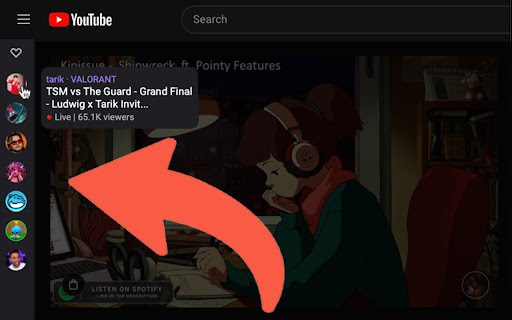
Sign in to your Twitch account and you will see the streams you follow appear as bubbles in the sidebar.
Get started by:
1. Add Live Bubbles to Chrome
2. Click the extension
3. Follow the prompts to sign in to your Twitch account
4. Reload any open YouTube pages
5. That's it! From now on, you'll see the Twitch sidebar in YouTube
Reviews
Loading reviews...
Permissions (2)
Permissions
identityℹ Can use your Google account identity storageℹ Can store data locally in your browser
Details
| Version | 0.0.9 |
| Updated | May 21, 2023 |
| Size | 31.4KiB |
| First Seen | Mar 31, 2026 |
Popular in social

Cisco Webex Extension
by cisco.chromestore
23M
★ 2.34
social
23M
★ 2.34
social

LINE
by LY Corporation
4M
★ 3.51
social
4M
★ 3.51
social

vidIQ Vision for YouTube
by vidIQ
3M
★ 4.48
social
3M
★ 4.48
social

7TV
by 7TV
3M
★ 4.57
social
3M
★ 4.57
social

Google Mail Checker
by Chrome Developer Relations
2M
★ 4.12
social
2M
★ 4.12
social
Popular Extensions

Adobe Acrobat: PDF edit, convert, sign tools
by Adobe Inc.
331M
★ 4.40
workflow
331M
★ 4.40
workflow

AdBlock — block ads across the web
by AdBlock
62M
★ 4.48
workflow
62M
★ 4.48
workflow

迅雷下载支持
by Shenzhen Xunlei Network Technology Co., Ltd.
59M
★ 2.77
workflow
59M
★ 2.77
workflow

Grammarly: AI Writing Assistant and Grammar Checker App
by Grammarly
42M
★ 4.50
communication
42M
★ 4.50
communication

Adblock Plus - free ad blocker
by eyeo GmbH
41M
★ 4.39
workflow
41M
★ 4.39
workflow