
⚠️Not updated in over a year ✅Highly rated
Description
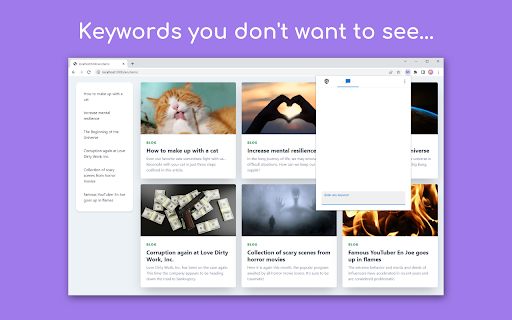
EmoGuard is a browser extension that allows you to block text or elements you don't want to see on any website.
➤ KEY FEATURES
• Keyword blocking:
Block keywords you don't want to see
• Customizing CSS selectors:
Pursue your own way of blocking
• Sync feature:
Sync data across all your devices using Dropbox
• Cross platform:
Supports desktop and some mobile browsers
➤ Why use EmoGuard?
• Get over the slander:
There are all kinds of people in the world. You can't change them, but you can control the information on the web pages you view with EmoGuard.
• Avoid any spoilers:
Spoilers sneak up on you like assassins and suddenly appear. Don't worry anymore, you can prevent it by adding the relevant words to EmoGuard.
• Focus on what matters:
Once people feel bad, they spend their time on distractions. So save your emotions with EmoGuard and use your precious time for what matters.
➤ More
For more information on how to use the extension, please visit the official website.
https://emoguard.app/
It's time to bring back the fun web.
Happy Internet Life!
➤ Release Notes
1.3.2
• Now supports Spanish, French, German, Italian, Dutch, Russian, Ukrainian, Chinese (Simplified), Chinese (Traditional), and Korean.
1.3.1
• Added feature to register keywords to the blocklist by right-clicking.
• Added option to always show whitelist.
• Updated default CSS selectors.
• Updated popup design.
• Fixed issue where the enable/disable of CSS selectors could not be overridden on each website.
• Fixed CSS selectors to be registered without converting letter case.
1.3.0
• Added whitelist feature.
• Added reset feature.
• Keyword detection sensitivity can now be adjusted.
• The popup icon now reflects the on/off status of the extension.
• Updated default CSS selectors.
• Fixed the popup screen design.
• Fixed an issue where keywords were not blocked in certain situations.
• Improved performance by skipping some processing when possible.
1.2.4
• Improved accuracy of keyword blocking.
• Fixed a sync bug.
1.2.3
• Improved stability and quality of keyword blocking.
• Fixed an issue that caused an error in Cloud Integration.
1.2.2
• Improved performance of keyword blocking.
• Fixed some bugs.
1.2.1
• Significantly improved performance of keyword blocking.
1.2.0
• Added CSS selector sorting feature.
• Added keyword sorting feature.
1.1.0
• Simplified the design of the extension's popup.
• Added customization mode for power users. Customization can be enabled from "⋮" in the top right of the popup.
1.0.0
• Released EmoGuard.
➤ Attribution
Twemoji graphics made by Twitter, Inc and other contributors are licensed under CC-BY 4.0:
https://creativecommons.org/licenses/by/4.0/




Reviews (1 cached)
★☆☆☆☆2024-01-06
Leo LaFleur
bruh doesn't work i try to ban Gyatt still shows up
Permissions (5)
Permissions
activeTabℹ Can access the current tab when you click the extension alarmsℹ Can schedule periodic background tasks contextMenusℹ Can add items to the right-click menu storageℹ Can store data locally in your browser tabsℹ Can see your open tabs and their URLs
Details
| Version | 1.3.2 |
| Updated | Jan 28, 2025 |
| Size | 3.32MiB |
| First Seen | Mar 24, 2026 |
Popular in tools

Browsec VPN - Free VPN for Chrome
by Browsec
7M
★ 4.44
tools
7M
★ 4.44
tools

Microsoft Bing Homepage & Search for Chrome
by Microsoft Corporation
4M
★ 3.72
tools
4M
★ 3.72
tools

Monica: All-In-One AI Assist & Smartest AI Agent
by Monica Team
3M
★ 4.89
tools
3M
★ 4.89
tools

Ad Blocker: Stands AdBlocker
by Stands
3M
★ 4.79
tools
3M
★ 4.79
tools

Google Dictionary (by Google)
by dictionary-extension-dev
3M
★ 4.36
tools
3M
★ 4.36
tools
Popular Extensions

Adobe Acrobat: PDF edit, convert, sign tools
by Adobe Inc.
330M
★ 4.40
workflow
330M
★ 4.40
workflow

Chrome Remote Desktop
by Chrome Remote Desktop Release Managers
38M
★ 3.14
workflow
38M
★ 3.14
workflow

Cisco Webex Extension
by cisco.chromestore
24M
★ 2.34
social
24M
★ 2.34
social

Kami for Google Chrome™
by Kami
17M
★ 4.56
education
17M
★ 4.56
education

Read&Write for Google Chrome™
by Texthelp
17M
★ 3.44
accessibility
17M
★ 3.44
accessibility