
⚠️Not updated in over 2 years
Description
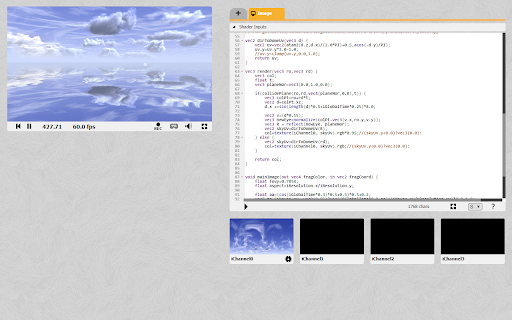
To load an image/audio/video file, drag and drop it either from your computer or a text/web link onto one of the texture preview slots.
Note that:
1. for textures it only works for 2D types
2. loading images from the web maybe blocked due to cross-origin HTTP requests not being allowed on their servers
3.for text/web links, only ones starting with https will work due to mixed content restrictions
Version 1.4
* removed unnecessary tab permissions
Version 1.3:
* added support for audio and videos files
Version 1.2:
* custom loaded textures now use the same ID as one from shadertoy.com, so you can save projects without issue
* the "changes you made may not be saved" popup will now not be triggered when loading a custom texture over an existing texture
Version 1.1:
* the texture filter and wrap settings are now read from the correct place
Reviews (2 cached)
★☆☆☆☆2025-09-13
Zoey Mikol
doesn't work...
★☆☆☆☆2020-06-28
James chen
This extension makes all shader toy icons invisible, and prevents me from using shader toy. I hate it.
Details
| Version | 1.4 |
| Updated | May 12, 2023 |
| Size | 4.38KiB |
| First Seen | Mar 24, 2026 |
More by ahills


Popular in developer

GoFullPage - Full Page Screen Capture
by GoFullPage
10M
★ 4.89
developer
10M
★ 4.89
developer

TouchEn PC보안 확장
by 라온시큐어
8M
★ 1.33
developer
8M
★ 1.33
developer

React Developer Tools
by Meta
5M
★ 3.95
developer
5M
★ 3.95
developer

Meta Pixel Helper
by Meta
4M
★ 3.90
developer
4M
★ 3.90
developer

ColorZilla
by colorzilla.com
4M
★ 4.59
developer
4M
★ 4.59
developer
Popular Extensions

Adobe Acrobat: PDF edit, convert, sign tools
by Adobe Inc.
322M
★ 4.40
workflow
322M
★ 4.40
workflow

AdBlock — block ads across the web
by AdBlock
62M
★ 4.48
workflow
62M
★ 4.48
workflow

迅雷下载支持
by Shenzhen Xunlei Network Technology Co., Ltd.
59M
★ 2.77
workflow
59M
★ 2.77
workflow

Grammarly: AI Writing Assistant and Grammar Checker App
by Grammarly
42M
★ 4.50
communication
42M
★ 4.50
communication

Adblock Plus - free ad blocker
by eyeo GmbH
40M
★ 4.39
workflow
40M
★ 4.39
workflow