
⚠️Not updated in over a year
Description
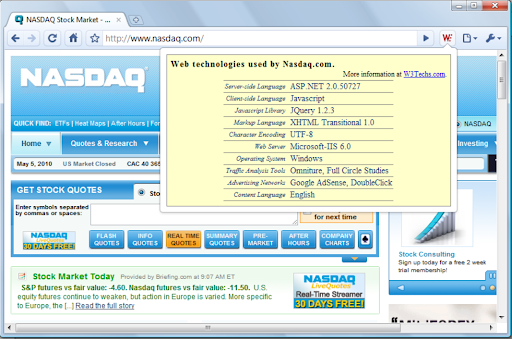
The W3Techs extension shows with one mouse click which web technologies the current site is using.
The technologies shown include content management systems, server-side and client-side programming languages, JavaScript libraries, web servers, operating systems, web hosting providers, DNS server providers, email server providers, content delivery networks, SSL certificate providers, traffic analysis tools, advertising networks and more. Additionally, you get background information and warnings on potential quality problems of the site.
Version 1.3 ensures compatibility with future Chrome versions.

Reviews (1 cached)
★☆☆☆☆2016-10-12
Hammad Rabbani
Not working only empty yellow box
Permissions (1)
Permissions
tabsℹ Can see your open tabs and their URLs
Details
| Version | 1.3 |
| Updated | May 7, 2024 |
| Size | 12.68KiB |
| First Seen | Mar 27, 2026 |
More by Sam



Popular in developer

GoFullPage - Full Page Screen Capture
by GoFullPage
10M
★ 4.89
developer
10M
★ 4.89
developer

TouchEn PC보안 확장
by 라온시큐어
8M
★ 1.33
developer
8M
★ 1.33
developer

React Developer Tools
by Meta
5M
★ 3.95
developer
5M
★ 3.95
developer

Meta Pixel Helper
by Meta
4M
★ 3.91
developer
4M
★ 3.91
developer

ColorZilla
by colorzilla.com
4M
★ 4.59
developer
4M
★ 4.59
developer
Popular Extensions

Adobe Acrobat: PDF edit, convert, sign tools
by Adobe Inc.
331M
★ 4.40
workflow
331M
★ 4.40
workflow

AdBlock — block ads across the web
by AdBlock
63M
★ 4.48
workflow
63M
★ 4.48
workflow

迅雷下载支持
by Shenzhen Xunlei Network Technology Co., Ltd.
59M
★ 2.77
workflow
59M
★ 2.77
workflow

Grammarly: AI Writing Assistant and Grammar Checker App
by Grammarly
42M
★ 4.50
communication
42M
★ 4.50
communication

Adblock Plus - free ad blocker
by eyeo GmbH
41M
★ 4.39
workflow
41M
★ 4.39
workflow